
- Mark as New
- Bookmark
- Subscribe
- Mute
- Subscribe to RSS Feed
- Permalink
- Report Inappropriate Content
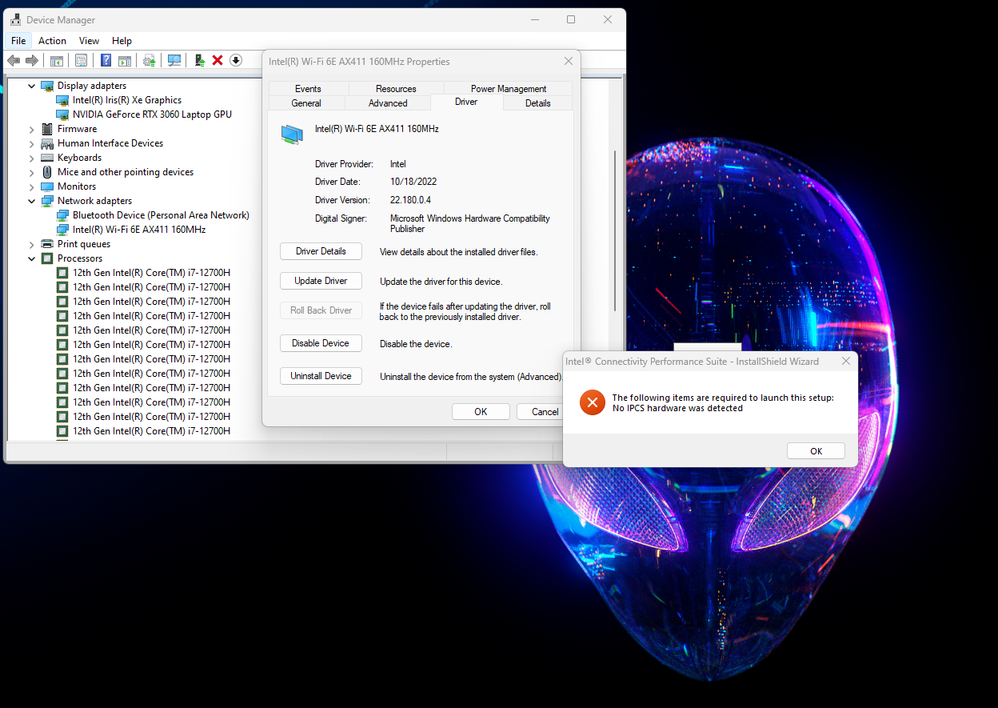
I am trying to install the Intel Connectivity Performance Suite but keep getting an error says: No IPCS hardware was detected.
I have 12th-Gen Intel Core i7 12700H CPU
AX411 Wi-Fi Card with latest drivers installed
Latest Intel Management Engine installed
Latest Windows 11 build installed
What am I missing?
Thanks
Link Copied

- Mark as New
- Bookmark
- Subscribe
- Mute
- Subscribe to RSS Feed
- Permalink
- Report Inappropriate Content
Hello ssj92,
Thank you for posting on the Intel® communities.
I am sorry you are having issues installing Intel® Connectivity Performance Suite. I will be glad to help you.
We are going to research about this. As soon as I have an update, I will let you know.
Best regards,
Steven G.
Intel Customer Support Technician.
- Mark as New
- Bookmark
- Subscribe
- Mute
- Subscribe to RSS Feed
- Permalink
- Report Inappropriate Content
Thank you,
I am hoping to try out the Intel Double Connect Technology, seems the software is the only way to use it.
- Mark as New
- Bookmark
- Subscribe
- Mute
- Subscribe to RSS Feed
- Permalink
- Report Inappropriate Content
Hello ssj92,
In order to better assist you, please download the Intel® SSU https://downloadcenter.intel.com/download/25293/Intel-System-Support-Utility-for-Windows-
Open the application and select "Everything", click on "Scan" to see the system and device information. By default, Intel® SSU will take you to the "Summary View". Click on the menu where it says "Summary" to change to "Detailed View". To save your scan, click on "Next", then "Save". Please attach the file to your reply.
Look forward to hearing back from you.
Best regards,
Steven G.
Intel Customer Support Technician.
- Mark as New
- Bookmark
- Subscribe
- Mute
- Subscribe to RSS Feed
- Permalink
- Report Inappropriate Content

- Mark as New
- Bookmark
- Subscribe
- Mute
- Subscribe to RSS Feed
- Permalink
- Report Inappropriate Content
having the same issue. Any fixes?

- Mark as New
- Bookmark
- Subscribe
- Mute
- Subscribe to RSS Feed
- Permalink
- Report Inappropriate Content
Having the same issue on 2 brand new 2022 Laptops and a several yr old desktop

- Mark as New
- Bookmark
- Subscribe
- Mute
- Subscribe to RSS Feed
- Permalink
- Report Inappropriate Content
Hello ssj92
Thank you for providing the log file. We will continue checking the information internally and will post back once we have an update.
Best regards,
Hugo O.
Intel Customer Support Technician.
- Mark as New
- Bookmark
- Subscribe
- Mute
- Subscribe to RSS Feed
- Permalink
- Report Inappropriate Content
Thank you, hoping it can be resolved so I can use double connect.
- Mark as New
- Bookmark
- Subscribe
- Mute
- Subscribe to RSS Feed
- Permalink
- Report Inappropriate Content
Hello @ssj92,
Many thanks for your patience on this matter.
Please perform the following steps and let me know of the outcome:
- Open a command prompt as Administrator.
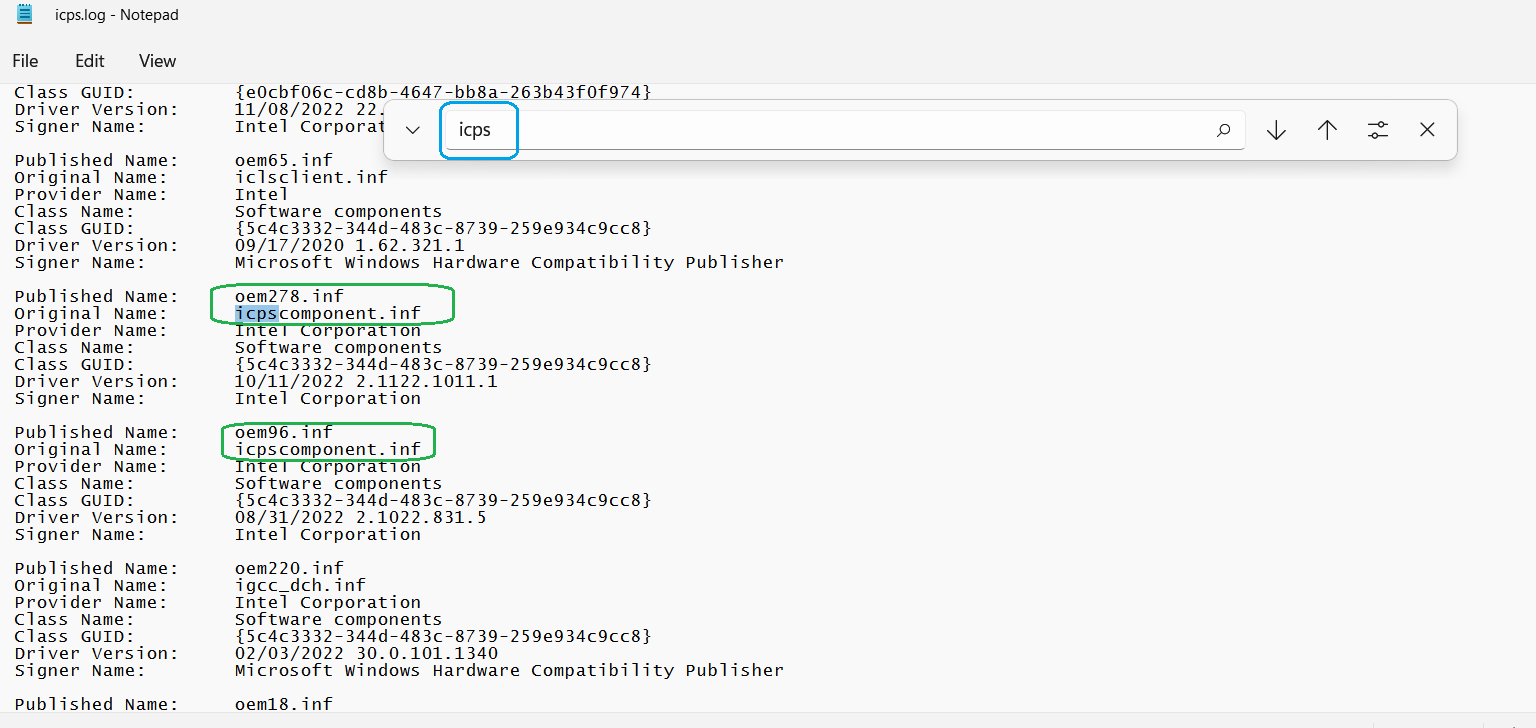
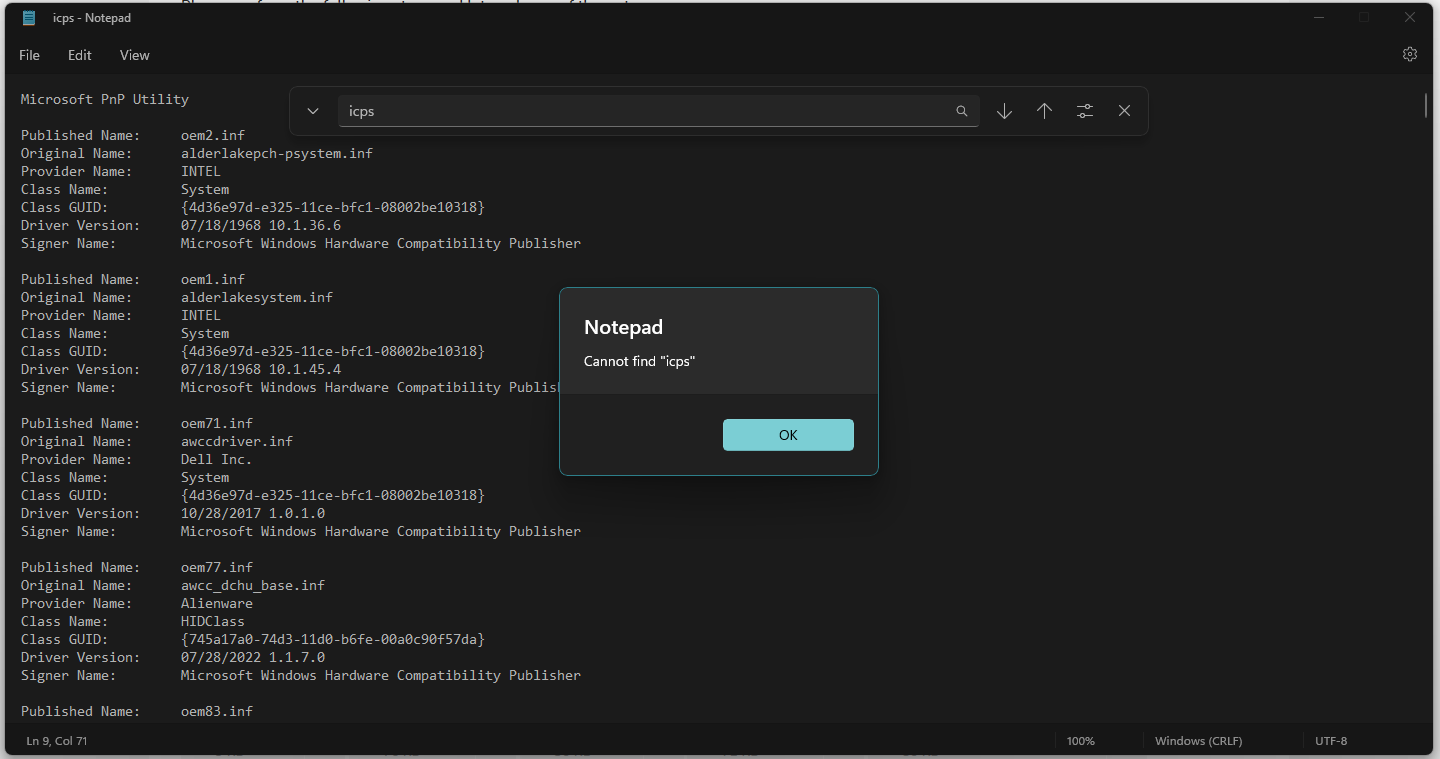
- In the command prompt, type pnputil /enum-drivers >c:\icps.log and press Enter. (refer to attached 'cmd-1.png')
- Go to c:\ and open the icps.log, press Ctrl+F to bring up a search box. Type 'icps' in the search box to find all the 'oem#.inf' with icpsextension and icpsComponent. (e.g. oem277.inf, oem278.inf, oem96.inf) as shown in attached 'icpsext.png' and 'icpscom.png'
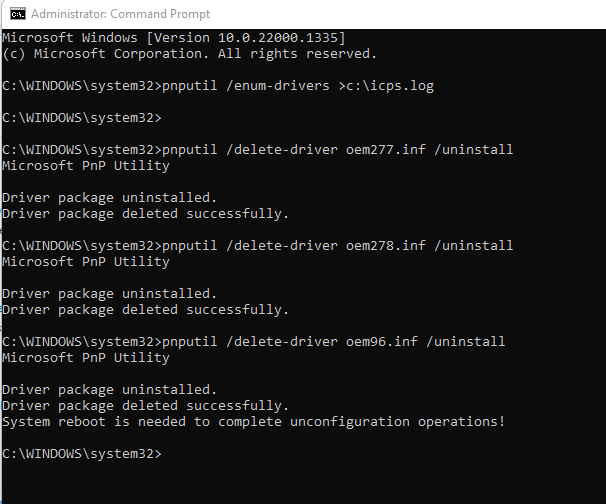
- Switch back to the command prompt, type the following command to completely uninstall all the drivers:
pnputil /delete-driver oem#.inf /uninstall
(as shown in attached 'cmd-2.png')
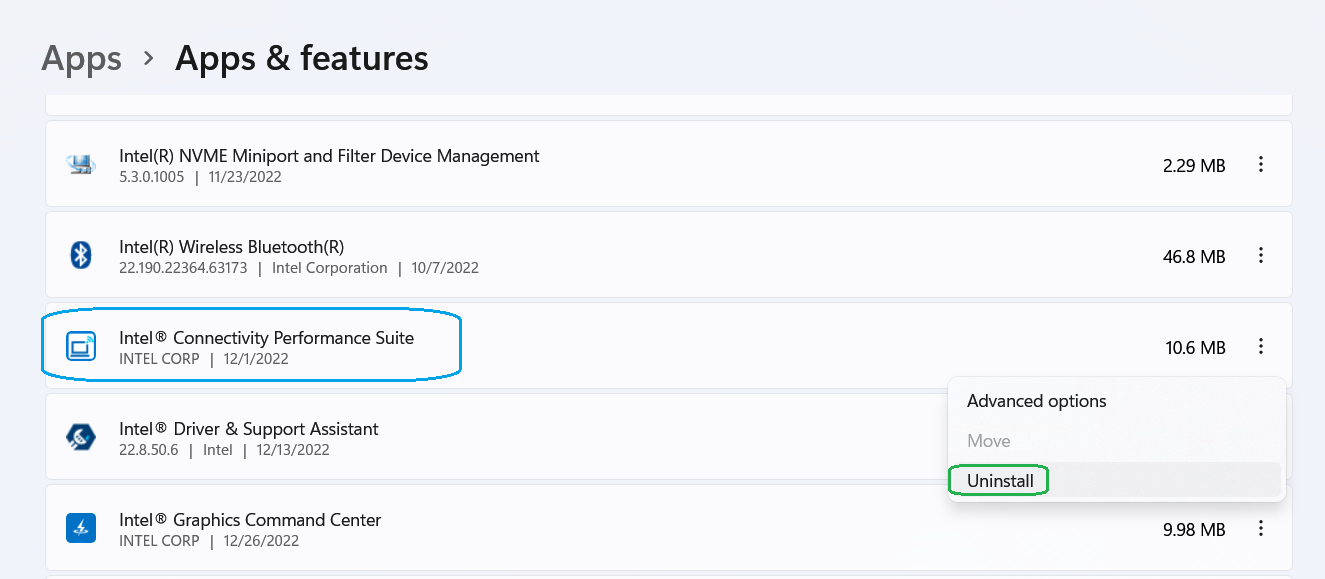
5. Go to Add or Remove Programs to uninstall Intel Connectivity Performance Suite (refer to attached 'Add-Remove-Program.png')
6. Reboot the system.
7. (Optional) Reinstall the Intel® Connectivity Performance Suite, or downgrade to an older version if needed.
Best regards,
Steven G.
Intel Customer Support Technician.
- Mark as New
- Bookmark
- Subscribe
- Mute
- Subscribe to RSS Feed
- Permalink
- Report Inappropriate Content
Didn't work for me. Scanning the log did not find any icps infs. i still get the error "no icps hardware installed" when i try to install the software for the AXE411
- Mark as New
- Bookmark
- Subscribe
- Mute
- Subscribe to RSS Feed
- Permalink
- Report Inappropriate Content
There are no entries with icps for me.
- Mark as New
- Bookmark
- Subscribe
- Mute
- Subscribe to RSS Feed
- Permalink
- Report Inappropriate Content
Many thanks to both for the information provided.
I will gather this information and keep working on this. As soon as I have an update, I will post back here.
Best regards,
Steven G.
Intel Customer Support Technician.
- Mark as New
- Bookmark
- Subscribe
- Mute
- Subscribe to RSS Feed
- Permalink
- Report Inappropriate Content
After doing a fresh install of Windows 11 the issue has resolved. I believe the problem possibly started after installing Intel chipset drivers.
- Mark as New
- Bookmark
- Subscribe
- Mute
- Subscribe to RSS Feed
- Permalink
- Report Inappropriate Content
Thank you, let me know if you need me to try anything else.
- Mark as New
- Bookmark
- Subscribe
- Mute
- Subscribe to RSS Feed
- Permalink
- Report Inappropriate Content
Hello ssj92,
The Intel® Connectivity Performance Suite is for specific systems, and it would be offered and pre-installed by the system manufacturer if the system supports the software.
According to the Alienware x14 Gaming web page (https://www.dell.com/en-us/shop/dell-laptops/alienware-x14-gaming-laptop/spd/alienware-x14-r1-laptop#tech-specs-anchor), Dell does not offer the ICPS software. Could you please check if your system has an Intel Evo or vPro sticker on it? These are examples of Dell Intel-Evo (https://www.dell.com/en-us/shop/dell-laptops/sr/laptops/intel-evo?appliedRefinements=38861) and Dell Intel-vPro (https://www.dell.com/en-us/shop/dell-laptops/sr/laptops/intel-vpro?page=2&appliedRefinements=38862,37680) devices.
Look forward to hearing back from you.
Best regards,
Steven G.
Intel Customer Support Technician.
- Mark as New
- Bookmark
- Subscribe
- Mute
- Subscribe to RSS Feed
- Permalink
- Report Inappropriate Content
We would like to know if you were you able to check the previous post.
Let us know if you still need assistance.
Best regards,
Steven G.
Intel Customer Support Technician.
- Mark as New
- Bookmark
- Subscribe
- Mute
- Subscribe to RSS Feed
- Permalink
- Report Inappropriate Content
I don't have an Alien I have 2 new laptops.
OMEN by HP Laptop 17t-ck100, 2022 version. originally came with Intel® Wi-Fi 6E AX211 (2x2) and Bluetooth® 5.3 wireless card upgraded to AX411.
MSI Raider G76 12UE-456US 2022 version, with Intel Wi-Fi 6 AX201 (2x2)
Same error on both "No IPCS hardware was detected" when installing Intel Connectivity Performance Suite
Do i have to do a clean install of W11?
- Mark as New
- Bookmark
- Subscribe
- Mute
- Subscribe to RSS Feed
- Permalink
- Report Inappropriate Content
so i bought an Intel Surface Pro 8 over the weekend. It is clearly Evo (https://www.microsoft.com/en-us/d/surface-pro-8/8qwcrtq8v8xg?activetab=pivot:overviewtab) and this software will not install. Get the same error message. So now I have 3 new Intel based platforms meeting evo specs that this software will not install on.
- Mark as New
- Bookmark
- Subscribe
- Mute
- Subscribe to RSS Feed
- Permalink
- Report Inappropriate Content
Hello DJV,
The Alienware comment was directed to ssj92, who is the post owner.
@DJV could you please confirm both of those laptops are either Intel vPro® or Intel® Evo™? They should have a sticker on that identifies them as either of those.
The Intel® Connectivity Performance Suite only works on specific Intel® Evo™ or Intel vPro® platforms with Intel® Wi-Fi 6/6E (or greater) products, as described here https://www.intel.com/content/www/us/en/download/738623/intel-connectivity-performance-suite-for-intel-wireless-products.html
Best regards,
Steven G.
Intel Customer Support Technician.


- Mark as New
- Bookmark
- Subscribe
- Mute
- Subscribe to RSS Feed
- Permalink
- Report Inappropriate Content
@Steven_Intel Steven, are you saying if I replaced an i9 13900K, on my homebuilt system, with a vPro i9 13000HK, the software would install and Double Connect would work?
The Windows 11 version does not have to be Enterprise and it does not require some type of special OEM configuration?
Thanks.

- Subscribe to RSS Feed
- Mark Topic as New
- Mark Topic as Read
- Float this Topic for Current User
- Bookmark
- Subscribe
- Printer Friendly Page