
- Marquer comme nouveau
- Marquer
- S'abonner
- Sourdine
- S'abonner au fil RSS
- Surligner
- Imprimer
- Signaler un contenu inapproprié
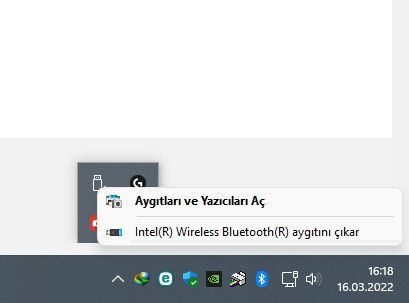
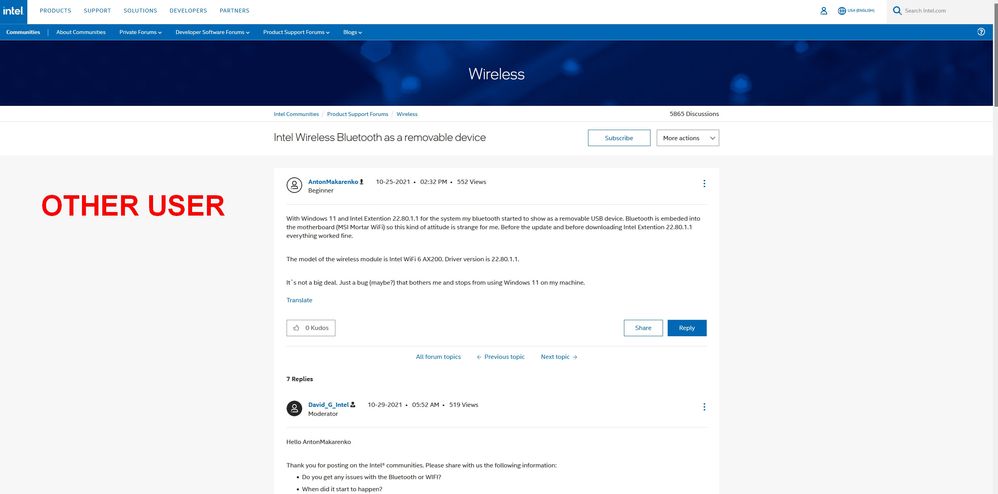
After updating the title (Intel Corporation - Extension - 22.80.1.1), my bluetooth device started to appear as a removable usb device even though it was embedded in the system. My BIOS and drivers are up to date. My motherboard model is MSI X570 PRO CARBON WIFI. The problem only happens in WINDOWS 11. I tried the updated drivers from both intel's site and MSI's site. No problem. After doing this update, my bluetooth device becomes removable.
Lien copié

- Marquer comme nouveau
- Marquer
- S'abonner
- Sourdine
- S'abonner au fil RSS
- Surligner
- Imprimer
- Signaler un contenu inapproprié
Hello Fi-ToNe,
Thank you for posting on the Intel® communities. I understand you are having issues with your device.
In order to better assist you, please provide the following:
1. Run the Intel® System Support Utility (Intel® SSU) to gather more details about the system.
- Download the Intel® SSU and save the application on your computer: https://www.intel.com/content/www/us/en/download/18377/intel-system-support-utility-for-windows.html
- Open the application, check the "Everything" checkbox, and click "Scan" to see the system and device information. The Intel® SSU defaults to the "Summary View" on the output screen following the scan. Click the menu where it says "Summary" to change to "Detailed View".
- To save your scan, click Next and click Save.
2. Is this the original adapter that came pre-installed on your computer or did you change/install the adapter to this one?
3. Does this happen with MSI drivers or only with Intel drivers?
4. Do you have any Bluetooth connection problems?
5. Do you see any errors at the device manager under your wireless device?
Regards,
Deivid A.
Intel Customer Support Technician
- Marquer comme nouveau
- Marquer
- S'abonner
- Sourdine
- S'abonner au fil RSS
- Surligner
- Imprimer
- Signaler un contenu inapproprié
Hello Fi-ToNe,
Were you able to check the previous post and get the information requested? Please let me know if you need more assistance.
Regards,
Deivid A.
Intel Customer Support Technician
- Marquer comme nouveau
- Marquer
- S'abonner
- Sourdine
- S'abonner au fil RSS
- Surligner
- Imprimer
- Signaler un contenu inapproprié
Hi DevividA_Intel
I have hidden the Intel Corporation - Extension - 22.80.1.1 update with windows show hide tool. No problem after installing the update. But after installing the update, the bluetooth device can still be removed.
- Marquer comme nouveau
- Marquer
- S'abonner
- Sourdine
- S'abonner au fil RSS
- Surligner
- Imprimer
- Signaler un contenu inapproprié
Hello Fi-ToNe,
I do appreciate your response, however, I would like to confirm if the issue persists since you mentioned "No problem after installing the update. But after installing the update, the Bluetooth device can still be removed."
Please let me know if you would like to continue with the support or if you would like to close this thread.
Regards,
Deivid A.
Intel Customer Support Technician
- Marquer comme nouveau
- Marquer
- S'abonner
- Sourdine
- S'abonner au fil RSS
- Surligner
- Imprimer
- Signaler un contenu inapproprié
Hello Fi-ToNe,
After checking your thread, I would like to know if you need further assistance.
If so, please let me know
Regards,
Deivid A.
Intel Customer Support Technician
- Marquer comme nouveau
- Marquer
- S'abonner
- Sourdine
- S'abonner au fil RSS
- Surligner
- Imprimer
- Signaler un contenu inapproprié
Uninstall Intel Corporation - Extension - 22.80.1.1 from windows update. Thank you. Topic can be closed.
- Marquer comme nouveau
- Marquer
- S'abonner
- Sourdine
- S'abonner au fil RSS
- Surligner
- Imprimer
- Signaler un contenu inapproprié
Hello Fi-ToNe,
I am glad to know that the issue got fixed by uninstalling the Intel driver.
As you mentioned, I will close this thread but you can open a new one in case you need further support.
Regards,
Deivid A.
Intel Customer Support Technician
- Marquer comme nouveau
- Marquer
- S'abonner
- Sourdine
- S'abonner au fil RSS
- Surligner
- Imprimer
- Signaler un contenu inapproprié
Hello Fi-ToNe,
As the last reply and based on your issue, I recommend you to check this behavior with your motherboard manufacturer (MSI) for further instructions and for a hardware review as well.
Please keep in mind that this thread will no longer be monitored by Intel.
Regards,
Deivid A.
Intel Customer Support Technician

- Marquer comme nouveau
- Marquer
- S'abonner
- Sourdine
- S'abonner au fil RSS
- Surligner
- Imprimer
- Signaler un contenu inapproprié


- S'abonner au fil RSS
- Marquer le sujet comme nouveau
- Marquer le sujet comme lu
- Placer ce Sujet en tête de liste pour l'utilisateur actuel
- Marquer
- S'abonner
- Page imprimable