
- Als neu kennzeichnen
- Lesezeichen
- Abonnieren
- Stummschalten
- RSS-Feed abonnieren
- Kennzeichnen
- Anstößigen Inhalt melden
Running PROset V. 17.1.0.0 and despite having my wifi profiles to connect automatically, 9 out of 10 ti es they do not connect and even choosing them manually they won't connect. I have to right click on PROset in the system tray and choose "reset PROset" for it to work. Anyone else having this problem or is there any fix for this?
- Tags:
- Wireless
Link kopiert

- Als neu kennzeichnen
- Lesezeichen
- Abonnieren
- Stummschalten
- RSS-Feed abonnieren
- Kennzeichnen
- Anstößigen Inhalt melden
Hi Paul, what's the wireless adapter model?
You may try searching for similar issues here: /community/tech/wireless/content Wireless Networking
It may help using the latest wireless driver provided by the http://www.intel.com/support/oems.htm system manufacturer.
- Als neu kennzeichnen
- Lesezeichen
- Abonnieren
- Stummschalten
- RSS-Feed abonnieren
- Kennzeichnen
- Anstößigen Inhalt melden
- Als neu kennzeichnen
- Lesezeichen
- Abonnieren
- Stummschalten
- RSS-Feed abonnieren
- Kennzeichnen
- Anstößigen Inhalt melden
I always have the newest drivers but I constantly have to reset proset to get it to connect automatically


- Als neu kennzeichnen
- Lesezeichen
- Abonnieren
- Stummschalten
- RSS-Feed abonnieren
- Kennzeichnen
- Anstößigen Inhalt melden
Uninstall ProSet in Control Panel. Let Windows manage your wifi. Doing so has been shown here and elsewhere to fix several issues with wireless connection: failure to connect, slow connections, failure to reconnect.
- Als neu kennzeichnen
- Lesezeichen
- Abonnieren
- Stummschalten
- RSS-Feed abonnieren
- Kennzeichnen
- Anstößigen Inhalt melden
Can you provide the wireless adapter model?
http://www.intel.com/support/wireless/wlan/sb/CS-025417.htm Intel® Wi-Fi Products — Identify Your Intel Wireless Adapter and Driver Version Number
- Als neu kennzeichnen
- Lesezeichen
- Abonnieren
- Stummschalten
- RSS-Feed abonnieren
- Kennzeichnen
- Anstößigen Inhalt melden
The model is Intel Dual Band Wireless-AC 7260
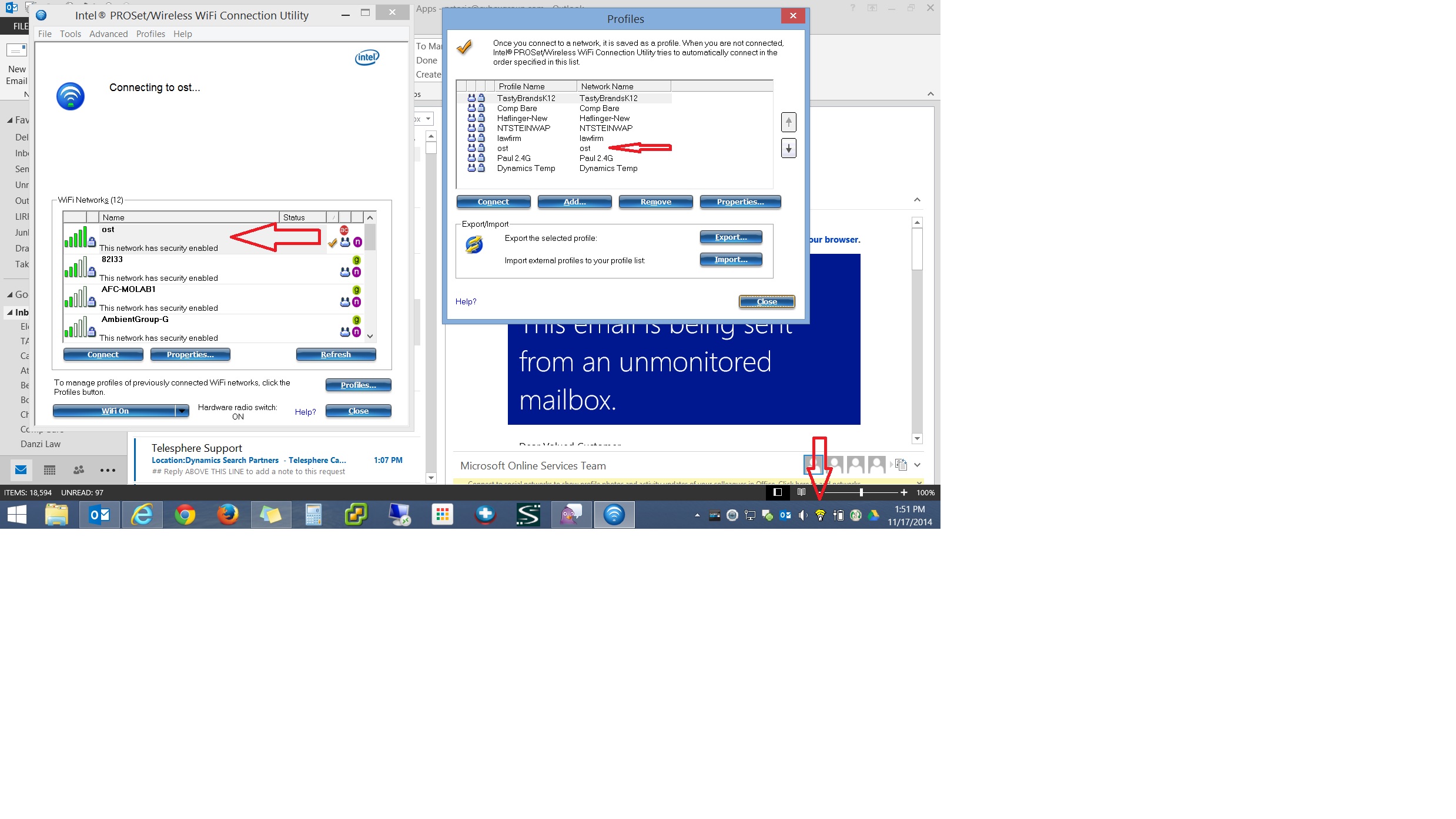
Here is a screenshot of what happens. Basically One I start my laptop from a cold boot or resume, it never connects to the wifi profile saved in there unless I right click Proset in the system tray and choose reset proset. I shouldn't have to do that each time. I have tried numerous version of Proset including the newest (17.1.0.0) and I've already completely removed the wifi driver and installed the newest one from Dell but had the same issue.
I tired letting windows manage it by removing Proset but I had the same problem.
The icon just stays yellow and never connects
- Als neu kennzeichnen
- Lesezeichen
- Abonnieren
- Stummschalten
- RSS-Feed abonnieren
- Kennzeichnen
- Anstößigen Inhalt melden
I just found out this thread is a duplicate. Please try the driver given here: /thread/57176 https://communities.intel.com/thread/57176

- RSS-Feed abonnieren
- Thema als neu kennzeichnen
- Thema als gelesen kennzeichnen
- Diesen Thema für aktuellen Benutzer floaten
- Lesezeichen
- Abonnieren
- Drucker-Anzeigeseite