
Hello,
Since a few days, on every starting in Windows 11 I have a message (in french)
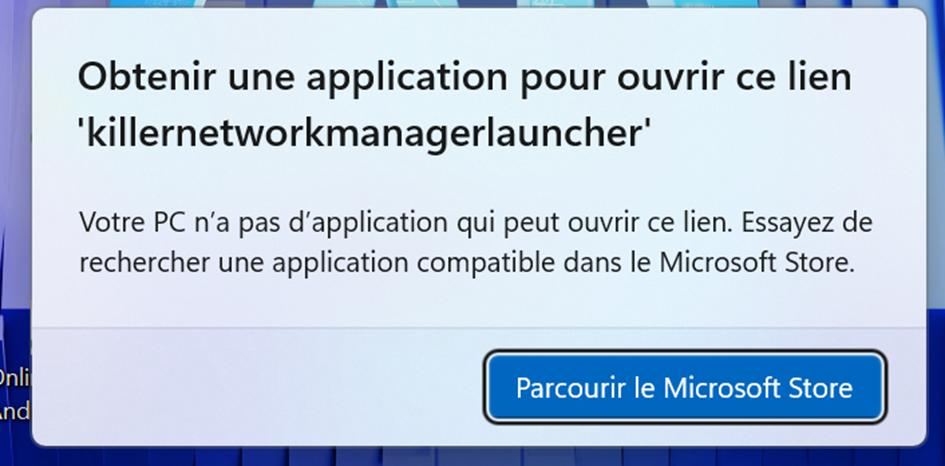
"Obtenir une application pour ouvrir ce lien 'killernetworkmanagerlauncher'
Votre PC n'a pas d'application qui peut ouvrir ce lien. Essayez de rechercher une application compatible dans le Microsoft Store".
Even after reinstalling
KillerPerformanceSuite_40.25.509.1465_Win10-11x64
Could you help me to solve this ?

I had the same problem, I downloaded and reinstalled the Intel Killer Performance suite from the Intel website:
https://www.intel.fr/content/www/fr/fr/download/19779/intel-killer-performance-suite.html
and the Killer Control Center from the Microsoft Store (just check the box at the end of the suite installation that will send you to the MS Store) and I no longer get the message.
链接已复制


I am also getting the same message popup.
Dell XPS1510, Windows11, Killer(R) Wi-Fi 6 AX1650s 160MHz Wireless Network Adapter (201D2W)
After several attempts, where I was getting a notification that a higher level was already installed on my laptop, I downloaded and reinstalled the Intel Killer Performance suite from the Intel website:
https://www.intel.fr/content/www/fr/fr/download/19779/intel-killer-performance-suite.html
This now seems to have rectified the problem.

Hello Lifeman67,
Thank you for posting in Intel community Forum.
For me to further check this, please help provide the following details:
- What is the model of your wireless or Killer controller?
- Was it working fine before?
- What was the last change made before the issue started?
- Aside from the error, are you having other issues?
- What are the troubleshooting steps that you tried so far?
If you have questions, please let us know. Thank you.
If you need assistance, please create a new thread for us to assist you on your own thread and gather the details of your systems.
Best regards,
Michael L.
Intel Customer Support Technician
Hy,
The wireless is a Killer(TM) Wi-Fi 7 BE1750w 320MHz Wireless Network Adapter (BE200D2W).
This problem appered after Killer application update or Windows update (I don't remember).
Sincerly
I had the same problem, I downloaded and reinstalled the Intel Killer Performance suite from the Intel website:
https://www.intel.fr/content/www/fr/fr/download/19779/intel-killer-performance-suite.html
and the Killer Control Center from the Microsoft Store (just check the box at the end of the suite installation that will send you to the MS Store) and I no longer get the message.
Hello Lifeman67,
Thank you for the update.
If you cannot launch your Intel Killer Performance Suite, can you try to follow the steps in the link below:
https://www.intel.com/content/www/us/en/support/articles/000058906/wireless/wireless-software.html
You may also follow the additional steps provided by @Arkan01
If you have questions, please let us know. Thank you.
@Lifeman67
If you need assistance, please create a new thread for us to assist you on your own thread and gather the details of your systems.
Thank you for the assistance.
Best regards,
Michael L.
Intel Customer Support Technician
Hello Lifeman67,
I hope you are having a good day.
I am sending another follow up to check if you need further assistance.
Since this thread is tagged as "Solved", I need to close this inquiry.
If you need further assistance, please post a new question as this thread will no longer be monitored.
Thank you and have a great day.
Best regards,
Michael L.
Intel Customer Support Technician
You're welcome, Mike,
I have another solution in case you don't want to reinstall the Killer Performance suite, you need to download Autoruns from the Microsoft site:
https://learn.microsoft.com/en-us/sysinternals/downloads/autoruns
Unzip it
Right-click on "Autoruns64" and run as administrator
Toggle off "Hide Windows Entries"
In the search bar, type "Killer"
In the list, right-click on "Killer Startup Task" and delete it.

Hi,
You don't need to install anything, there's already a Task Scheduler Microsoft application.
No, downloading a software and toggling things is not faster or simpler than:
- Open Task Scheduler
- Right click "Killer Startup Task"
- Select disable (or delete)
It's fine that you offered a solution that certainly helped some people.
Don't bother justifying.
I just replied to your post for people to know there's an even simpler solution already available on their computer.
I understand your point, but to be honest, your comment — while technically correct — isn't particularly helpful to most users.
Simply saying “use Task Scheduler” without context or screenshots assumes a level of familiarity that many people don’t have. In fact, a lot of users don’t even know what the Task Scheduler is, let alone how to navigate it or which task to disable.
That’s exactly why I took the time to create a detailed step-by-step guide — with visuals — to make the process easy and accessible for everyone, not just power users.
So yes, both solutions exist, but one is complete and user-friendly, while the other is just a short pointer.
