
- 신규로 표시
- 북마크
- 구독
- 소거
- RSS 피드 구독
- 강조
- 인쇄
- 부적절한 컨텐트 신고
Previously I installed the beta version of the application (https://i.imgur.com/hzG5rAG.png), but due to bugs, I returned to the stable version. Now I can't install the latest stable version 20.22.815 (https://i.imgur.com/nFEJAb5.png + https://i.imgur.com/qeKXwbL.png). Though the beta version of the application itself is uninstalled, it seems that there are some tails left somewhere (maybe in the registry), which is why the installer cannot update the application. I also tried uninstalling IntelConnectivityPerformanceSuite completely, but it doesn't help
Can you fix this?
링크가 복사됨

- 신규로 표시
- 북마크
- 구독
- 소거
- RSS 피드 구독
- 강조
- 인쇄
- 부적절한 컨텐트 신고
Hello Olexander,
Thank you for posting on the Intel® communities.
I am sorry you are having issues installing the Intel® Connectivity Performance Suite. I will be glad to help you.
Please provide the following information:
- What is the model of your Intel wireless adapter?
- Do you have the latest wireless driver installed? If not, please perform a clean installation of the latest driver version 22.190.0.4 (https://www.intel.com/content/www/us/en/download/19351/windows-10-and-windows-11-wi-fi-drivers-for-intel-wireless-adapters.html)
Clean installation Instructions: https://www.intel.com/content/www/us/en/support/articles/000022173/wireless.html
Best regards,
Steven G.
Intel Customer Support Technician.

- 신규로 표시
- 북마크
- 구독
- 소거
- RSS 피드 구독
- 강조
- 인쇄
- 부적절한 컨텐트 신고
Please help had problem also when updating Intel® Connectivity Performance Suite for Intel® Wireless Products was interrupted with version 21.23.294.
1. Already clean uninstall WIFI driver and install newies driver Intel® Wi-Fi 6E/Wi-Fi 6 ver 22.200.06
2. Try to down version to Intel® Connectivity Performance Suite for Intel® Wireless Products was interrupted with version 21.22.1168.
3. Now in device manager and Intel Driver and support show my last driver in attachment , but can't run the apps
4. I try several times from point 1 to 2 still don't work
please fine attach file of my laptop Asus Zenbook Oled 14 UX3402ZA
Regards,
Alex
- 신규로 표시
- 북마크
- 구독
- 소거
- RSS 피드 구독
- 강조
- 인쇄
- 부적절한 컨텐트 신고
Hi,
Here is additional info:
1. Intel wireless adapter - Intel(R) Wi-Fi 6E AX211
2. Driver installed - 22.190.0.4 (updated today), tried to install the app after updating the drivers, but to no luck
https://i.imgur.com/iKjRYZ8.png
- 신규로 표시
- 북마크
- 구독
- 소거
- RSS 피드 구독
- 강조
- 인쇄
- 부적절한 컨텐트 신고
Hello Olexander,
Many thanks for the information provided.
Please confirm the following are true:
- You are using an Intel® Evo™ or Intel vPro® platform.
- You have installed the Intel® Management Engine drivers, usually available at the device manufacturer's website (recommended). As well, you may download the Intel® Management Engine drivers from here https://www.intel.com/content/www/us/en/download/682431/intel-management-engine-drivers-for-windows-10-and-windows-11.html
If the above information is true, and you are still unable to install the software, please download the Intel® SSU https://downloadcenter.intel.com/download/25293/Intel-System-Support-Utility-for-Windows-
Open the application and select "Everything", click on "Scan" to see the system and device information. By default, Intel® SSU will take you to the "Summary View". Click on the menu where it says "Summary" to change to "Detailed View". To save your scan, click on "Next", then "Save". Please attach the file to your reply.
Best regards,
Steven G.
Intel Customer Support Technician.
- 신규로 표시
- 북마크
- 구독
- 소거
- RSS 피드 구독
- 강조
- 인쇄
- 부적절한 컨텐트 신고
Hi Steven,
Here is the information you asked for:
"You are using an Intel® Evo™ or Intel vPro® platform" - Yes.
"You have installed the Intel® Management Engine drivers" - Yes (https://i.imgur.com/2GQrkZb.png).
"Please attach the file to your reply" - Done.
Thank you!
- 신규로 표시
- 북마크
- 구독
- 소거
- RSS 피드 구독
- 강조
- 인쇄
- 부적절한 컨텐트 신고
Update.
I found a new beta version https://www.intel.com/content/www/us/en/download/759028/intel-connectivity-performance-suite-for-intel-wireless-products-beta.html and installed it. The installation went without errors.
The problem seems to be solved, but I'm afraid that when the next stable version is released, I won't be able to switch to it from the beta version, because you use the same numbering for beta and stable versions.
- 신규로 표시
- 북마크
- 구독
- 소거
- RSS 피드 구독
- 강조
- 인쇄
- 부적절한 컨텐트 신고
Many thanks for your response.
I am going to work on this case. As soon as I have an update, I will let you know.
Best regards,
Steven G.
Intel Customer Support Technician.

.png)
.png)
.png)
- 신규로 표시
- 북마크
- 구독
- 소거
- RSS 피드 구독
- 강조
- 인쇄
- 부적절한 컨텐트 신고
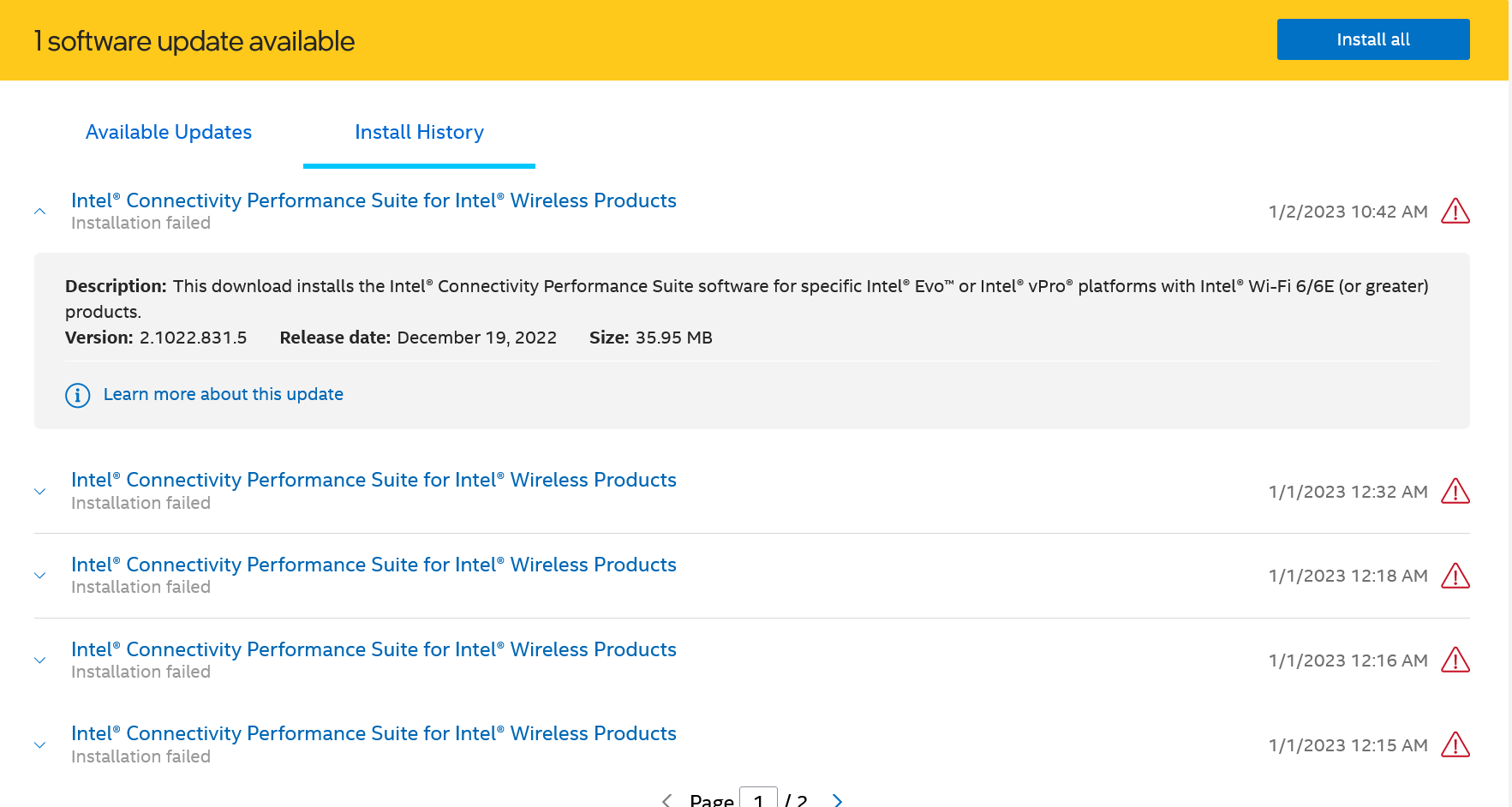
Intel® Connectivity Performance Suite for Intel® Wireless Products
Installation failed with error code 0x80000000 (-2147483648)
Driver updates for Wifi, Blutooth, DCH, and CPS were offered on 01/01/2023. All installation attempts fail.
Requested diagnostics attached.
- 신규로 표시
- 북마크
- 구독
- 소거
- RSS 피드 구독
- 강조
- 인쇄
- 부적절한 컨텐트 신고
Hello Olexander,
Many thanks for your patience on this.
Your concern is very valid. Please try the following steps and let me know of the outcome:
- Open a command prompt as Administrator.
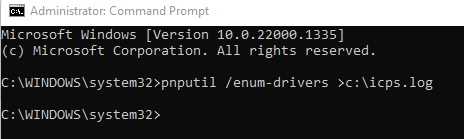
- In the command prompt, type pnputil /enum-drivers >c:\icps.log and press Enter. (refer to attached 'cmd-1.png')
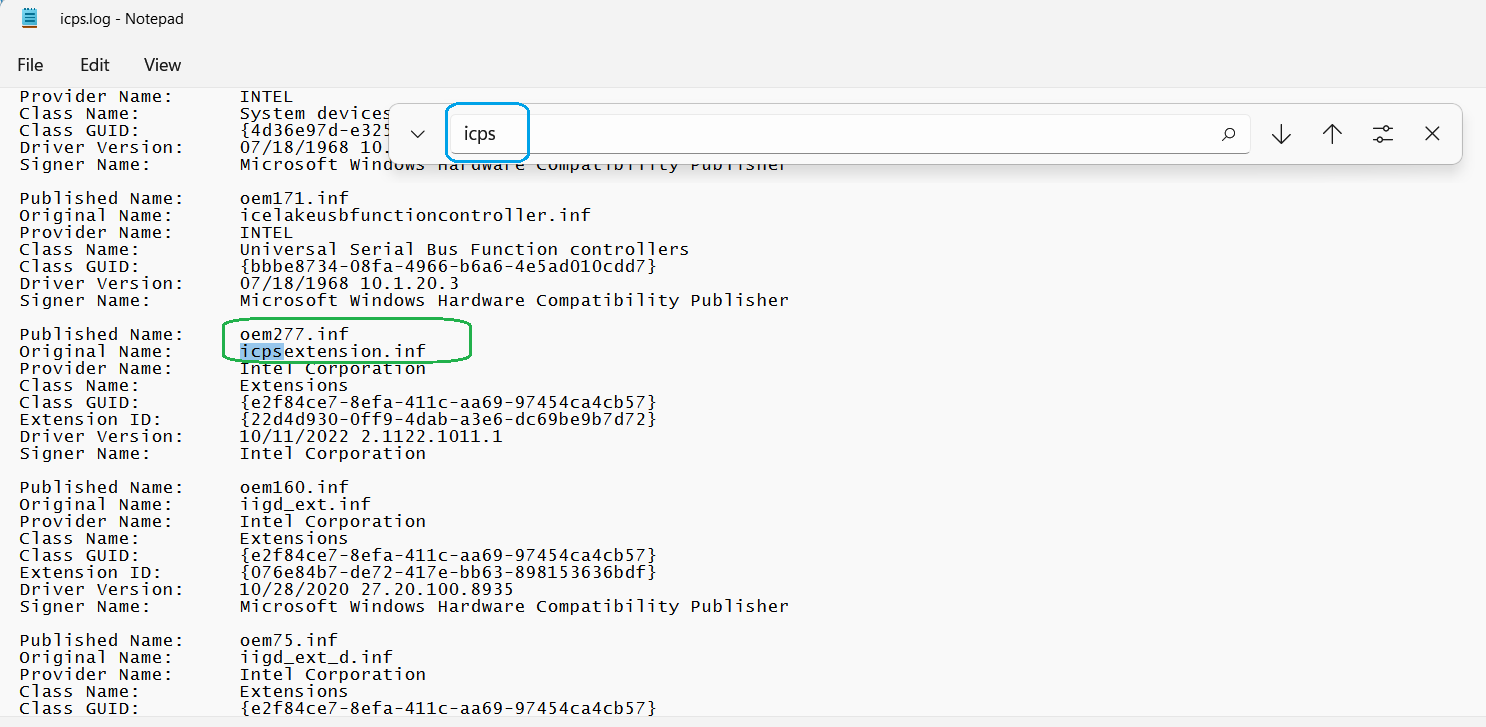
- Go to c:\ and open the icps.log, press Ctrl+F to bring up a search box. Type 'icps' in the search box to find all the 'oem#.inf' with icpsextension and icpsComponent. (e.g. oem277.inf, oem278.inf, oem96.inf) as shown in attached 'icpsext.png' and 'icpscom.png'
- Switch back to the command prompt, type the following command to completely uninstall all the drivers:
pnputil /delete-driver oem#.inf /uninstall
(as shown in attached 'cmd-2.png')
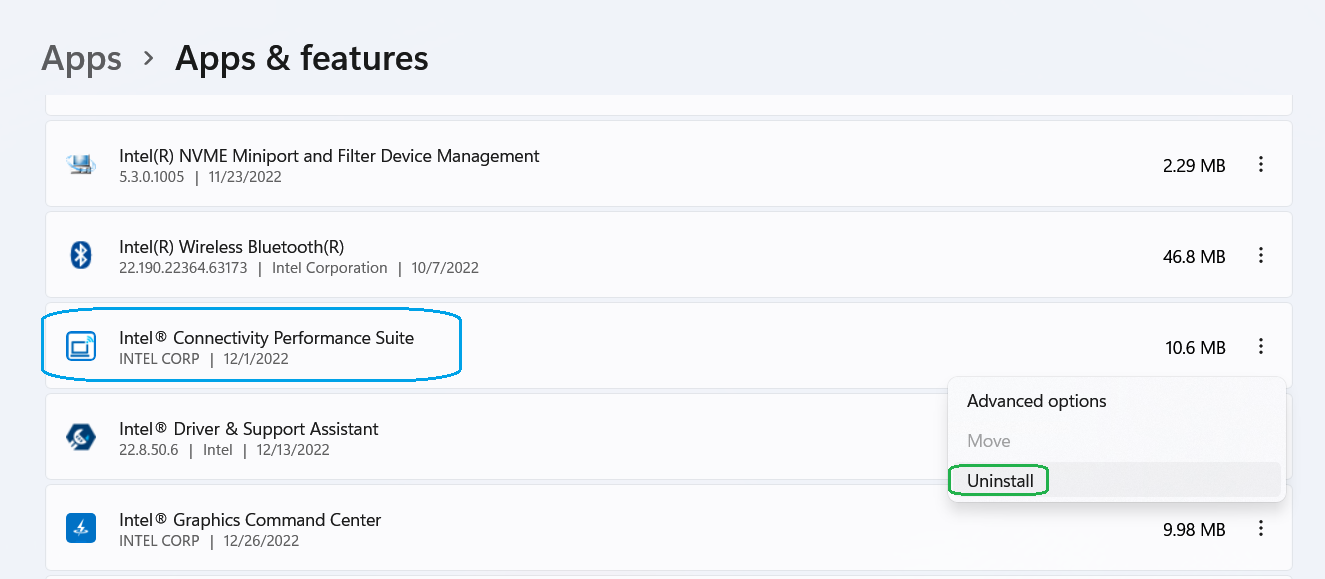
5. Go to Add or Remove Programs to uninstall Intel Connectivity Performance Suite (refer to attached 'Add-Remove-Program.png')
6. Reboot the system.
7. (Optional) Reinstall the Intel® Connectivity Performance Suite, or downgrade to an older version if needed.


- 신규로 표시
- 북마크
- 구독
- 소거
- RSS 피드 구독
- 강조
- 인쇄
- 부적절한 컨텐트 신고
Many thanks for your response.
Please let us know of the outcome once you have performed the steps.
Best regards,
Steven G.
Intel Customer Support Technician.
- 신규로 표시
- 북마크
- 구독
- 소거
- RSS 피드 구독
- 강조
- 인쇄
- 부적절한 컨텐트 신고
We would like to know if you were you able to check the previous post.
Let us know if you still need assistance.
Best regards,
Steven G.
Intel Customer Support Technician.
- 신규로 표시
- 북마크
- 구독
- 소거
- RSS 피드 구독
- 강조
- 인쇄
- 부적절한 컨텐트 신고
Hi Steven,
Thank you for the supplied solution to this problem.
I have tried it. However, I have had difficulties with it, and so I am no further forward.
With reference to the first steps concerning the removal of the OEMxxx.inf files relating to 'icpsext.png' and 'icpscom.png', icpsext.png removed successfully the .inf. However, I was unable to remove the further 2 .infs relating to icpsext.png because they were "in use".
Would I be wrong to suspect that this is becuase they are already in use with the drivers for the AX211 chips in this laptop. It is Intel EVO i7.
Do you think you need to change the order of the steps because of this, or do you need any further information before you do so.
Regards, Colin
PS: Obviously the situation remains unresolved and no new version of ICPS has been offered.
- 신규로 표시
- 북마크
- 구독
- 소거
- RSS 피드 구독
- 강조
- 인쇄
- 부적절한 컨텐트 신고
Many thanks for your detailed response, @ColinS.
I appreciate your inputs, and in order to provide you with a response to that, I will keep working and investigating further about this issue. As soon as I have an update or solution, I will post it back here.
Best regards,
Steven G.
Intel Customer Support Technician.
- 신규로 표시
- 북마크
- 구독
- 소거
- RSS 피드 구독
- 강조
- 인쇄
- 부적절한 컨텐트 신고
Hello @Olexander and @ColinS,
We acknowledge that Intel Connectivity Performance Suite v20.22.815 may be problematic at installation, and for that reason was removed from Download Center.
Please keep using Intel Connectivity Performance Suite v21.22.1168, which was shifted from BETA to a production release (https://www.intel.com/content/www/us/en/download/738623/765807/intel-connectivity-performance-suite-for-intel-wireless-products.html).
Let me know if you have further concerns.
Best regards,
Steven G.
Intel Customer Support Technician.
- 신규로 표시
- 북마크
- 구독
- 소거
- RSS 피드 구독
- 강조
- 인쇄
- 부적절한 컨텐트 신고
We would like to know if you were you able to check the previous post.
Let us know if you still need assistance or have further concerns.
Best regards,
Steven G.
Intel Customer Support Technician.
- 신규로 표시
- 북마크
- 구독
- 소거
- RSS 피드 구독
- 강조
- 인쇄
- 부적절한 컨텐트 신고
Since we have not heard back from you, we will close this thread. If you need any additional information, please submit a new question, as this thread will no longer be monitored.
Best regards,
Steven G.
Intel Customer Support Technician.
- 신규로 표시
- 북마크
- 구독
- 소거
- RSS 피드 구독
- 강조
- 인쇄
- 부적절한 컨텐트 신고
Hi Steven.
Apologies. My earlier reply to your enquiry about this bounced.
Yes, the Beta driver that you moved into production resolved the issue for me.
So, I am content for this thread to be closed.
Thank you for your assitance in addressing this issue.
Best regards, Colin
