
- Mark as New
- Bookmark
- Subscribe
- Mute
- Subscribe to RSS Feed
- Permalink
- Report Inappropriate Content
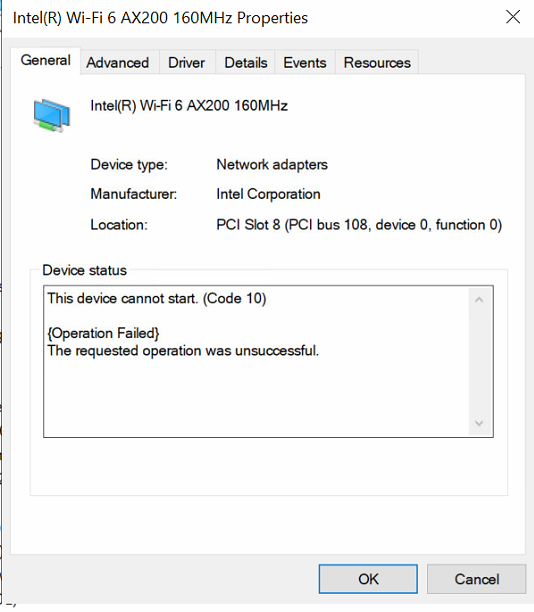
We recently purchased New HP intel and AMD core I7 laptops. The issue is when we connect to our domain and perform restart, it looses wireless connection. On checking wireless driver under device manager it has an exclamation mark. Has anyone experienced the issue? I would appreciate the support on this forum to help me resolve the problem
Link Copied
- « Previous
-
- 1
- 2
- Next »
- Mark as New
- Bookmark
- Subscribe
- Mute
- Subscribe to RSS Feed
- Permalink
- Report Inappropriate Content
From your suggestion i can attest that the problem originates when machines are connected to Domain. The WIFI adapter performs well when not Joined to domain. I have gone through domain group policy and i seem not to get a configuration that causes this problems. Do you have in mind some group policies that affect WIFI network adapter? Another funny realization is that this problem is only to this specific model of laptop. All other models are running well. I have also posted this problem in microsoft Support forum but yet to get assisted. Thanks alot @Khun_Doug for your response

- Mark as New
- Bookmark
- Subscribe
- Mute
- Subscribe to RSS Feed
- Permalink
- Report Inappropriate Content
LangatNic,
It's possible that domain membership installs something that isn't otherwise installed. And a domain GPO can also push registry entries. I would meet with someone that maintains the domain controllers and see what all happens when joining the domain. The interesting thing is that whatever the change is going from stand-alone to being a domain member does not get undone when leaving the domain. That definitely speaks to something installed, or some registry tweak. And it might be best to find this because there is no telling when the next group of new PCs and laptops stumble across the same problem.
- Mark as New
- Bookmark
- Subscribe
- Mute
- Subscribe to RSS Feed
- Permalink
- Report Inappropriate Content
Thanks @Khun_Doug for the support. i really suspect too registry entries. Kindly connect me with an expert on that area. Again thanks
- Mark as New
- Bookmark
- Subscribe
- Mute
- Subscribe to RSS Feed
- Permalink
- Report Inappropriate Content
LangaNic,
Your domain administrator, or whomever within the domain that manages the domain GPO, should be able to go over that with you. I did find a tool that allows a visual view of a domain GPO. You can try the tool and look for anything that deals with the network, device drivers, and registry tweaks. Here is a link to the software: https://www.ghacks.net/2018/06/18/search-the-windows-group-policy-and-look-up-registry-keys/

- Subscribe to RSS Feed
- Mark Topic as New
- Mark Topic as Read
- Float this Topic for Current User
- Bookmark
- Subscribe
- Printer Friendly Page
- « Previous
-
- 1
- 2
- Next »