Hi,
I am using Intel's NUC Baytrail device and have connected a temperature sensor to the I2C interface.
Platform: Intel NUC Baytrail device
Operating System: Windows 7
Testing interface: I2C
Situations handled:
1. Changed BIOS from UEFI to Secured mode
2. Step 1 helped to show the I2C device in the device manager.
3. Writing a test application program to perform read / write operation
4. Createfile() returns the handle of the temperature sensor device
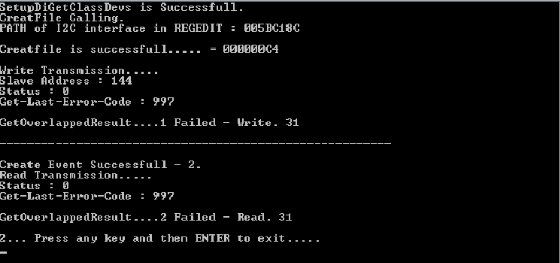
5. The write / read operation does not succeed.
Below is the code for the same.
// LocalPortTestApp.cpp : Defines the entry point for the console application.
//
//
# include "stdafx.h"
# include
# include
# include "I2Cpublic.h"
# include
# include
# include
# include
# include
# include
# include
# include
# include
# include
using namespace std;
/**
* These are the generic rights used in serial com port open
*/
# define S_GENERIC_READ (0x80000000UL) ///
# define S_GENERIC_WRITE (0x40000000UL) ///
# define S_GENERIC_EXECUTE (0x20000000UL) ///
# define S_GENERIC_ALL (0x10000000U1L) ///
/**
* Constants used in serial com port open
*/
# define S_CREATE_NEW 1UL ///
# define S_CREATE_ALWAYS 2UL ///
# define S_OPEN_EXISTING 3UL ///
# define S_OPEN_ALWAYS 4UL ///
# define S_TRUNCATE_EXISTING 5UL ///
/*****************************************************************************************************
* GENERAL TYPEDEF
****************************************************************************************************/
typedef unsigned char sUINT8; ///<8 bit variable
typedef signed char sINT8; ///<7 bit variable
typedef unsigned char* sUINT8P; ///<8 bit variable pointer
typedef const unsigned char* sCUINT8P; ///<8 bit constant variable pointer
typedef short int sINT16; ///<15 bit variable
typedef unsigned short sUINT16; ///<16 bit variable
typedef unsigned short* sUINT16P; ///<16 bit variable pointer
typedef long sINT32; ///<31 bit variable
typedef unsigned long sUINT32; ///<32 bit variable
typedef unsigned long* sUINT32P; ///<32 bit variable pointer
typedef const unsigned long* sCUINT32P; ///<32 bit variable pointer
typedef float sFLOAT; ///
typedef double sDOUBLE; ///
typedef unsigned char sBOOL; ///<8 bit variable
typedef void* sVOIDP; ///
typedef const void* sCVOIDP; ///
/**
* ENUM for ERROR CODE which will be return value
*/
enum returnStatus
{
S_SUCCESS = 0, ///
S_ERROR_FAILURE = 1, ///
S_ERROR_PORT_OPEN = 2, ///
S_ERROR_PORT_CLOSE = 3, ///
S_ERROR_CONFIG_PORT = 4, ///
S_ERROR_READ_BUFFER = 5, ///
S_ERROR_WRITE_BUFFER = 6, ///
S_ERROR_ARGUMENT = 7, ///
S_ERROR_CHANNEL_INVALID = 8, ///
S_ERROR_TIME_OUT = 9, ///
S_ERROR_SEND = 10, ///
S_ERROR_SEQUENCE = 11, ///
S_ERROR_PORT_ACQUIRED = 14, ///
S_ERROR_HANDLE_MISMATCH = 15, ///
S_BOOT_MODE = 16 ///
};
# define BUF_SIZE 50
int main(int argc, char* argv[])
{
returnStatus eResult = S_ERROR_PORT_OPEN;
GUID *i2cGuid = const_cast(&I2C_LPSS_INTERFACE_GUID);
HDEVINFO hDevInfo;
SP_DEVINFO_DATA devInfoData;
HANDLE i2c_Handle = HANDLE(NULL); ///
hDevInfo = SetupDiGetClassDevs(i2cGuid, NULL, NULL, DIGCF_DEVICEINTERFACE | DIGCF_ALLCLASSES);
if(hDevInfo == INVALID_HANDLE_VALUE)
{
return S_ERROR_FAILURE;
}
else
{
std::cout << "SetupDiGetClassDevs is Successfull.\n";
}
devInfoData.cbSize = sizeof(SP_DEVINFO_DATA);
SP_DEVICE_INTERFACE_DATA devInterfData = { 0 };
devInterfData.cbSize = sizeof(SP_DEVICE_INTERFACE_DATA);
devInfoData.cbSize = sizeof(SP_DEVINFO_DATA);
DWORD i = 0;
if(SetupDiEnumDeviceInterfaces(hDevInfo, NULL, i2cGuid, i, &devInterfData))
{
DWORD size = 0;
if (!SetupDiGetDeviceInterfaceDetail(hDevInfo, &devInterfData, NULL, 0, &size, 0))
{
if (GetLastError() == ERROR_NO_MORE_ITEMS)
{
eResult = S_SUCCESS;
while(1);
return 0;
}
PSP_DEVICE_INTERFACE_DETAIL_DATA pInterfaceDetailData = (PSP_DEVICE_INTERFACE_DETAIL_DATA)LocalAlloc(LPTR, size);
pInterfaceDetailData->cbSize = sizeof(SP_DEVICE_INTERFACE_DETAIL_DATA);
if (!SetupDiGetDeviceInterfaceDetail(hDevInfo, &devInterfData, pInterfaceDetailData, size, &size, &devInfoData))
{
std :: cout << "SetupDiGet...
链接已复制

Hello prajose_john,
Welcome to the Intel Embedded Community.
We have attached the following document Intel® AtomTM Processor E3800 Windows 7 IO Driver Software Developer's Manual, which you may find useful in troubleshooting this issue.
In order to offer you the best support possible, and as this issue is related to an Intel NUC, and to software development on Windows I recommend you to post this issue in the following websites:
The Intel Windows Developer Zone Forum https://software.intel.com/en-us/forum https://software.intel.com/en-us/forum
The NUC community https://communities.intel.com/community/tech/nuc Forum: Intel NUC | Intel Communities
Best regards,
Jimmy.
Hi Jimmy,
Nice to meet you over discussion.
I had this copy and have derived the code that has been shared based on the same.
I have a few questions:
- BIOS changed from UEFI to Secured mode on Intel NUC board. This helped to populate the I2C device in the device manager on Windows 7. Does this mean the I2C driver worked?
- The Createfile() returns the handle of the device (temperature sensor) a slave device connected to I2C interface on board. Does this mean the driver is working?
- We check with oscilloscope after the above process and on probing, we do not see the clock line up. Does this mean the driver is not responding to the application?
- There is DMA enabled in Windows 7. Has this any impact on this?
Thanks again in anticipation of your support.
- Reg.
-prajose john


Hello, Prajose.
Thanks for using the Embedded Community. I noticed that you have a Basic account with the EDC. If you would like to apply for a Privileged account which allows you to more easily access Intel confidential content on the EDC, please go to http://www.intel.com/content/www/us/en/embedded/embedded-design-center-support.html Intel® Embedded Design Center Contact and Support and click on "Manage your Intel Profile" in the MANAGE YOUR ACCOUNT section of the page. You can then click on "upgrade to Privileged" and complete the form to apply for Privileged. Let us know when you have done this and we'll expedite the review process for you. Hope this is helpful as you'll have access to more content, tools and services. LynnZ.
Hi Gabriel,
I am running out of time with my deliverables.
Can you please introduce me to NUC team. I have this as blocker for my deliverables.
Intel has multi million dollar business waiting on closure of this issue. This is for Intel's Signage IOT BU.
Please expedite this issue and help me resolve.
kind reg.
-prajose
Thanks Gabriel.
I have received the mail and hope to get some resolution.
The BIOS you have sent me will not have any impact. On the same NUC device, I have windriver running and I2C works fine.
In case of windows, I have issues. I have my reasons to worry on the I2C driver for NUC for windows 7.
reg.
-prajose
Hi Gabriel,
I have upgraded the BIOS which you suggested and following is the outcome:
According to DE3815TYBE_TechProdSpec07.pdf , Section : 2.3 BIOS Security Jumper, Table : 26,
- Setting the Jumper Position as 1-2 and updating the BIOS Version with 2042.bio file. After upgrade the Keyboard and Mouse is not working. After rebooting the system and pressing F2, it will go to BIOS Change settings.
- Setting the jumper position as 2-3 we observe that the BIOS Recovery will not work and on pressing F2, It does not go to BIOS Change settings. The Keyboard and Mouse was not working.
- Setting the jumper position as none then it is asking for Press [F4] BIOS Recovery and By pressing F4 it shows the message that power down your board. Then again when restarting the board the Keyboard and Mouse does not work and By Pressing F2 it goes to BIOS Change Settings.
The above are 3 different behavior when changing the Jumper positions. Moreover, we also attempted with remote session but that also did not pass.
In other words, the BIOS 2042.bio upgrade did not work.
reg.
-prajose