
- Marquer comme nouveau
- Marquer
- S'abonner
- Sourdine
- S'abonner au fil RSS
- Surligner
- Imprimer
- Signaler un contenu inapproprié
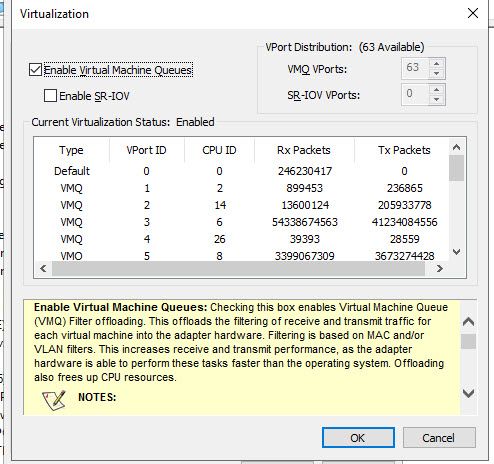
Both have the Proset portions of the drivers installed.
The X722 driver is missing the advanced properties of the Proset software. Specifically the screen at , properties > advanced > Virtualization > Properties. Which shows current VMQ and SR-IOV ports which is attached.
Is there any way to get this functionality on the X722 adapters, or to retrieve this information using the Intel powershell commands? I haven't been successful at that route either yet.
Thanks!

- Marquer comme nouveau
- Marquer
- S'abonner
- Sourdine
- S'abonner au fil RSS
- Surligner
- Imprimer
- Signaler un contenu inapproprié
Hello Rob,
Please be informed that as per the link below. Windows* 8.1 and Windows Server* 2012 R2 are the last operating systems to support the Intel PROSet command-line utilities.
So for the rest of the guide, please open this link:
https://www.intel.com/content/www/us/en/support/articles/000005778/network-and-i-o/ethernet-products.html
If you still have questions, please let us know.
Best regards,
Michael L.
Intel Customer Support Technicians
A Contingent Worker at Intel
Lien copié
- Marquer comme nouveau
- Marquer
- S'abonner
- Sourdine
- S'abonner au fil RSS
- Surligner
- Imprimer
- Signaler un contenu inapproprié
Hello Rob,
Thank you for posting in Intel Ethernet Communities.
For me to understand the issue, please provide the following details.
- What is your OS?
- What is the driver version installed?
- What feature are you trying to configure?
If you have questions, Please let us know.
Best regards,
Michael L.
Intel Customer Support Technicians
A Contingent Worker at Intel
- Marquer comme nouveau
- Marquer
- S'abonner
- Sourdine
- S'abonner au fil RSS
- Surligner
- Imprimer
- Signaler un contenu inapproprié
Hello Rob,
I just want to make a follow up on the following information the I requested.
- What is your OS?
- What is the driver version installed?
- What feature are you trying to configure?
If you have questions, Please let us know.
Best regards,
Michael L.
Intel Customer Support Technicians
A Contingent Worker at Intel
- Marquer comme nouveau
- Marquer
- S'abonner
- Sourdine
- S'abonner au fil RSS
- Surligner
- Imprimer
- Signaler un contenu inapproprié
The operating system is Server 2019 Datacenter.
It appears that screen is in the old version of the driver and not the newer 1.10.130.0 driver release on 5/29/19.
Specifically I'm trying to make sure that the virtual machines are attaching to VMQ ports correctly in this new driver.
- Marquer comme nouveau
- Marquer
- S'abonner
- Sourdine
- S'abonner au fil RSS
- Surligner
- Imprimer
- Signaler un contenu inapproprié
Hello Rob,
Please be informed that as per the link below. Windows* 8.1 and Windows Server* 2012 R2 are the last operating systems to support the Intel PROSet command-line utilities.
So for the rest of the guide, please open this link:
https://www.intel.com/content/www/us/en/support/articles/000005778/network-and-i-o/ethernet-products.html
If you still have questions, please let us know.
Best regards,
Michael L.
Intel Customer Support Technicians
A Contingent Worker at Intel
- Marquer comme nouveau
- Marquer
- S'abonner
- Sourdine
- S'abonner au fil RSS
- Surligner
- Imprimer
- Signaler un contenu inapproprié
Hello Rob,
I just want to check if you already tried the guide that we provided.
If you still have questions, please let us know.
Best regards,
Michael L.
Intel Customer Support Technicians
A Contingent Worker at Intel
- Marquer comme nouveau
- Marquer
- S'abonner
- Sourdine
- S'abonner au fil RSS
- Surligner
- Imprimer
- Signaler un contenu inapproprié
I was able to download the proset powershell functions and figure out what I needed.
- Marquer comme nouveau
- Marquer
- S'abonner
- Sourdine
- S'abonner au fil RSS
- Surligner
- Imprimer
- Signaler un contenu inapproprié
Hello Rob,
Thank you for the update. If you still have questions, please let us know.
Best regards,
Michael L.
Intel Customer Support Technicians
A Contingent Worker at Intel
- Marquer comme nouveau
- Marquer
- S'abonner
- Sourdine
- S'abonner au fil RSS
- Surligner
- Imprimer
- Signaler un contenu inapproprié
Hello Rob,
Just checking if you still need assistance, just let us know.
Best regards,
Michael L.
Intel Customer Support Technicians
A Contingent Worker at Intel

- S'abonner au fil RSS
- Marquer le sujet comme nouveau
- Marquer le sujet comme lu
- Placer ce Sujet en tête de liste pour l'utilisateur actuel
- Marquer
- S'abonner
- Page imprimable