
- Als neu kennzeichnen
- Lesezeichen
- Abonnieren
- Stummschalten
- RSS-Feed abonnieren
- Kennzeichnen
- Anstößigen Inhalt melden
Hi everyone,
I just recently built a new PC using an ASUS Z490 Gaming F as my motherboard. The onboard NIC is a Intel i225V 2.5GB. I am experiencing strange throttling in Steam and general Internet speed tests. I have a 500mbps fibre connection and before on my much older pc I would get around 480mbps on pretty much every speed test available, now it's hovering around 150-250mbps. Steam would also download around 48MBps, now it's sticking around 24MBps.
I have updated the firmware and drivers to newest available.
As a test, I also installed a cheap TP-Link Nic and all my issues have been resolved using this. So it appears to be an issue with the Intel Nic IMO. Has anyone come across this issue or at least similar? I would rather not have a cheap TP link NIC if my onboard NIC is meant to operate better than this.
Thanks in advance. Please ask any questions that may help to lead to an answer.
Kind regards
Link kopiert

- Als neu kennzeichnen
- Lesezeichen
- Abonnieren
- Stummschalten
- RSS-Feed abonnieren
- Kennzeichnen
- Anstößigen Inhalt melden
I'm curious if it has anything to do with the issues I'm experiencing. Can you disable IPv6 on your I225-V? That's what resolved my connection issues.
- Als neu kennzeichnen
- Lesezeichen
- Abonnieren
- Stummschalten
- RSS-Feed abonnieren
- Kennzeichnen
- Anstößigen Inhalt melden
That’s a good idea, I will try this tonight.
Kind regards
- Als neu kennzeichnen
- Lesezeichen
- Abonnieren
- Stummschalten
- RSS-Feed abonnieren
- Kennzeichnen
- Anstößigen Inhalt melden
Worth a shot though.

- Als neu kennzeichnen
- Lesezeichen
- Abonnieren
- Stummschalten
- RSS-Feed abonnieren
- Kennzeichnen
- Anstößigen Inhalt melden
Hi kiz2694,
We would like to follow up if the advice of the other members of this forum addressed your concern, or are you still having the same issue?
Looking forward to your reply, Should we not get your reply, we will check back after 3 business days.
Best Regards,
Alfred S
Intel® Customer Support
- Als neu kennzeichnen
- Lesezeichen
- Abonnieren
- Stummschalten
- RSS-Feed abonnieren
- Kennzeichnen
- Anstößigen Inhalt melden
Hi Kiz2694,
We need to close this thrad since we have not gotten a response from you: maybe because you are busy or preoccupied at the moment. We know that this is important for you to get it resolved and it is also equally important for us to give you the right solution; as much as we would like to assist you, we need to close it to attend to other customers. We hope for your consideration and understanding on this one.
If you still need assistance with your concern, you can reply back to the thread or create another topic, and we will be more than glad to assist you
Thank you for contacting Intel® and have a great week!
Best Regards,
Alfred S
Intel® Customer Support

- Als neu kennzeichnen
- Lesezeichen
- Abonnieren
- Stummschalten
- RSS-Feed abonnieren
- Kennzeichnen
- Anstößigen Inhalt melden
Hey there,
I' ve got the exact same Issue with my I219-V. I am directly connected to my UniFi 16 Port Gbit Switch with a CAT6 Cable.
My Speed (regardless of Internet-Speedtest or Downloads from CIFS-Share) caps at around 500Mbit (50-60MB/s). I never had a problem like this. All Other Clients on the Network (Realtek NICs) do not have any Problemes and are able to Download from CIFS Server with 115MB/s.
Any suggestions?
KR
Thorsten
- Als neu kennzeichnen
- Lesezeichen
- Abonnieren
- Stummschalten
- RSS-Feed abonnieren
- Kennzeichnen
- Anstößigen Inhalt melden
Same problem here with Asus Z490 Formula XII.
Speed only 120-200 Mbits with i225.
Onboard Marvell Aquantia no problem 1 Gbit.
- Tags:
- 90

- Als neu kennzeichnen
- Lesezeichen
- Abonnieren
- Stummschalten
- RSS-Feed abonnieren
- Kennzeichnen
- Anstößigen Inhalt melden
Rubbish. You are a spammer.
And, you are going against the rules of the forum.
Doc

- Als neu kennzeichnen
- Lesezeichen
- Abonnieren
- Stummschalten
- RSS-Feed abonnieren
- Kennzeichnen
- Anstößigen Inhalt melden
I found a solution. Please disable in advanced network card options - ipv4 Checksum offload. Turn it off. After this treatment, I have full speed

- Als neu kennzeichnen
- Lesezeichen
- Abonnieren
- Stummschalten
- RSS-Feed abonnieren
- Kennzeichnen
- Anstößigen Inhalt melden
I am using a Rog Strix Z490-f Gaming mother board and have exactly the same issues as others.
Using 1Gb internet connection and bairly able to acheive speeds of 700mbps
other computers on the network are easily acheiving almost the full speds of 1000gbps
I have ran many different drivers and flashed the bios to the latest as per asus website
Made many changes to the settings as listed in this thread to no solution.
running on cat 6e cable same as the other computers but just not able to make this work.
When you watch a speed test you can see it almost throttle back very quickly and hold around the 680 mbps
- Als neu kennzeichnen
- Lesezeichen
- Abonnieren
- Stummschalten
- RSS-Feed abonnieren
- Kennzeichnen
- Anstößigen Inhalt melden
- Als neu kennzeichnen
- Lesezeichen
- Abonnieren
- Stummschalten
- RSS-Feed abonnieren
- Kennzeichnen
- Anstößigen Inhalt melden
I have gone and purchased a cheep 1GB NIC card to put in to see the difference - spoke to the supplier who without any questions have raised an RTM as faulty and happy to replce the board.
NIC should arrive tomorrow so I will update the findings.
- Als neu kennzeichnen
- Lesezeichen
- Abonnieren
- Stummschalten
- RSS-Feed abonnieren
- Kennzeichnen
- Anstößigen Inhalt melden
I have now received and fitted a pcie TP-Link network card model TG-3468
I went into the bios and disabled the Intel® I225-V 2.5Gb Ethernet controller
Rog Strix Z490-F Gaming
The speeds using the TP-Link card are perfect in every way I am now getting full speeeds of my internet and able to transfer files around my home network at full speed.
Sadly the Intel® I225-V 2.5Gb Ethernet controller is either faulty or has problems.
The board will be going back for a replacement RTM and I can only keep my fingers crossed that the new board will not suffer the same problem.
- Als neu kennzeichnen
- Lesezeichen
- Abonnieren
- Stummschalten
- RSS-Feed abonnieren
- Kennzeichnen
- Anstößigen Inhalt melden
How is it going with your RMAed Board? Does it work now?
I still have the same issue...
- Als neu kennzeichnen
- Lesezeichen
- Abonnieren
- Stummschalten
- RSS-Feed abonnieren
- Kennzeichnen
- Anstößigen Inhalt melden
Hi the new replacement board arrives today so I am just waiting on delivery.
I will hope to update this later.

- Als neu kennzeichnen
- Lesezeichen
- Abonnieren
- Stummschalten
- RSS-Feed abonnieren
- Kennzeichnen
- Anstößigen Inhalt melden
From what I can gather this a hardware issue that should have been fixed but there are still motherboards out there with the hardware flaw.
- Als neu kennzeichnen
- Lesezeichen
- Abonnieren
- Stummschalten
- RSS-Feed abonnieren
- Kennzeichnen
- Anstößigen Inhalt melden
I have to contradict,
I dont think this is an hardware issue. I have this issue with a 4 year old Asus Z170-Pro Graming MB. I never had Issues with my NIC (and I am using it verry activly with my NAS-Server, Netdrives etc.)
One day I noticed a significant reduction in performance. I used to copy from an to my Netdrives with around 112 MB/s pretty good usage of my 1Gbit connection. But currently it caps at around 500Mbit (copying with 50-60MB/s). I tried another (older) Driver, tried with Linux, changed Switch-Port, used another cable, tried all NIC settings in this thread (which i also had not to use before) -> Result: speeds are bad.
I tried another NIC (Realtek USB-C Dock frome Notebook) and the speed was back (same Switch, same Cable, same Port).
I cannot believe a NIC been faulty just like that to cap half the speed.... IMHO this is a Firmware Issue.
KR
- Als neu kennzeichnen
- Lesezeichen
- Abonnieren
- Stummschalten
- RSS-Feed abonnieren
- Kennzeichnen
- Anstößigen Inhalt melden
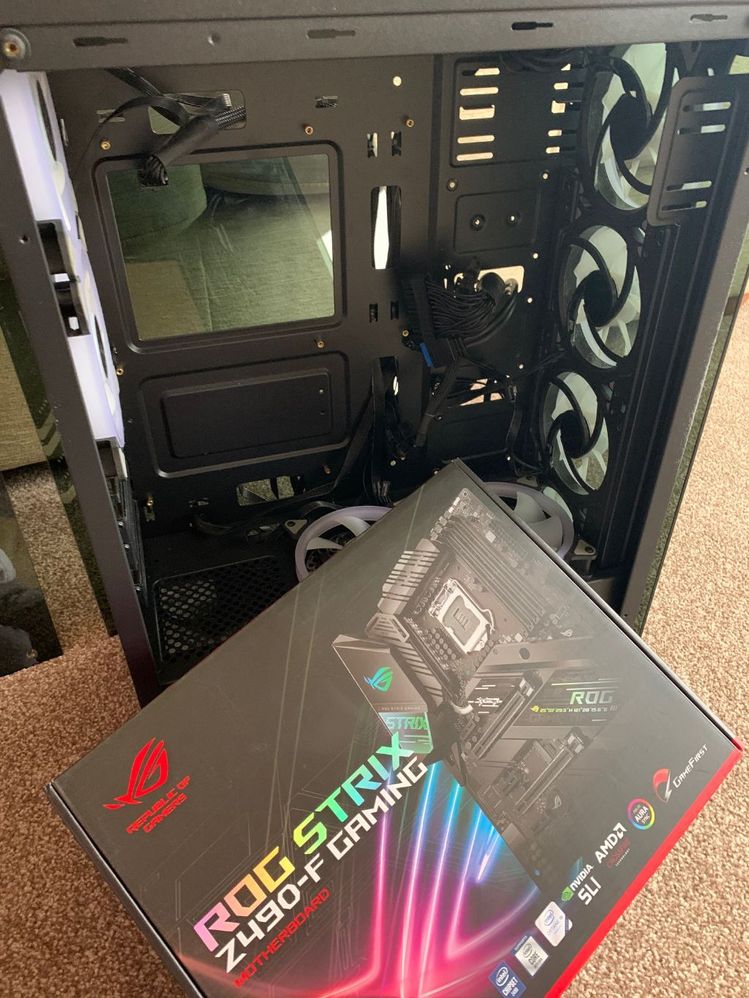
Okay board has arrived - time to get this fitted back in and Tested.
will report back.
- Als neu kennzeichnen
- Lesezeichen
- Abonnieren
- Stummschalten
- RSS-Feed abonnieren
- Kennzeichnen
- Anstößigen Inhalt melden
Well pc fully built back up and tested again.
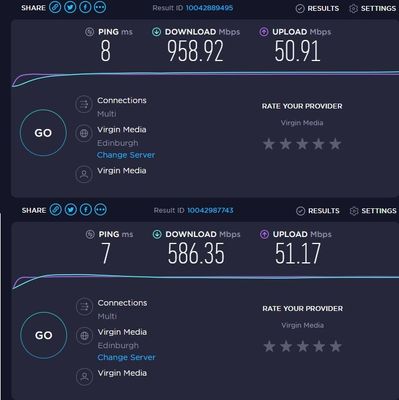
sadly I am still getting very poor speeds on the intel 1225V lan connection.
The picture bellow shows on the top my speeds using another pc connected to the same cable and network The second speed test is using my asus board and showing the exact issues i have with this chipset and board.
I will have to contact the supplied of the board in the morning and make some sort of arraingement as this is just not what i expected.


- Als neu kennzeichnen
- Lesezeichen
- Abonnieren
- Stummschalten
- RSS-Feed abonnieren
- Kennzeichnen
- Anstößigen Inhalt melden
Is it possible to get an answert from intel on this... I honestly think its some firmware issue... why else should it happen to brand new and old hardware at the same time ?
- Als neu kennzeichnen
- Lesezeichen
- Abonnieren
- Stummschalten
- RSS-Feed abonnieren
- Kennzeichnen
- Anstößigen Inhalt melden
I wish I had the answer to that.
Very disapointed in this lan socket chips set on the board. So many of the z490 boards use the same chipset for lan.
I will need to look around different boards and find one that doesnt use this 2.5 GB lan connection as i feel that it has serious problems.
2 out of 2 boards same problem.
I tested back in the TP link pcie nic i purchased and my speeds go right back up again.

- RSS-Feed abonnieren
- Thema als neu kennzeichnen
- Thema als gelesen kennzeichnen
- Diesen Thema für aktuellen Benutzer floaten
- Lesezeichen
- Abonnieren
- Drucker-Anzeigeseite