
- Mark as New
- Bookmark
- Subscribe
- Mute
- Subscribe to RSS Feed
- Permalink
- Report Inappropriate Content
Hello!
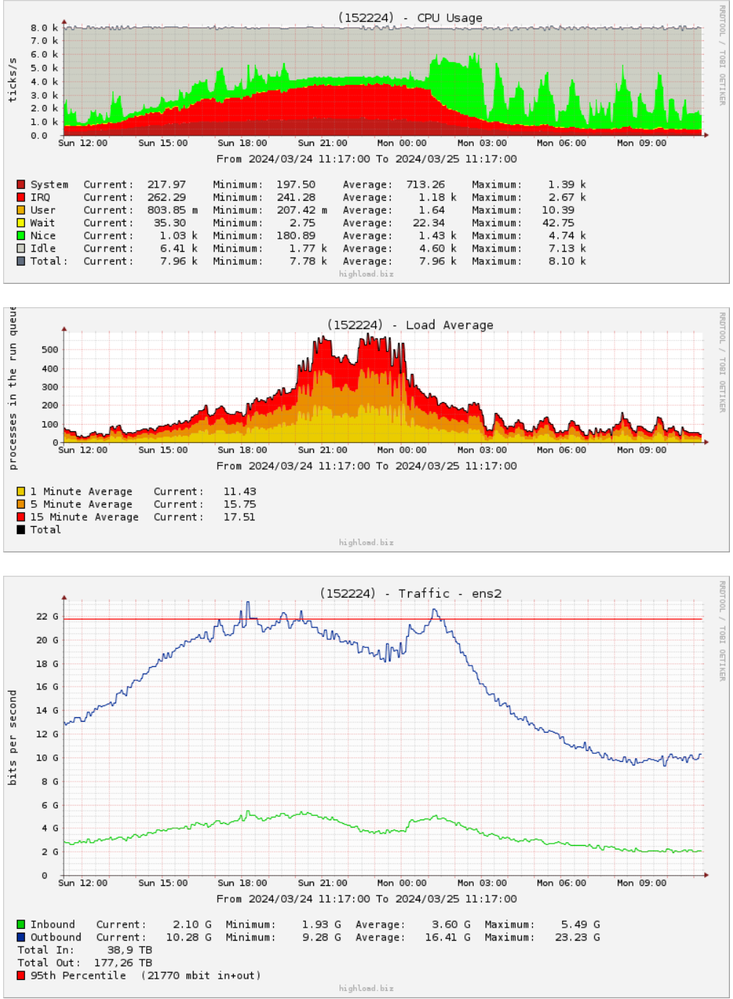
I have a problem with Intel XL710, after 22 Gbps of traffic some cores of processor loads 100% IRQ and traffic goes down.
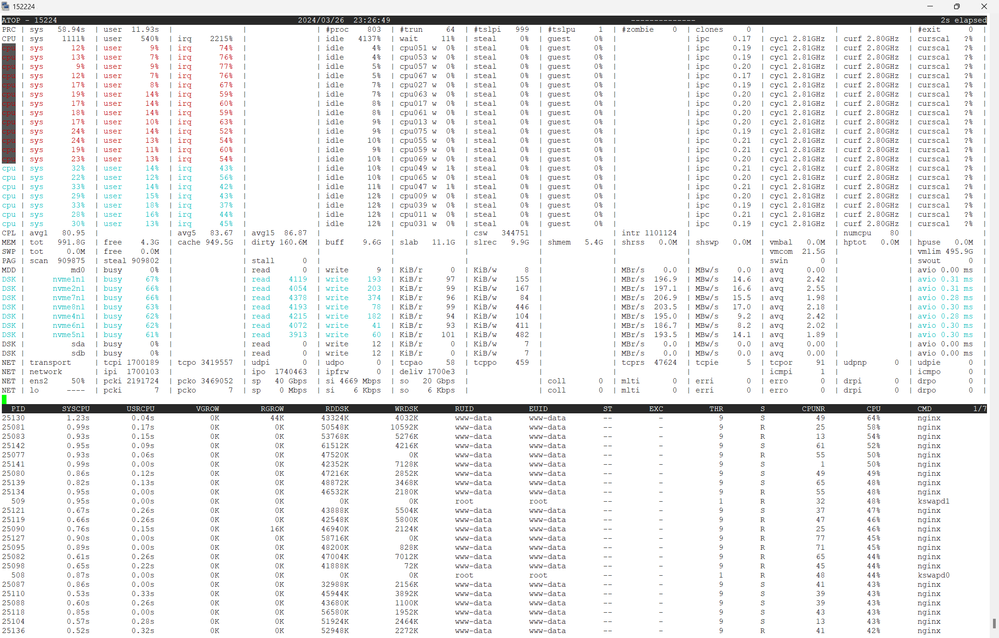
There are latast firmware and driver:
# ethtool -i ens2
driver: i40e
version: 2.24.6
firmware-version: 9.40 0x8000ecc0 1.3429.0
expansion-rom-version:
bus-info: 0000:d8:00.0
supports-statistics: yes
supports-test: yes
supports-eeprom-access: yes
supports-register-dump: yes
supports-priv-flags: yes
I read this guide
And made all possible configurations. But nothing changes
382  set_irq_affinity local ens2
  384  set_irq_affinity all ens2
  387  ethtool -C ens2 adaptive-rx off adaptive-tx off rx-usecs 0 tx-usecs 0
  389  ethtool -C ens2 adaptive-rx off adaptive-tx off rx-usecs 5000 tx-usecs 20000
  391  ethtool -C ens2 adaptive-rx off adaptive-tx off rx-usecs 10000 tx-usecs 20000
  393  ethtool -g ens2
  394  ethtool -C ens2 adaptive-rx off adaptive-tx off rx-usecs 84 tx-usecs 84
  396  ethtool -C ens2 adaptive-rx off adaptive-tx off rx-usecs 62 tx-usecs 62
  398   ethtool -S ens2 | grep drop
  399   ethtool -S ens2 | grep drop
  400   ethtool -S ens2 | grep drop
  401   ethtool -S ens2 | grep drop
  402  ethtool -C ens2 adaptive-rx off adaptive-tx off rx-usecs 336 tx-usecs 84
  403   ethtool -S ens2 | grep drop
  404   ethtool -S ens2 | grep drop
  406   ethtool -S ens2 | grep drop
  407  ethtool -C ens2 adaptive-rx off adaptive-tx off rx-usecs 672 tx-usecs 84
  408   ethtool -S ens2 | grep drop
  409   ethtool -S ens2 | grep drop
  411   ethtool -S ens2 | grep drop
  412   ethtool -S ens2 | grep drop
  425   ethtool -S ens2 | grep drop
  426   ethtool -S ens2 | grep drop
  427  ethtool -C ens2 adaptive-rx off adaptive-tx off rx-usecs 8400 tx-usecs 840
  428  ethtool -C ens2 adaptive-rx off adaptive-tx off rx-usecs 4200 tx-usecs 840
  430   ethtool -S ens2 | grep drop
  431   ethtool -S ens2 | grep drop
  432   ethtool -S ens2 | grep drop
  433   ethtool -S ens2 | grep drop
  434  ethtool -C ens2 adaptive-rx off adaptive-tx off rx-usecs 4200 tx-usecs 1680
  435   ethtool -S ens2 | grep drop
  436   ethtool -S ens2 | grep drop
  439  ethtool -C ens2 adaptive-rx off adaptive-tx off rx-usecs 3200 tx-usecs 3200
  469  ethtool -a ens2
  472  ethtool ens2
  473  ethtool -i ens2
  475  ethtool -i ens2
  476  ethtool ens2
  482  ethtool -C ens2 adaptive-rx on
  484  ethtool -c ens2
  486  ethtool -C ens2 adaptive-tx on
  487  ethtool -c ens2
  492  history | grep ens2
  494  ethtool -m ens2
  499  ethtool -C ens2 adaptive-rx off adaptive-tx off rx-usecs 4200 tx-usecs 1600
  501  history | grep ens2
Server configuration:
80 cores Intel(R) Xeon(R) Gold 6230 CPU @ 2.10GHz
RAM 960 GB
8 x SAMSUNG MZQLB7T6HMLA-000AZ NVME disks
Ethernet Controller XL710 for 40GbE QSFP+ (rev 02)
What can be done with the settings of this network card to solve the problem?
On another server with a similar configuration, but a different network cards, everything is fine
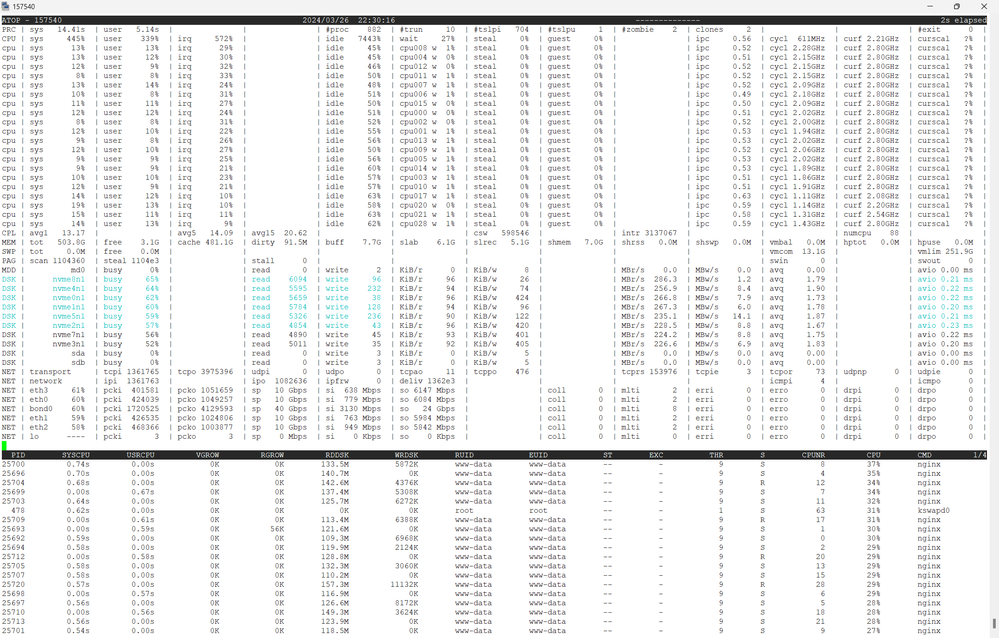
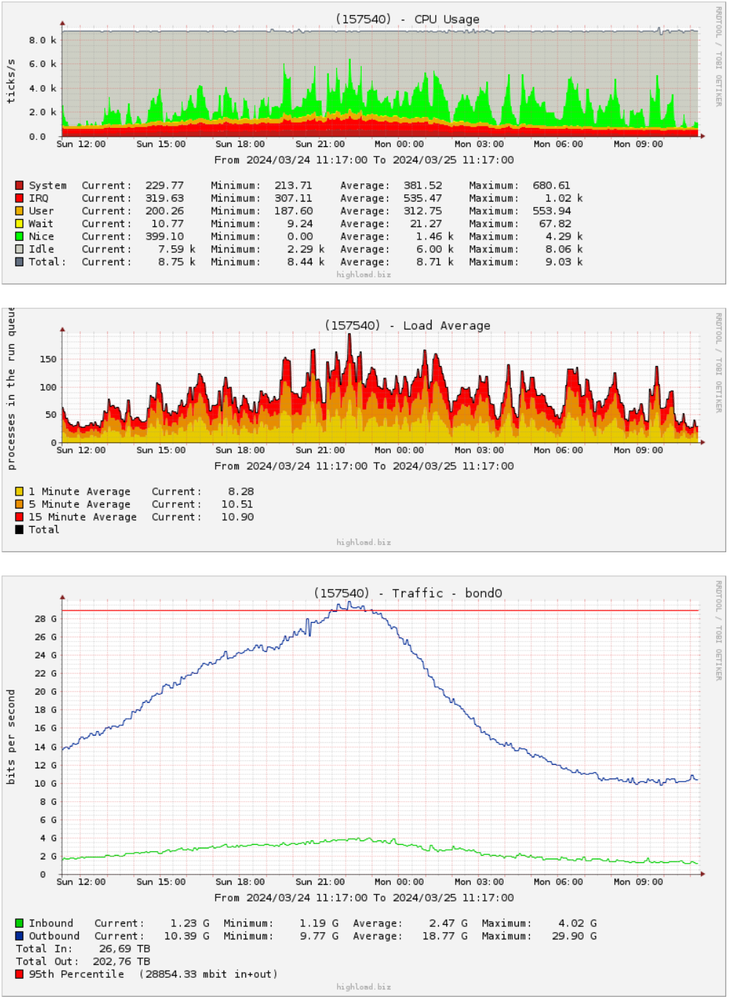
Server configuration:
88 cores Intel(R) Xeon(R) CPU E5-2699 v4 @ 2.20GHz
RAM 512 GB
8 x SAMSUNG MZQLB7T6HMLA-00007 NVME disks
4 x 82599ES 10-Gigabit SFI/SFP+ Network Connection
Link Copied
- « Previous
- Next »
- Mark as New
- Bookmark
- Subscribe
- Mute
- Subscribe to RSS Feed
- Permalink
- Report Inappropriate Content
Hello, Sazirah!
1. You enabled GRO, HW-TC-OFFLOAD and UFO: GRO is recommended for TCP traffic, UFO is recommended for UDP traffic /fragmentation (if kernel supports) and TC offload is for traffic prioritization.
Questions:We would like to check if you trying QoS offload/traffic prioritization and also UDP fragmentation?
No, I haven't QoS and UDP traffic
2. Made some changes on Jan5th: using ethtool -C command configured interrupt moderation settings on ens1f0 and ens1f1 interfaces.
Suggestion: adaptive-rx/ tx off, tx/rx-usecs and rx-usecs-high are enough to configure, and also "tx/rx usec and rx-usecs-high" values are very high (1 ms & 2 ms), no need go with such a big number. Here is the command to use. Also tried to adaptive-tx/rx ON, don't enabled them.
ethtool -C $NIC_INTERFACE adaptive-rx off adaptive-tx off rx-usecs 100 tx-usecs 100 rx-usecs-high 100
As you can see my very first message in this topic, I tried very high values and very small values. Now I am using adaptive-rx on adaptive-tx on because it almost better for my current traffic 7.8Gbps inbound traffic and 22Gbps oubound traffic.
3. Logs for Feb2-Feb 4:
One of the bonded interfaces is down. Kindly resolve the issue. If the problem persists, it will impact performance.
No. As you can see it disabled only for 200ms for a 1 second. I updated firmware or driver that time. All interfaces are UP:
6: ens1f0: <BROADCAST,MULTICAST,SLAVE,UP,LOWER_UP> mtu 1500 qdisc mq master bond0 state UP group default qlen 25000
    link/ether 3c:fd:fe:a8:62:04 brd ff:ff:ff:ff:ff:ff
7: ens1f1: <BROADCAST,MULTICAST,SLAVE,UP,LOWER_UP> mtu 1500 qdisc mq master bond0 state UP group default qlen 25000
    link/ether 3c:fd:fe:a8:62:04 brd ff:ff:ff:ff:ff:ff
5. "ethtool -S ens1f0 | grep port.rx_dropped" stats collected in Feb
output says that there are many drops, which means that the packets are being received by the NIC but not passed to the OS. Reasons for the drops:
a. RX buffer is small, increase it using the command : ethtool -G $NIC_INTERFACE rx 4096 tx 4096
b. double check affinity, Intel provides the "set_irq_affinity" script in drivers tarball. Please use the same script to set the affinity.
c. Set the queues using the command " ethtool -L $NIC_INTERFACE combined "$Num_Core"
d. set the Interrupt coalescing using the command : same command mentioned in point 2 above
e. Set the kernel max using the command: sysctl -w net.core.rmem_max=16777216 ; sysctl -w net.core.wmem_max=16777216
a) I always increase buffer for maximum:
root@152224:/# ethtool -g ens1f0
Ring parameters for ens1f0:
Pre-set maximums:
RX: 4096
RX Mini: 0
RX Jumbo: 0
TX: 4096
Current hardware settings:
RX: 4096
RX Mini: 0
RX Jumbo: 0
TX: 4096
b) I always use script set_irq_affinity:
/usr/sbin/set_irq_affinity local $ETHor
/usr/sbin/set_irq_affinity all $ETHc) By default queues are combined and it number = number of cores CPUs
d) I've already tried many options
e)
root@152224:/# grep mem /etc/sysctl.conf
net.core.rmem_default = 131072
net.core.wmem_default = 131072
net.core.rmem_max = 16777216
net.core.wmem_max = 16777216
net.ipv4.tcp_rmem = 4096 131072 16777216
net.ipv4.tcp_wmem = 4096 131072 16777216
#net.ipv4.tcp_mem = 524288 1048576 2097152
net.ipv4.tcp_mem = 6672016 6682016 7185248
vm.overcommit_memory=0
net.core.optmem_max = 65536
Earlier our team were unable to reproduce the issue as we ran the test with platinum processor (for better performance we go with platinum processor) , but you were using Intel(R) Xeon(R) Gold 6230 CPU @ 2.10GHz & Intel(R) Xeon(R) CPU E5-2699 v4 @ 2.20GHz .
Please be inform that we are currently have the 6230 processor and have configured the setup. Traffic testing is yet to be done.
Once completed, we will update the results.
Please, if you do the test, keep in mind that the problems are most likely due to incoming traffic. Load the network card so that there is 7Gbps of incoming traffic and 25Gbps of outgoing traffic at the same time.
I also think the problem is not in the CPU, but in the 700 series network cards. It was not for nothing that I compared it with a similar (in terms of functions and traffic) server, where 4x10 Gbit/s cards are installed and the CPU load differs several times.

- Mark as New
- Bookmark
- Subscribe
- Mute
- Subscribe to RSS Feed
- Permalink
- Report Inappropriate Content
Hi Andrii_Vasylyshyn,
Good Day!
This is the first follow-up regarding the issue you reported to us.
We wanted to inquire whether you had the opportunity to review our previous message.
Feel free to reply to this message, and we'll be more than happy to assist you further.
Regards,
Simon
Intel Customer Support Technician
- Mark as New
- Bookmark
- Subscribe
- Mute
- Subscribe to RSS Feed
- Permalink
- Report Inappropriate Content
Hi Simon!
I have read and responded point by point. My answer is above yours
- Mark as New
- Bookmark
- Subscribe
- Mute
- Subscribe to RSS Feed
- Permalink
- Report Inappropriate Content
Hi Andrii_Vasylyshyn,
Thank you for your response and apologies for the inconvenience. Due to a technical issue, I was unable to see your previous post.
Please allow me sometime, while I check with my resources. I will get back to you as soon as I have an update.
Best regards,
Simon
Intel Customer Support Technician

- Mark as New
- Bookmark
- Subscribe
- Mute
- Subscribe to RSS Feed
- Permalink
- Report Inappropriate Content
Hello Andrii_Vasylyshyn,
Thank you for your patience, and we apologize for the delay in getting back to you.
We were able to reproduce the issue using the Gold processor mentioned—throughput is significantly degraded, and there is a noticeable increase in IRQ load. In contrast, the issue is not observed when using Platinum processors. We are currently documenting all the results and will update the ticket by early next week.
Best regards,
Vikas
Intel Customer Support Technician
- Mark as New
- Bookmark
- Subscribe
- Mute
- Subscribe to RSS Feed
- Permalink
- Report Inappropriate Content
Thank you for your work! I couldn't even think that the problem could be due to the processor
- Mark as New
- Bookmark
- Subscribe
- Mute
- Subscribe to RSS Feed
- Permalink
- Report Inappropriate Content
Hello Andrii_Vasylyshyn,
Thank you for your response. Will provide an update by early next week.
Regards,
Vikas
Intel Customer Support Technician

- Mark as New
- Bookmark
- Subscribe
- Mute
- Subscribe to RSS Feed
- Permalink
- Report Inappropriate Content
Hi Andrii_Vasylyshyn,
Greetings!
We have conducted extensive tests in our lab across different generations of Intel Xeon processors, including 1st and 3rd generation Gold and Platinum models. Here are the results:
Based on our findings, the processor does not appear to be a limiting factor. The use of a Gold processor aligns with our successful test results, and no issues were observed.
Initially, we tested with a 4-port 82599ES 10-Gigabit NIC in one system (configured as a 40 Gbps bond) and an XX710 NIC in the other system (configured as a 50 Gbps bond). The results were as expected—high throughput, no packet loss, and minimal IRQs.
Next, we tested with a 4-port X710 NIC in one system (40 Gbps bond) and the XX710 NIC in the other system (50 Gbps bond). In this setup, we observed a throughput of 9.43 Gbps. While there were no packet drops and IRQs remained low, the throughput fell short of the expected 40 Gbps due to the xmit_hash_policy.
- Intel 82599ES (10-Gigabit): Load balancing works without explicitly setting xmit_hash_policy.
- Intel X710 / XXV710 (10G/25G): Requires explicit setting of xmit_hash_policy=layer3+4 for proper load balancing. This means it requires diversity in IP and port to distribute traffic effectively; otherwise, load balancing fails unless the hashing includes L3/L4 info.
We are currently documenting all relevant details in a file and will share it once it's ready.
Conclusion: After setting the hash policy, we observed good results with both XXV710 and X710 NICs, with no IRQs.
Please let me know if you need any further information or clarification.
Best regards,
Ragulan_Intel
- Mark as New
- Bookmark
- Subscribe
- Mute
- Subscribe to RSS Feed
- Permalink
- Report Inappropriate Content
Hello, Ragulan!
I always use bond_xmit_hash_policy layer3+4

- Mark as New
- Bookmark
- Subscribe
- Mute
- Subscribe to RSS Feed
- Permalink
- Report Inappropriate Content
Hi Andre,
We have shared the test result file in your personal email for review. Please go through same at your leisure and do write back to us for any other query/issue.
Regards.
Subhashish_Intel.
- Mark as New
- Bookmark
- Subscribe
- Mute
- Subscribe to RSS Feed
- Permalink
- Report Inappropriate Content
Hello Andrii_Vasylyshyn,
Thank you for your response. We are reviewing this and we will get back to you again on same.
Regards,
Subhashish_Intel.
- Mark as New
- Bookmark
- Subscribe
- Mute
- Subscribe to RSS Feed
- Permalink
- Report Inappropriate Content
Hi Andrii_Vasylyshyn,
Good day!
I wanted to inform you that we are actively working on this issue and will get back to you as soon as we have an update.
If you have any questions or need further assistance in the meantime, feel free to reach out.
Regards,
Simon
Intel Customer Support Technician
- Mark as New
- Bookmark
- Subscribe
- Mute
- Subscribe to RSS Feed
- Permalink
- Report Inappropriate Content
Hi Simon!
Thank you for your work!
This problem is not so urgent anymore. Today we changed XXV710 cards to 82599ES

- Mark as New
- Bookmark
- Subscribe
- Mute
- Subscribe to RSS Feed
- Permalink
- Report Inappropriate Content
Hi Andrii_Vasylyshyn,
Good day!
We have shared the recommendations via email regarding the reported issue. Kindly review them and provide us with an update.
Additionally, please let us know if you require any further assistance regarding the issue, or if we are good to close the request.
Best Regards,
Sreelakshmi
Intel Customer Support Technician
- Mark as New
- Bookmark
- Subscribe
- Mute
- Subscribe to RSS Feed
- Permalink
- Report Inappropriate Content
Hi Andrii Vasylyshyn,
Could you please confirm whether we can proceed to archive this case for now, or if you require any further assistance from our end?
Best regards,
Simon
Intel Customer Support Technician
- Mark as New
- Bookmark
- Subscribe
- Mute
- Subscribe to RSS Feed
- Permalink
- Report Inappropriate Content
Hi, Simon!
My problem with high IRQ no longer valid. Unfortunately, the reason could not be established. But also in your tests it was not possible to repeat or disprove the ceiling of 43 Gbit/s, when 2x25 Gbit/s XXV710 in bond with xmit_hash_policy layer3+4 are used

- Mark as New
- Bookmark
- Subscribe
- Mute
- Subscribe to RSS Feed
- Permalink
- Report Inappropriate Content
Hello Andrii_Vasylyshyn,
Greetings!!
Thank you for your response. We are reviewing this and we will get back to you again on same.
Best Regards,
Vishal Shet P
Intel Customer Support Technician
- Mark as New
- Bookmark
- Subscribe
- Mute
- Subscribe to RSS Feed
- Permalink
- Report Inappropriate Content
Hello!
After replacing XXV710 cards with 82599ES yesterday was the first day with peak traffic over 22 Gbps. And even with 82599ES the problem has not disappeared. Although the IRQ load became lower and there were 0 droped packets, the ceiling of 22 Gbps remained and judging by the graphs there was service degradation. I will compare the software configs of the servers today


- Mark as New
- Bookmark
- Subscribe
- Mute
- Subscribe to RSS Feed
- Permalink
- Report Inappropriate Content
Hi Andrii,
Thank you for the confirmation. We will proceed to archive this case.
Best Regards,
Simon
Intel Customer Support Technician
- Mark as New
- Bookmark
- Subscribe
- Mute
- Subscribe to RSS Feed
- Permalink
- Report Inappropriate Content
Hello!
It looks like the problem really is the processor.
Here's another server with an Intel(R) Xeon(R) Gold 6230 CPU @ 2.10GHz
and an Intel Corporation Ethernet Controller E810-C for QSFP (rev 02) network card. Here, the performance limit is ~40Gbps.
In a week, we'll replace the Intel(R) Xeon(R) Gold 6230 CPU @ 2.10GHz on both problematic servers and compare the results.
My guess is that the problem is the low frequency of one core. I analyzed other servers with single-core frequencies of 2.2GHz - 3.1GHz. They don't have these issues, even though all the settings are identical. Or, the problem is with the specific processor model - Intel Xeon Gold 6230.

- Mark as New
- Bookmark
- Subscribe
- Mute
- Subscribe to RSS Feed
- Permalink
- Report Inappropriate Content
Hello!
Processor Intel(R) Xeon(R) Gold 6230 CPU @ 2.10GHz was changed to Intel(R) Xeon(R) Platinum 8268 CPU @ 2.90GHz on server 160631 but it didn't get any better. Recently, the traffic on this server could not exceed the 30 Gbps limit. As it turns out, this server, like server 152224, where this whole saga began, has DCPMM installed.
root@160631:/#  ipmctl show -memoryresources
 MemoryType   | DDR         | PMemModule   | Total
==========================================================
 Volatile     | 0.000 GiB   | 1008.000 GiB | 1008.000 GiB
 AppDirect    | -           | 0.000 GiB    | 0.000 GiB
 Cache        | 256.000 GiB | -            | 256.000 GiB
 Inaccessible | 0.000 GiB   | 1.817 GiB    | 1.817 GiB
 Physical     | 256.000 GiB | 1009.817 GiB | 1265.817 GiB
Both of these servers are file servers. As you can see in the MEM line from the atop utility, the main memory is used for file cache, 960 GB out of 992 GB:
MEM | tot 991.8G | free 7.1G | cache 959.9G | dirty 0.8M | buff 173.3M | slab 7.3G | slrec 6.1G | shmem 68.3M | shrss 0.0M | shswp 0.0M | vmbal 0.0M | hptot 0.0M | hpuse 0.0M |
I think this file cache on the DCPMM is the very brake and source of excess irq.
As soon as I enabled aio in nginx, traffic immediately went up, and irq went down. Direct access to NVMe disks bypassing the Linux file cache on DCPMM reduces overhead.


- Subscribe to RSS Feed
- Mark Topic as New
- Mark Topic as Read
- Float this Topic for Current User
- Bookmark
- Subscribe
- Printer Friendly Page
- « Previous
- Next »