
- Mark as New
- Bookmark
- Subscribe
- Mute
- Subscribe to RSS Feed
- Permalink
- Report Inappropriate Content
Hello, I’m experiencing a graphics issue in Apex Legends where:
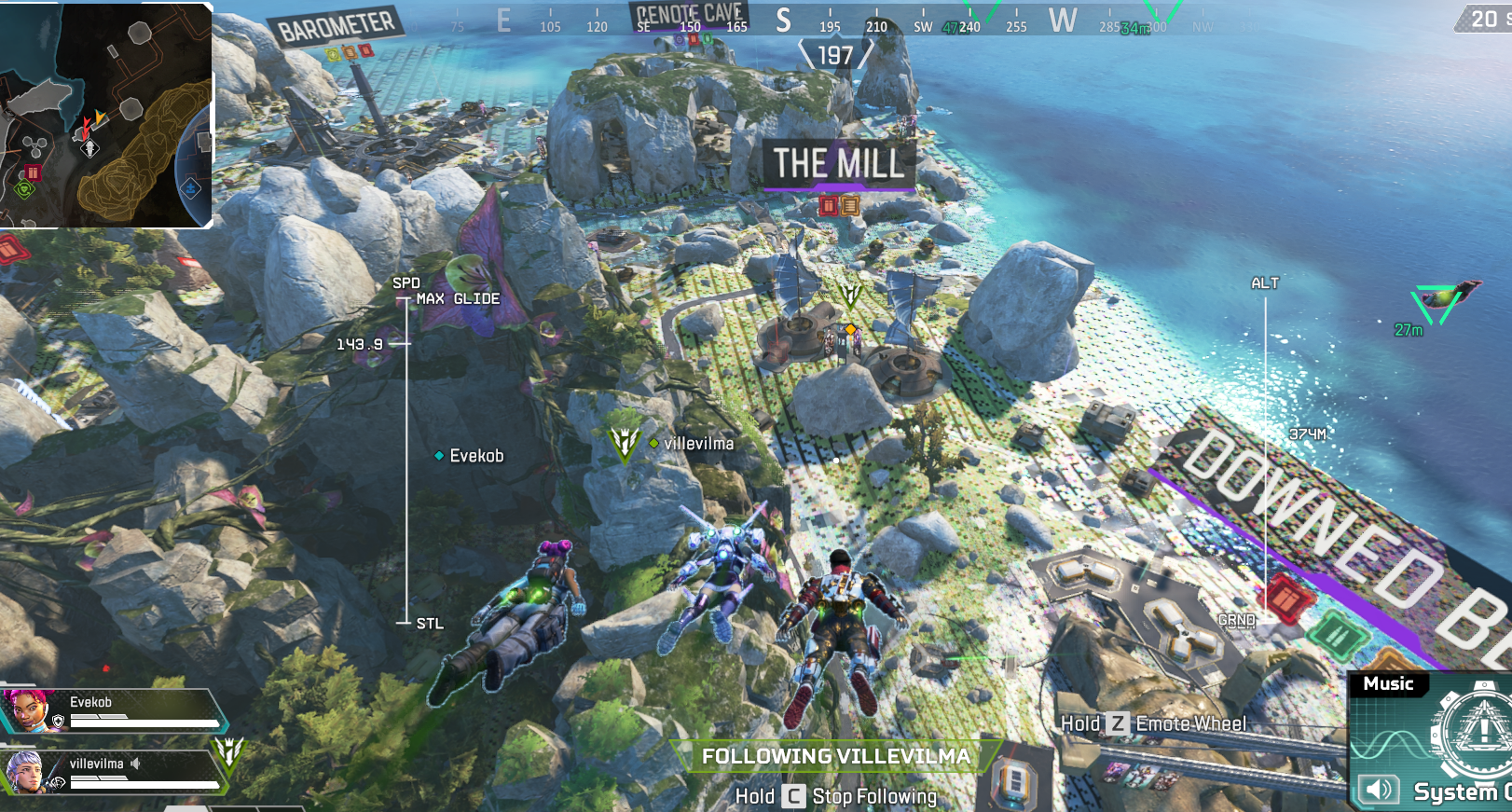
- Ground textures never load correctly and always appear extremely low-resolution, blocky, or corrupted. This happens throughout the entire match, not just when viewing from the dropship.(See screenshot(The screenshot was taken from another discussion.))
- A recent update introduced a snow problem on one of the maps (Since you have a size limitation, here is a link to the video of the second point: https://drive.google.com/file/d/1maCzoxXX_1Sbp3xy9d4OMMvU3biOjl3_/view?usp=sharing)
- I've been struggling with the first point for a year now, but I've almost gotten used to it, but another 2nd point has appeared.
System Specs:
GPU: Intel Arc B580 (12 GB VRAM)
CPU: Ryzen 5 8400f
RAM: 32 GB DDR5
OS: Windows 11 (64-bit, fully updated)
Drivers: Intel Arc Graphics – 32.0.101.8425
BIOS: Resizable BAR enabled
- Report for intel graphics driver in attach
Settings Tested:
Texture Streaming Budget: Tested all
Texture Filtering: 16x Anisotropic
Adaptive Resolution: OFF
Anti-Aliasing: TSAA
Model Detail: High
Issue Details:
Ground textures (grass, dirt, farmland, etc.) appear pixelated, blotchy, and low-detail at all times, even when standing right on them.
Textures do not seem to properly load into high resolution, despite sufficient VRAM and system RAM.
Other games on the same hardware display textures normally, so this seems isolated to Apex Legends.
- On the other map, I understand that the reflection on the snow is very bad, or there is a problem with the lighting (I don’t really understand)
Steps Tried:
Updated GPU drivers (latest Intel Arc drivers).
Updated Windows.
Enabled ReBAR in BIOS.
Verified game files.
Adjusted all relevant graphics settings (textures, filtering, adaptive resolution, etc.).
- I reinstalled Windows on both 10 and 11.
Result: Issue persists across all settings and tests.
If there's anything else that needs to be added, let me know and I'll send it as soon as I can.
Link Copied

- Mark as New
- Bookmark
- Subscribe
- Mute
- Subscribe to RSS Feed
- Permalink
- Report Inappropriate Content
Hello,
I am also experiencing the same graphical issues with Apex legends with my Intel Arc B580.
I have the exact same issues as Orionx. I too can live with the poor ground textures on Storm point being very pixellated and not loading correctly. However with the latest issue regarding the snow glitching out - as seen in the shared video above https://drive.google.com/file/d/1maCzoxXX_1Sbp3xy9d4OMMvU3biOjl3_/view?usp=sharing
It renders the game impossible to play!
It is really frustrating.
Please can you update the drivers accordingly, liase with EA if its an issue on their side.
We paid for a graphics card that simply isn't doing its job.
Looking forward to some updates regarding this asap.
Kind regards,
Michael
- Mark as New
- Bookmark
- Subscribe
- Mute
- Subscribe to RSS Feed
- Permalink
- Report Inappropriate Content
Thank you for sharing this!
I thought I was alone with these issues and had been gritting my teeth through Storm Point Maps.
This new snow issue is unacceptable!
I hope we get some answers soon!
Thanks for a really detailed summary of the issues we have all been experiencing!
Best regards,
Michael
- Mark as New
- Bookmark
- Subscribe
- Mute
- Subscribe to RSS Feed
- Permalink
- Report Inappropriate Content

- Mark as New
- Bookmark
- Subscribe
- Mute
- Subscribe to RSS Feed
- Permalink
- Report Inappropriate Content

- Mark as New
- Bookmark
- Subscribe
- Mute
- Subscribe to RSS Feed
- Permalink
- Report Inappropriate Content

- Mark as New
- Bookmark
- Subscribe
- Mute
- Subscribe to RSS Feed
- Permalink
- Report Inappropriate Content
- Mark as New
- Bookmark
- Subscribe
- Mute
- Subscribe to RSS Feed
- Permalink
- Report Inappropriate Content

- Mark as New
- Bookmark
- Subscribe
- Mute
- Subscribe to RSS Feed
- Permalink
- Report Inappropriate Content
- Mark as New
- Bookmark
- Subscribe
- Mute
- Subscribe to RSS Feed
- Permalink
- Report Inappropriate Content
Details on this issue: when I get closer, these squares disappear.

- Mark as New
- Bookmark
- Subscribe
- Mute
- Subscribe to RSS Feed
- Permalink
- Report Inappropriate Content
I just wanted to reply to your post and confirm that I am experiencing the exact same issues on my Intel Arc B580.
The ground textures are extremely low-resolution and pixelated, especially on Storm Point, and they do not properly load even when standing right next to them. The recent snow glitch on World’s Edge is even worse and makes certain areas almost unplayable.
I have tried everything as well:
Clean driver installation (including DDU)
Latest drivers installed
Windows fully updated
ReBAR enabled
Verified game files
Adjusted all in-game graphics settings
Nothing has resolved the issue.
I also tested by switching back to my previous GPU (Radeon RX 480), and the problem disappears completely, so it definitely seems specific to the Arc B580.
It’s reassuring (in a way) to see that others are experiencing the same issue, as it suggests this is not an isolated hardware fault but possibly a driver or compatibility problem that needs to be addressed.
Hopefully Intel can investigate this properly and provide a fix soon.
- Mark as New
- Bookmark
- Subscribe
- Mute
- Subscribe to RSS Feed
- Permalink
- Report Inappropriate Content
Hello,
I'm experiencing the exact same issue. I had the texture issues on Stormpoint but wasn't affecting my gameplay. Now this issue on Worlds Edge makes it completely unplayable. I'm avoiding running ranked on the days of Worlds Edge. It's visually awful and I've had so many people comment on it on stream too. This started with the new season and we still don't have a fix. Very disappointing.
Thanks,
Chloe
- Mark as New
- Bookmark
- Subscribe
- Mute
- Subscribe to RSS Feed
- Permalink
- Report Inappropriate Content
Update : Driver 32.0.101.8531
Intel: ARC B580
CPU: R5 5600
RAM: 16 GB
GAME: Apex legends Maps world edge.
I've updated the drivers, but the problem is still there.

- Mark as New
- Bookmark
- Subscribe
- Mute
- Subscribe to RSS Feed
- Permalink
- Report Inappropriate Content
I just wanted to let you know that I’ve temporarily downgraded my driver again for World’s Edge after finding this comment:
https://github.com/IGCIT/Intel-GPU-Community-Issue-Tracker-IGCIT/issues/1205#issuecomment-4017529859
Down to version .8331.
I didn’t do a full uninstall with DDU. I only cleared the shader cache once and then ran the Intel installation twice (twice because the first attempt always fails with some error. After the reboot, the second attempt always works for me).
I think the other artifacts will probably remain, but at least there’s no more disco effect on World’s Edge.
- Mark as New
- Bookmark
- Subscribe
- Mute
- Subscribe to RSS Feed
- Permalink
- Report Inappropriate Content
- Mark as New
- Bookmark
- Subscribe
- Mute
- Subscribe to RSS Feed
- Permalink
- Report Inappropriate Content
yes, you are right!
did you also try this forum?
https://community.intel.com/t5/Intel-Arc-Discrete-Graphics/bd-p/arc-graphics
There is also a thread:
https://community.intel.com/t5/Intel-Arc-Discrete-Graphics/Graphical-issues-in-the-game-APEX-Legends-intel-arc-b580/m-p/1740812#M34228
- Mark as New
- Bookmark
- Subscribe
- Mute
- Subscribe to RSS Feed
- Permalink
- Report Inappropriate Content
No, I haven't tried that. I'll write about my problem a little later in the thread you linked. I'll probably also duplicate our entire thread there (the main issues).

- Mark as New
- Bookmark
- Subscribe
- Mute
- Subscribe to RSS Feed
- Permalink
- Report Inappropriate Content
- Mark as New
- Bookmark
- Subscribe
- Mute
- Subscribe to RSS Feed
- Permalink
- Report Inappropriate Content
No, they haven't fixed it yet. I hope they at least looked at this thread.

- Mark as New
- Bookmark
- Subscribe
- Mute
- Subscribe to RSS Feed
- Permalink
- Report Inappropriate Content
Specs:
R5 7500F
ASROCK B580 INTEL ARC
KLEVV RAM 32 GB 6000MHZ



- Mark as New
- Bookmark
- Subscribe
- Mute
- Subscribe to RSS Feed
- Permalink
- Report Inappropriate Content
Dear Arc B580 users,
I would like to thank everyone in the community for your support and shared feedback. I am also an Arc B580 user, and I, too, have been deeply plagued by this exact issue for a long time.
I want to share some good news: I have already escalated this issue directly to the Intel Engineering team via a formal support ticket (Case ID: 06819152).
The engineering team has officially acknowledged this as a known driver-level rendering problem affecting the Arc B580 community. They are currently investigating it as a priority for an upcoming driver fix.
To provide transparency on their progress, the team has finally published an official Knowledge Base (KB) article regarding these specific texture and scenery issues (updated on March 23th)
https://www.intel.com/content/www/us/en/support/articles/000101933/graphics.html
Therefore, Intel engineers already have all the data and logs they need, and the issue is officially documented.
Please refer to the KB article, hang tight, and let's wait for the upcoming driver update. A real fix is actively in the works!
Best regards,
Zeongit Jip

- Subscribe to RSS Feed
- Mark Topic as New
- Mark Topic as Read
- Float this Topic for Current User
- Bookmark
- Subscribe
- Printer Friendly Page