
- Отметить как новое
- Закладка
- Подписаться
- Отключить
- Подписка на RSS-канал
- Выделить
- Печать
- Сообщить о недопустимом содержимом
After a recent drivers upgrade offered by Intel Driver & Support Assistant, two version before the latest one is working in my memory.
I have two monitors, eDP-1 is the built-in one of my laptop. HDMI-1 is Dell E1911 (quite old).
eDP-1 is in 1920x1080, HDMI-1 is in 1440x900, whatever I set in Windows Settings, the one on HDMI-1 will always looks like 1920x1080, it seems like driver reported false value to monitor... In previous 2 or 3 version, it works as intended. Please fix bug.
My another monitor Dell U2417H works fine...

- Отметить как новое
- Закладка
- Подписаться
- Отключить
- Подписка на RSS-канал
- Выделить
- Печать
- Сообщить о недопустимом содержимом
kmahyyg, Thank you for posting in the Intel® Communities Support.
In order for us to provide the most accurate assistance on this scenario, we just wanted to confirm a few details about your system:
What is the model of the laptop?
Is this a new computer?
Did you make any recent hardware/software changes besides installing the driver recommended by the Intel® Driver Support Assistant?
Which Windows* version are you using?
Please provide the Intel® Graphics report while the external monitor is attached to the laptop:
https://www.intel.com/content/www/us/en/support/articles/000005848/graphics.html
And also please provide the SSU report so we can verify further details about the components in your platform, please check all the options in the report including the one that says "3rd party software logs":
Any questions, please let me know.
Regards,
Albert R.
Intel Customer Support Technician
Ссылка скопирована
- Отметить как новое
- Закладка
- Подписаться
- Отключить
- Подписка на RSS-канал
- Выделить
- Печать
- Сообщить о недопустимом содержимом
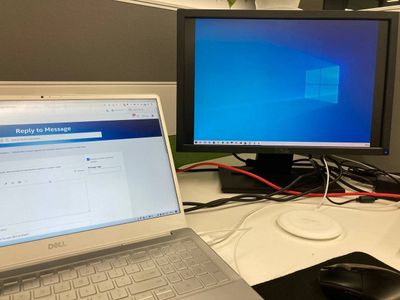
It looks like this ^
However, the monitor on the right should fulfilled.
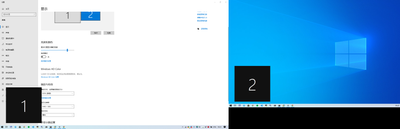
My settings. The 1440x900 is the recommended resolution by vendor.
- Отметить как новое
- Закладка
- Подписаться
- Отключить
- Подписка на RSS-канал
- Выделить
- Печать
- Сообщить о недопустимом содержимом
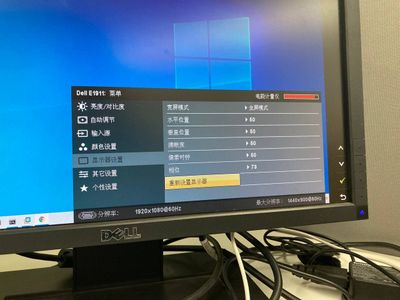
in monitor settings, it said laptop reported 1920x1080@60hz to it... but the max it can offer is 1440x900@60hz .
l
- Отметить как новое
- Закладка
- Подписаться
- Отключить
- Подписка на RSS-канал
- Выделить
- Печать
- Сообщить о недопустимом содержимом
kmahyyg, Thank you for posting in the Intel® Communities Support.
In order for us to provide the most accurate assistance on this scenario, we just wanted to confirm a few details about your system:
What is the model of the laptop?
Is this a new computer?
Did you make any recent hardware/software changes besides installing the driver recommended by the Intel® Driver Support Assistant?
Which Windows* version are you using?
Please provide the Intel® Graphics report while the external monitor is attached to the laptop:
https://www.intel.com/content/www/us/en/support/articles/000005848/graphics.html
And also please provide the SSU report so we can verify further details about the components in your platform, please check all the options in the report including the one that says "3rd party software logs":
Any questions, please let me know.
Regards,
Albert R.
Intel Customer Support Technician
- Отметить как новое
- Закладка
- Подписаться
- Отключить
- Подписка на RSS-канал
- Выделить
- Печать
- Сообщить о недопустимом содержимом
The problem disappeared when I came into office this morning. It seems caused by a loose plug-in HDMI cable. Thanks for your support.
- Отметить как новое
- Закладка
- Подписаться
- Отключить
- Подписка на RSS-канал
- Выделить
- Печать
- Сообщить о недопустимом содержимом
kmahyyg, You are very welcome, thank you very much for letting us know those details.
Perfect, excellent, it is great to hear that the problem got fixed, that it was just related to a loose plug-in HDMI cable, and that now the computer is showing the correct resolution.
Any other inquires, do not hesitate to contact us again.
Regards,
Albert R.
Intel Customer Support Technician

- Подписка на RSS-канал
- Отметить тему как новую
- Отметить тему как прочитанную
- Выполнить отслеживание данной Тема для текущего пользователя
- Закладка
- Подписаться
- Страница в формате печати