
- Mark as New
- Bookmark
- Subscribe
- Mute
- Subscribe to RSS Feed
- Permalink
- Report Inappropriate Content
I want to be able to run it when I want to. I'm not a gamer, the nearest I get to intense graphics is YouTube, consequently I don't want this slowing Windows startup or running all the time.

- Mark as New
- Bookmark
- Subscribe
- Mute
- Subscribe to RSS Feed
- Permalink
- Report Inappropriate Content
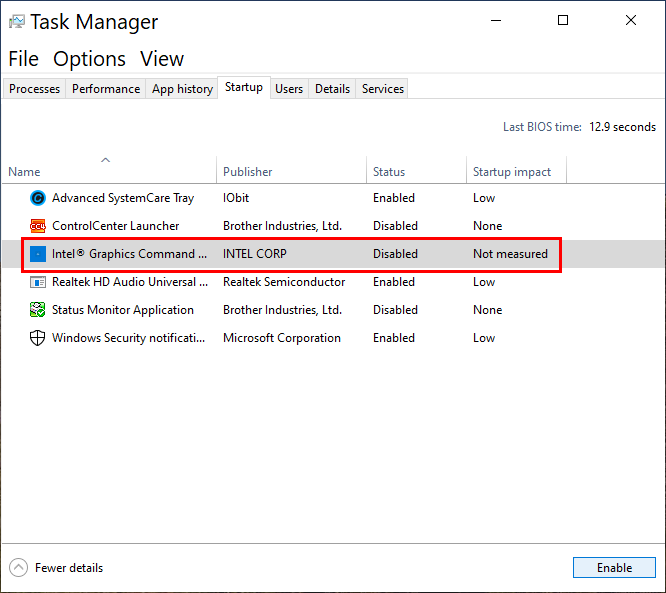
Open Task manager, Startup Tab and disable Intel Graphics Command Center.
Leon
Link Copied
- Mark as New
- Bookmark
- Subscribe
- Mute
- Subscribe to RSS Feed
- Permalink
- Report Inappropriate Content
Open Task manager, Startup Tab and disable Intel Graphics Command Center.
Leon

- Mark as New
- Bookmark
- Subscribe
- Mute
- Subscribe to RSS Feed
- Permalink
- Report Inappropriate Content
I use Nvidia graphic card. I have deleted the driver in Device Manager and disable it in BIOS. Also, I don't see it in the startup tab, but it is still running.
At startup, it takes high CPU and rams then goes to idle state as the picture shows.
- Mark as New
- Bookmark
- Subscribe
- Mute
- Subscribe to RSS Feed
- Permalink
- Report Inappropriate Content
Hi @LTrần2
When you have question, you should always open new thread instead of writing in old thread. So, open thread of yours and I'll and other members will help you.
Leon

- Mark as New
- Bookmark
- Subscribe
- Mute
- Subscribe to RSS Feed
- Permalink
- Report Inappropriate Content
People like to add on to someone else's question. It's a psychological thing ... if someone else had the same problem, then you don't feel so dumb to ask the same question!
- Mark as New
- Bookmark
- Subscribe
- Mute
- Subscribe to RSS Feed
- Permalink
- Report Inappropriate Content
This thread is closed and not monitored any more. In addition although the problem may looks similar the solution could be other. Any way, I understand that @LTrần2 have read the solutions proposed here and it didn't help. Therefore is necessary to open a new thread, describe the system and the problem. For example I don't understand what does it mean "I have deleted the driver in Device Manager and disable it in BIOS"? In this thread we are giving advice how to disable the Intel Graphics Command Center (IGCC). IGCC is not a driver, it is an application, can't be deleted from DM or disabled in BIOS.
Leon
- Mark as New
- Bookmark
- Subscribe
- Mute
- Subscribe to RSS Feed
- Permalink
- Report Inappropriate Content
It's ok, although this's an old thread it is the first that people can get after google searching. But your opinion is also good, I will consider it. Anyways, thank you for your help, I have remembered the best old solution-DDU graphic remover. It works.
- Mark as New
- Bookmark
- Subscribe
- Mute
- Subscribe to RSS Feed
- Permalink
- Report Inappropriate Content
Additional way to stop Intel Graphics Command Center to run at Windows login
- Right mouse Click on Intel Graphics Command Center in Windows Start menu.
- Click on More > App settings
- Switch Intel Graphics Command Center startup task to OFF.
Leon
(Same thing can be done in Windows Settings> Apps > Startup)
- Mark as New
- Bookmark
- Subscribe
- Mute
- Subscribe to RSS Feed
- Permalink
- Report Inappropriate Content
Thank you very much. I had tried using Autoruns to find the startup entry but, for some reason, it didn't appear in the list (or I didn't recognize it).
John


- Mark as New
- Bookmark
- Subscribe
- Mute
- Subscribe to RSS Feed
- Permalink
- Report Inappropriate Content
How can you use intel graphics? Is there anything i could boost my cpu for playing Call Of Duty: Cold War. My CPU is i5 8400 with basic cooler that comes with it and my friends make fun of my RTX 3060 Ti, which i bought from non-official vendor. Please help me with solving this issue if someone knows how. Optimization for that game is a bit off. Same goes for Battlefield 2042.

- Subscribe to RSS Feed
- Mark Topic as New
- Mark Topic as Read
- Float this Topic for Current User
- Bookmark
- Subscribe
- Printer Friendly Page