
- Als neu kennzeichnen
- Lesezeichen
- Abonnieren
- Stummschalten
- RSS-Feed abonnieren
- Kennzeichnen
- Anstößigen Inhalt melden
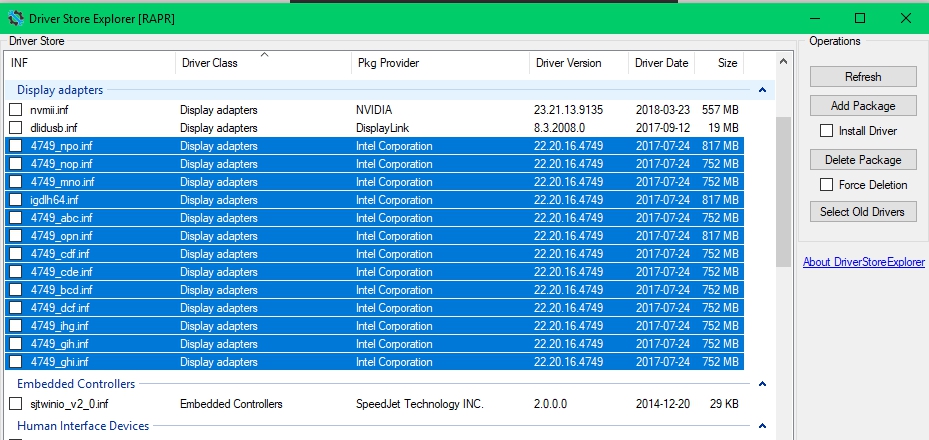
Intel is killing my SSD with all this space usage, My HDD is full because of this.
Now I'm wondering of some of these can be deleted as there's no way that all these drivers are needed. They all seem to be the same version however, so none can be flagged as obsolete. Anyone has any idea if some of them can be cleared?
- Tags:
- Drivers
Link kopiert

- Als neu kennzeichnen
- Lesezeichen
- Abonnieren
- Stummschalten
- RSS-Feed abonnieren
- Kennzeichnen
- Anstößigen Inhalt melden
Hello NaturalBornCamper
Thank you for joining the community.
In order to help you better, I would like to gather more information about the configuration you have on the computer. Please attach to this thread the TXT file the Intel® System Support Utility will generate: https://downloadcenter.intel.com/download/25293/Intel-System-Support-Utility https://downloadcenter.intel.com/download/25293/Intel-System-Support-Utility
Steps to save the report:
- Run the utility.
- Click on "Scan" to get the scanned system.
- Once the scan is complete click on "next".
- Use the "save" option, save the report to your desktop.
- To attach a file, you must click the "Attach" option on the bottom right-hand corner of the response box.
Regards,
Leonardo C.
- Als neu kennzeichnen
- Lesezeichen
- Abonnieren
- Stummschalten
- RSS-Feed abonnieren
- Kennzeichnen
- Anstößigen Inhalt melden
Hello there,
Thank you very much for your answer, here's the requested data:
- Als neu kennzeichnen
- Lesezeichen
- Abonnieren
- Stummschalten
- RSS-Feed abonnieren
- Kennzeichnen
- Anstößigen Inhalt melden
Hello NaturalBornCamper
Thank you for your response.
Go to the device manager (right click on the Windows logo> device manager) and use the option "update driver"> "browse my computer"> "let me pick from a list" let us know what options of the driver are you able to see?
We see that you are using the version .4749 can you provide us with the download link to that version?
Regards,
Leonardo C.
- Als neu kennzeichnen
- Lesezeichen
- Abonnieren
- Stummschalten
- RSS-Feed abonnieren
- Kennzeichnen
- Anstößigen Inhalt melden
Hello,
Thanks again for your answer. Here's the page where the download link is:
https://www.msi.com/Laptop/support/PE70-6QD# down-driver&Win10%2064 https://www.msi.com/Laptop/support/PE70-6QD# down-driver&Win10%2064
And here's the download link:
http://download.msi.com/nb_drivers/vga/VGA_win64_20.19.15.4300_0x00e3ad01.zip http://download.msi.com/nb_drivers/vga/VGA_win64_20.19.15.4300_0x00e3ad01.zip
Finally, here's the list of drivers I can update with:

- Als neu kennzeichnen
- Lesezeichen
- Abonnieren
- Stummschalten
- RSS-Feed abonnieren
- Kennzeichnen
- Anstößigen Inhalt melden
Hello NaturalBornCamper
Thank you for your response.
You can try to uninstall the driver for your system and clean install the drivers provided by the manufacturer.
Please follow the steps below to uninstall the graphics driver:
- On the keyboard, press WinLogo key + R, then type in devmgmt.msc
- Expand the Display Adapters section.
- Find the Intel® Graphics Driver. The driver can also be called the Intel® Graphics Media Accelerator Driver (Intel® GMA Driver).
- Right-click the Intel Graphics Driver and select Uninstall.
- Select the checkbox "Delete" the driver software for this device.
- Reboot the computer after the uninstall process has finished.
After the reboot run please run the driver store explorer to review the outcome (if possible share that outcome with us).
Once the process is complete try installing the driver provided by the OEM. To avoid any automatic driver update please complete the steps without the internet connection.
Regards,
Leonardo C.
- Als neu kennzeichnen
- Lesezeichen
- Abonnieren
- Stummschalten
- RSS-Feed abonnieren
- Kennzeichnen
- Anstößigen Inhalt melden
Hey there, thanks again for your answer.
I did as you instructed and all the drivers were still in the driver store when I rebooted with my wifi card disabled.
So I just got tired of this and went nuclear. I deleted all the drivers in the store, rebooted and reinstalled the driver from MSI's website. All is clean and working now, I was afraid something might break but it's all good.
Thanks for sticking with me.
Marco

- RSS-Feed abonnieren
- Thema als neu kennzeichnen
- Thema als gelesen kennzeichnen
- Diesen Thema für aktuellen Benutzer floaten
- Lesezeichen
- Abonnieren
- Drucker-Anzeigeseite