
- Mark as New
- Bookmark
- Subscribe
- Mute
- Subscribe to RSS Feed
- Permalink
- Report Inappropriate Content
General - UI Usability, Misc. Issues, Ease of Use
Please provide any general feedback pertaining to our Intel® Graphics Command Center.
The other feedback pages are:
- One Click Game - Automatic Games Settings (AGS) feedback
- Gaming - Education, Settings, Game Detection
- Display / Media - Home Theater / Video Controls and Education
- For more details, check out our FAQ
- For the list of most recent updates, please see our Revision History Page
- For known issues, please check our Known Issues List
Link Copied

- Mark as New
- Bookmark
- Subscribe
- Mute
- Subscribe to RSS Feed
- Permalink
- Report Inappropriate Content
Hello, i just download IGCC yesterday and it seems to be not working for me, i am running on MSI GE63 using Intel UHD 630, already did many installs and uninstalls but still not working for me, when i click on IGCC it just open for a second and then close itself, while i want to use Intel Graphic Control Panel, it says to recheck my driver status, i already installed the latest DCH driver through Intel DSA and it says updated.
Thanks before.

- Mark as New
- Bookmark
- Subscribe
- Mute
- Subscribe to RSS Feed
- Permalink
- Report Inappropriate Content
Hello @EAlex3
Please provide us the DxDiag.txt file to have a better picture of your current system configuration.
Regards,
Ronald M.
- Mark as New
- Bookmark
- Subscribe
- Mute
- Subscribe to RSS Feed
- Permalink
- Report Inappropriate Content
Hello, thanks for replying
this is my dxdiag result
thankyou for your assistance
- Mark as New
- Bookmark
- Subscribe
- Mute
- Subscribe to RSS Feed
- Permalink
- Report Inappropriate Content
Thanks @EAlex3 !
The file you provided is a very blurry picture. Please save your log in a text format and replace your previous picture with the text file. Thanks again.

- Mark as New
- Bookmark
- Subscribe
- Mute
- Subscribe to RSS Feed
- Permalink
- Report Inappropriate Content
On the latest version 1.100.1181.0 I have 2 issues:
- Update driver is showed to Beta drivers, I have a higher number then the update is showed. Im on 26.20.100.6708 and the update is 25.20.100.6618
- when i go to the video tab, i get a notice that i need to enable "automatically process video to enhance it" but i have already enable it.
Dell Xps 13 9350
Windows 10 Build: 18875.1000 (Insider - skip ahead ring)

- Mark as New
- Bookmark
- Subscribe
- Mute
- Subscribe to RSS Feed
- Permalink
- Report Inappropriate Content
Hi @jkok0,
I reported these 2 issues to the Intel® GCC team. We really appreciate your feedback! Thanks!
- Mark as New
- Bookmark
- Subscribe
- Mute
- Subscribe to RSS Feed
- Permalink
- Report Inappropriate Content
Desperately need an option to control Color Saturation and Gamma.
Dell XPS 9570 owner.
- Mark as New
- Bookmark
- Subscribe
- Mute
- Subscribe to RSS Feed
- Permalink
- Report Inappropriate Content
Thanks for the feedback @GSlaz! We're working on getting these enhancement requests implemented by the Intel® Graphics Command Center team. Feel free to let us know if you have anymore feedback in the future!

- Mark as New
- Bookmark
- Subscribe
- Mute
- Subscribe to RSS Feed
- Permalink
- Report Inappropriate Content
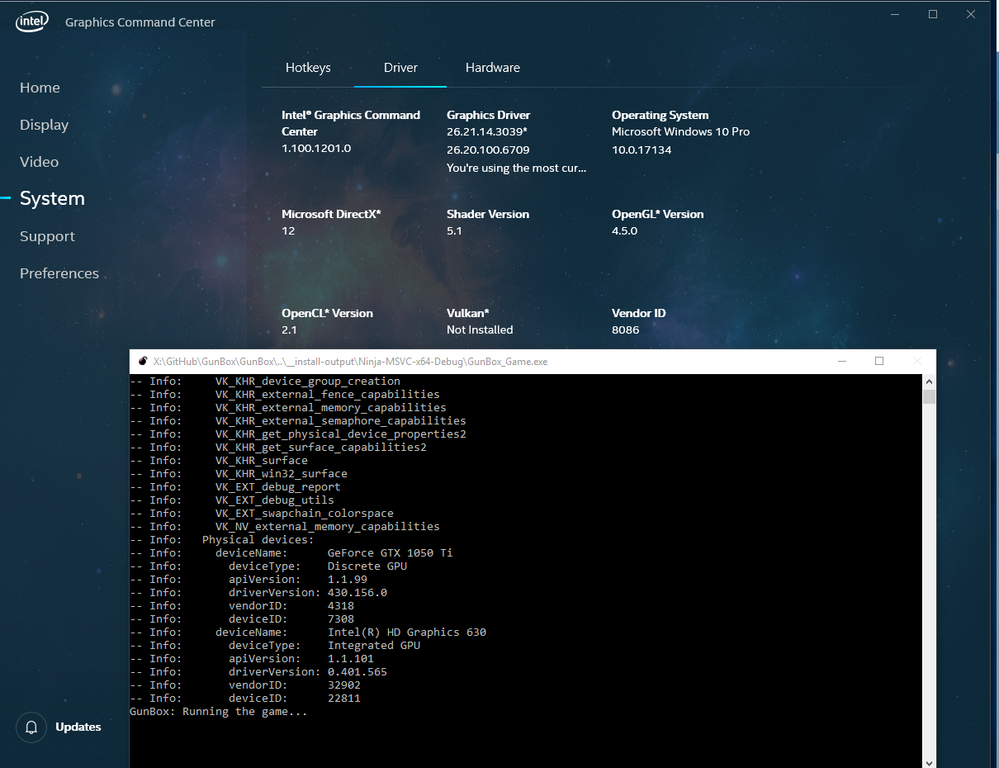
Vulkan is not properly supported:
- Mark as New
- Bookmark
- Subscribe
- Mute
- Subscribe to RSS Feed
- Permalink
- Report Inappropriate Content
Hi @Zingam ,
Thank you for reporting this to us. Can you please elaborate on what about Vulkan is not supported?For example, is Vulkan appearing as uninstalled when it is installed? We would highly appreciate any additional details.

- Mark as New
- Bookmark
- Subscribe
- Mute
- Subscribe to RSS Feed
- Permalink
- Report Inappropriate Content
On NUC8i7HVK together with Radeon RX Vega Setting utility GCC works OK.
Please also see this thread with complains: https://forums.intel.com/s/question/0D50P00004Kzjh0SAB/new-intel-dch-graphics-control-panel-app-lacking-important-settings
Leon
- Mark as New
- Bookmark
- Subscribe
- Mute
- Subscribe to RSS Feed
- Permalink
- Report Inappropriate Content
Hello @LWAKSMAN,
Thank you for helping out a fellow user! I updated the corresponding thread addressing their requests regarding Intel® GCC.

- Mark as New
- Bookmark
- Subscribe
- Mute
- Subscribe to RSS Feed
- Permalink
- Report Inappropriate Content
As far as I can see, the Intel Graphics Command Center does not (yet?) make it possible to define multiple displays in collage mode (combine the screen estate of several displays side-by-side into one large virtual screen).
So in order to define a setup of several displays in collage mode, I need to use the Intel HD Graphics Control Panel app.
However, when I launch the Graphics Control Center, it suggests that I uninstall the HD Graphics Control Panel app. Even when a collage mode setup is defined and in use. I fell for this uninstallation trap and was at a loss when I could not configure my collage setup anymore. It took a while until I realized that I needed to reinstall the HD Graphics Control Panel app until I can change the settings of my collage setup again.
Could Graphics Control Center not suggest to uninstall the HD Graphics Control Panel if some feature is in use that it does not support yet?
- Mark as New
- Bookmark
- Subscribe
- Mute
- Subscribe to RSS Feed
- Permalink
- Report Inappropriate Content
Hi @tsvk
At the moment, Intel® GCC does not have the capability for collage mode. However, I would recommend to keep an eye out for future updates. 🙂 Some features are not yet part of the Intel® Graphics Command Center so we recommend to uninstall the Intel® HD Graphics Control Panel if you do not need the missing features.
Nevertheless, we understand your concerns so I can route your suggestion to the appropriate team. Thank you for your input @tsvk !

- Mark as New
- Bookmark
- Subscribe
- Mute
- Subscribe to RSS Feed
- Permalink
- Report Inappropriate Content
Hello support,
I installed Intel Graphics Command Center 1.100.1725.0 on Windows 10 (18362.356).
After opening IGCC, shortcuts using Ctrl + Alt don't work in other apps, even though System HotKeys are "Off" in IGCC. For exemple, I try executing Ctrl + Alt shortcuts in SublimeText, and nothing happens. However, if I kill IGCCTray using Task Manager, my Ctrl + Alt shorcuts starts working again in SublimeText (until I re-open IGCC, that is).
Was it clear? Tell me if I need to provide additional info.
- Mark as New
- Bookmark
- Subscribe
- Mute
- Subscribe to RSS Feed
- Permalink
- Report Inappropriate Content
Hello @GDube1,
I reported your issue to the Intel GCC team and they will investigate this. Thank you for your feedback! We will contact you if further information is needed.

- Mark as New
- Bookmark
- Subscribe
- Mute
- Subscribe to RSS Feed
- Permalink
- Report Inappropriate Content
Honest feedback: 3 years ago, you asked advanced users on what needs to be improved in the Intel drivers. Many people asked to finally implement a function to set chroma subsampling (4:4:4 / 4:2:2 / 4:2:0) and color depth per channel (12/10/8 bpc) manually like e. g. nVidia and AMD has been offering it for years now. Nothing has happened. Many people worldwide can't use their UHD Graphics to display 4K60fps with HDR due to this limitation. Instead, time, money and man power is spent on redesigning the Control Center. Well, nice to have, but this does not really matter if you can't use your PC as intended. Are you so ignorant about customer desires or what is the reason why nothing has happened for 3 years regarding that topic?
- Mark as New
- Bookmark
- Subscribe
- Mute
- Subscribe to RSS Feed
- Permalink
- Report Inappropriate Content
For those reading this Intel GCC General Feedback thread, the response to @stna1981 was provided in this other thread: Advanced users - we need your feedback: Control Panel color configuration options.

- Mark as New
- Bookmark
- Subscribe
- Mute
- Subscribe to RSS Feed
- Permalink
- Report Inappropriate Content
hello
there is still a problem of remembering the setting after a reboot
this time it applies to ''contrast'' in ''video''
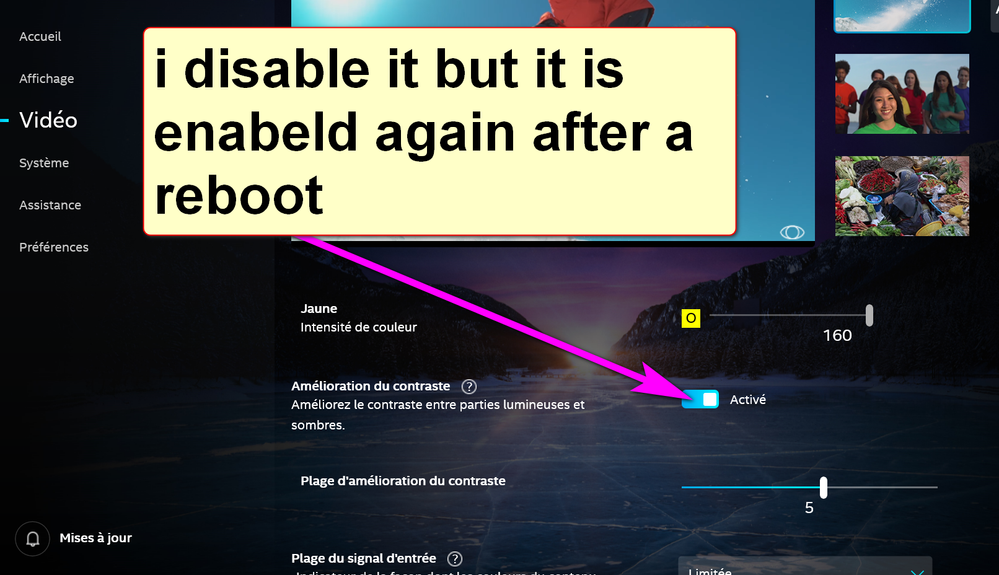
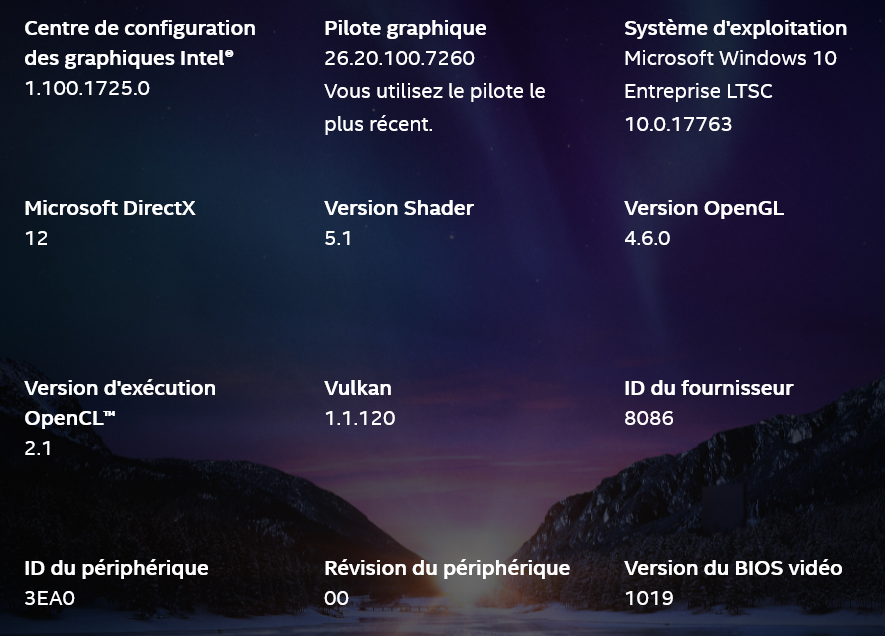
this is my config i5-8265u on thinkpad with 620 UHD as the igpu with w10 1809 up to date
- Mark as New
- Bookmark
- Subscribe
- Mute
- Subscribe to RSS Feed
- Permalink
- Report Inappropriate Content
Hi @KLope! The IGCC team is currently aware of this issue and is investigating this. I'll provide them the system details you have given us. We appreciate you taking the time to provide feedback!

- Subscribe to RSS Feed
- Mark Topic as New
- Mark Topic as Read
- Float this Topic for Current User
- Bookmark
- Subscribe
- Printer Friendly Page