
- Marcar como novo
- Marcador
- Subscrever
- Silenciar
- Subscrever fonte RSS
- Destacar
- Imprimir
- Denunciar conteúdo inapropriado
Note: I am running an Acer Aspire V 15 Touch V3-5272PG-56CY
Processor: Intel Core i5-4210U
RAM: 8GB DDR3
Operating System: Windows 10 64-Bit
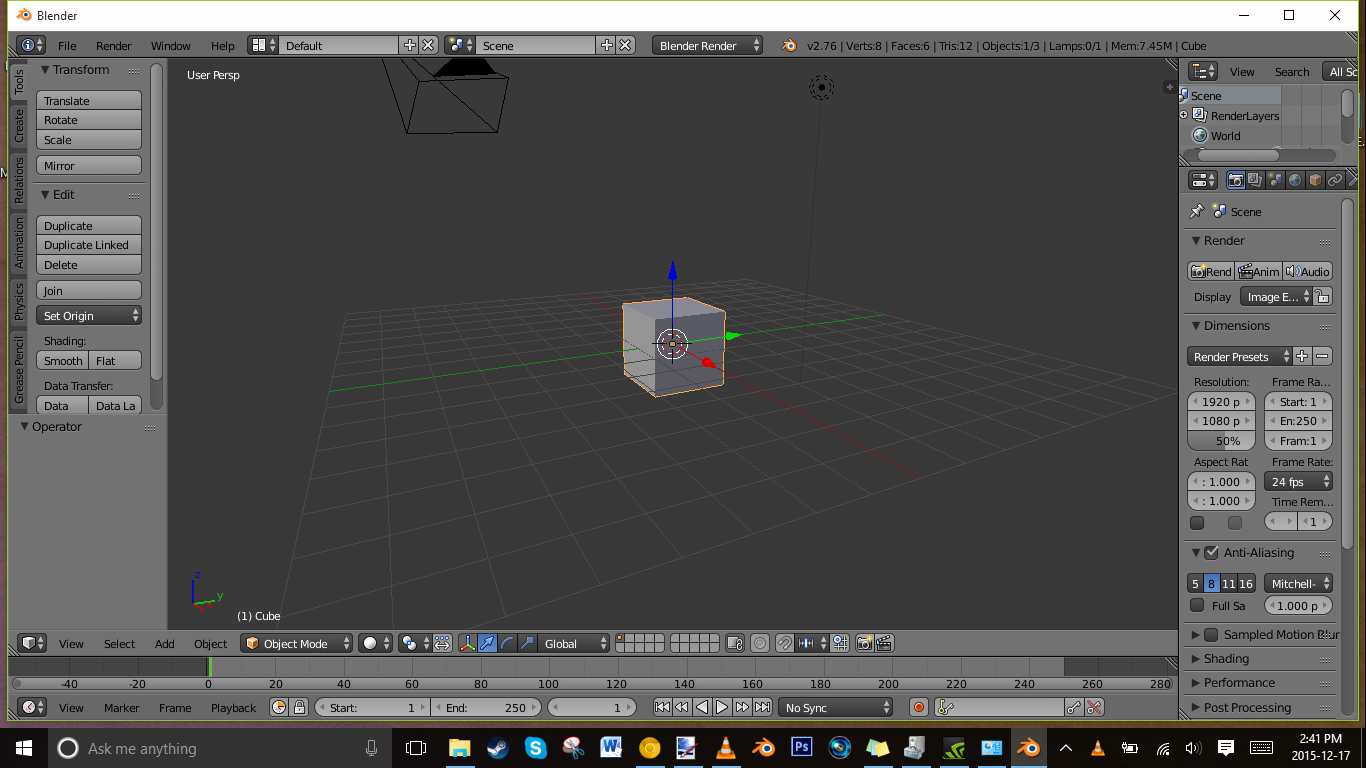
Last night, before I headed to bed, I logged into RIFT. I once tabbed out of it as it was closing, and it bluescreened my computer, but I've learned my lesson. Anyhow, I closed the game and headed off to bed. I turned on my computer in the morning, and it was surprisingly slow. That was not a problem, or so I thought. Right when I got to the login screen, I noticed a problem; there were artifacts appearing everywhere on my screen. I tried to log in anyway, but my computer crashed. I thought a reboot would help, but it didn't. It continued to display artifacts, and on occasion, bluescreen. I tried to pinpoint the issue, and after about an hour of poking around, I realized it was my Intel Integrated Graphics. I rely on this to run my computer, while my NVIDIA 840M handles my games.
When I disable the integrated graphics, the problem ceases, but Window's native graphics are slow and unstable. They are not comfortable to use at all, and I'm having trouble typing this right now. I have uninstalled my drivers on both chips, reinstalled them, etc. etc. I cannot access the Nvidia control panel without the intgrated graphics being enabled. My question is, how can I fix this problem? I have seemingly tried every conceivable solution. The I ran the Intel Diagnostic Tool, and nothing came up. Is there anything I'm missing?
Artifacts when Intel Integrated Graphics are enabled.
No artifacts when graphics are disabled
Link copiado
- Marcar como novo
- Marcador
- Subscrever
- Silenciar
- Subscrever fonte RSS
- Destacar
- Imprimir
- Denunciar conteúdo inapropriado
Nobody has any potential solutions? I am still trying to solve it, but can't seem to find anything.


- Marcar como novo
- Marcador
- Subscrever
- Silenciar
- Subscrever fonte RSS
- Destacar
- Imprimir
- Denunciar conteúdo inapropriado
Does this problem happen with driver version 4326? The below driver provides a beta version for your Intel® HD Graphics 4400.
https://downloadcenter.intel.com/download/25541/Intel-Beta-Graphics-Driver-for-Windows-7-8-1-10-15-40- Download Intel® Beta Graphics Driver for Windows® 7/8.1/10* [15.40]
Allan.
- Marcar como novo
- Marcador
- Subscrever
- Silenciar
- Subscrever fonte RSS
- Destacar
- Imprimir
- Denunciar conteúdo inapropriado
- Marcar como novo
- Marcador
- Subscrever
- Silenciar
- Subscrever fonte RSS
- Destacar
- Imprimir
- Denunciar conteúdo inapropriado
I have some new information. My computer uses this thing called Nvidia Optimus, and the GPU is filtered through the Intel GPU, so that's why my control panel isn't working. I still can't figure out why there are artifacts though. I hate to bump, but is there anything out there?
- Marcar como novo
- Marcador
- Subscrever
- Silenciar
- Subscrever fonte RSS
- Destacar
- Imprimir
- Denunciar conteúdo inapropriado
You could try installing the driver manually with the zip version:
https://downloadcenter.intel.com/download/25541/Intel-Beta-Graphics-Driver-for-Windows-7-8-1-10-15-40- Download Intel® Beta Graphics Driver for Windows® 7/8.1/10* [15.40]
Try instructions linked below for Windows® 8.1, they are the same:
http://www.intel.com/content/www/us/en/support/graphics-drivers/000005629.html?wapkw=how+to+manually+install+a+driver How to Manually Install a Driver in Microsoft Windows 8* or Windows...
Allan.
- Marcar como novo
- Marcador
- Subscrever
- Silenciar
- Subscrever fonte RSS
- Destacar
- Imprimir
- Denunciar conteúdo inapropriado
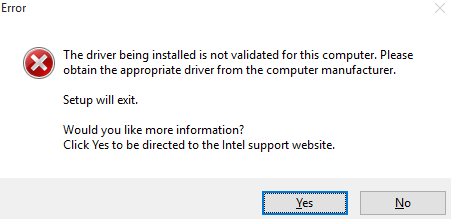
It's still not installing.
- Marcar como novo
- Marcador
- Subscrever
- Silenciar
- Subscrever fonte RSS
- Destacar
- Imprimir
- Denunciar conteúdo inapropriado
Then, I recommend contacting your computer manufacturer for customized graphics driver. It seems that your computer manufacturer does not allow the installation of generic drivers.
http://us.acer.com/ac/en/US/content/series/aspire-v http://us.acer.com/ac/en/US/content/series/aspire-v
Allan.
- Marcar como novo
- Marcador
- Subscrever
- Silenciar
- Subscrever fonte RSS
- Destacar
- Imprimir
- Denunciar conteúdo inapropriado
I have tried downloading those in the past. I have found a break in the case though. There are no artifacts when I run Pool Nation FX, which is an Unreal Engine based game. I don't know why, but maybe there is some sort of explanation?

- Subscrever fonte RSS
- Marcar tópico como novo
- Marcar tópico como lido
- Flutuar este Tópico para o utilizador atual
- Marcador
- Subscrever
- Página amigável para impressora