
Hello, My issue is with PC Freezing and the only option to recover from the freeze is a hard boot. CTRL/ALT/DELETE, for task manager- no response. From what I can see, there was a Windows Update installed on 9/4/2020.
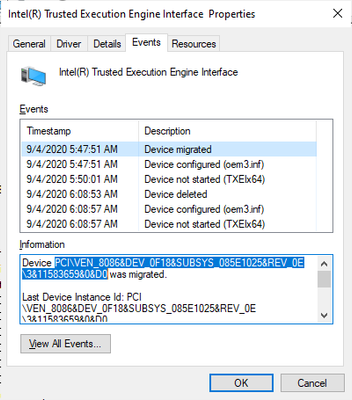
Acer Aspire AXC-603G-UW14
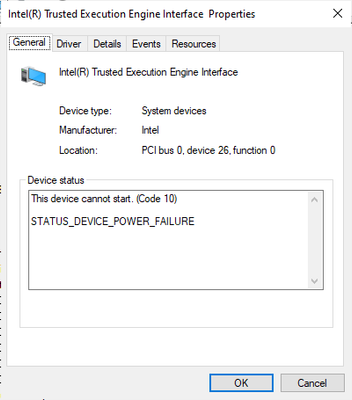
This device cannot start. (Code 10)
STATUS_DEVICE_POWER_FAILURE
|
DeviceInstanceId |
PCI\VEN_8086&DEV_0F18&SUBSYS_085E1025&REV_0E\3&11583659&0&D0 |
|
DriverName |
oem3.inf |
|
ClassGuid |
{4d36e97d-e325-11ce-bfc1-08002be10318} |
|
ServiceName |
TXEIx64 |
|
LowerFilters |
|
UpperFilters |
|
Problem |
0xa |
|
Status |
0xc000009e |
Device name Diana
Processor Intel(R) Celeron(R) CPU J1900 @ 1.99GHz 1.99 GHz
Installed RAM 4.00 GB (3.88 GB usable)
Device ID
Product ID
System type 64-bit operating system, x64-based processor
Pen and touch No pen or touch input is available for this display
Edition Windows 10 Home
Version 20H2
Installed on 9/4/2020
OS build 19042.685
Experience Windows Feature Experience Pack 120.2212.551.0
I’m trying to avoid a clean install of Windows. I saw another post that was having the same issue, just a different make/model. The solution was:
1 - Download the "Intel(R) Trusted Execution Engine Interface" driver located under "Others" in the link below:
https://www.asus.com/us/Laptops/E403SA/HelpDesk_Download/ https://www.asus.com/us/Laptops/E403SA/HelpDesk_Download/
*Please be aware that the content on that site is not controlled by Intel*. This information is offered for your convenience and should not be viewed as an endorsement by Intel* for the merchants or services offered there.*
2 - Disconnect the system from the internet.
3 - Go to device manager and uninstall the driver that is currently installed.
4 - Reboot the system and then reinstall the driver downloaded previously.
5 - Reboot the system again and then check if the error persists.
The user reported back that this did the trick. Can you please confirm that I should take the same steps, and if so, can you please provide a link for it? The post for the resolution was two years prior, and my issue seemed to show up during a Windows Upgrade 9/4/2020.
I appreciate any input that can be provided.

Frankly, AFAIAC, you should reinstall Windows 10 at least once a year anyway.
...S
連結已複製
My main concern is that my computer is randomly freezing up and stays frozen until a hard boot is done. I did not know it was standard to reinstall windows 10 annually, but appreciate that information. When I noticed the issue with the freeze, my first thought was to check the device manager. Thats when I saw an issue with the Intel Trusted Execution Engine Interface. I have a Logitech Webcam that I use, and disconnected it two nights ago. No freeze since then. I will follow your recommendation and take it from there.
Just my opinion,
...S
Thanks for breaking it down for me. NOW it makes more sense to me and will be taking your advice. The beginner feels much better, Thanks!

