
- Mark as New
- Bookmark
- Subscribe
- Mute
- Subscribe to RSS Feed
- Permalink
- Report Inappropriate Content
I am using QT5.15.1 and OpenCascade7.5.0 in my project. When I build the source code and trying to run it, 3D view is not showing, instead it is reporting below error.

My laptop graphics driver is
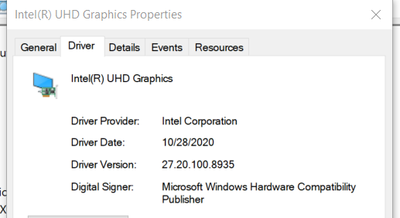
But same project is working in another laptop with Intel(R) HD Graphics 620 (27.20.100.8681).
Can anyone he me to sort it out?
This is a big issue for me, with this I cannot move forward with my project.
Thanks in advance.
Link Copied

- Mark as New
- Bookmark
- Subscribe
- Mute
- Subscribe to RSS Feed
- Permalink
- Report Inappropriate Content
Hello VinojanT
Thank you for posting on the Intel️® communities. Please share more information with us:
- Steps to replicate this problem
- Intel® System Support Utility (Intel® SSU) results
- Download the Intel SSU https://downloadcenter.intel.com/download/25293/Intel-System-Support-Utility-for-Windows-
- Open the application and select "Everything" click on "Scan" to see the system and device information. By default, Intel® SSU will take you to the "Summary View".
- Click on the menu where it says "Summary" to change to "Detailed View".
- To save your scan, click on "Next", then "Save".
Regards,
David G
Intel Customer Support Technician
- Mark as New
- Bookmark
- Subscribe
- Mute
- Subscribe to RSS Feed
- Permalink
- Report Inappropriate Content
Were you able to check the previous post?
Let us know if you still need assistance.
Best regards,
David G.
Intel Customer Support Technician
- Mark as New
- Bookmark
- Subscribe
- Mute
- Subscribe to RSS Feed
- Permalink
- Report Inappropriate Content
Hi David G,
Thank you for your quick response.
Still I cannot solve the issue. I created post in Opencascade (With OCCT 7.5.0 build, 3D viewer is not showing up in applications - Forum Open Cascade Technology) forum and waiting for their reply.
Best regards.
Vinojan T.
- Mark as New
- Bookmark
- Subscribe
- Mute
- Subscribe to RSS Feed
- Permalink
- Report Inappropriate Content
Thank you for the update. If you need assistance from us, please provide the information above or if you want to continue with their support let us know to close this thread.
Regards,
David G.
Intel Customer Support Technician
- Mark as New
- Bookmark
- Subscribe
- Mute
- Subscribe to RSS Feed
- Permalink
- Report Inappropriate Content
Were you able to check the previous post?
Let us know if you still need assistance.
Best regards,
David G.
Intel Customer Support Technician
- Mark as New
- Bookmark
- Subscribe
- Mute
- Subscribe to RSS Feed
- Permalink
- Report Inappropriate Content
Yes, Now my issue is fixed. But I need to use NVIDIA as preferred GPU.
Best regards,
Thank you.
- Mark as New
- Bookmark
- Subscribe
- Mute
- Subscribe to RSS Feed
- Permalink
- Report Inappropriate Content
We are glad to know you found a solution, thank you for taking the time to share this fix, and hopefully, it may help other community members experiencing similar behavior. Since the thread is now solved, we will proceed to close it.
Please keep in mind that this thread will no longer be monitored by Intel. Thank you for your understanding.
Best regards,
David G
Intel Customer Support Technician

- Subscribe to RSS Feed
- Mark Topic as New
- Mark Topic as Read
- Float this Topic for Current User
- Bookmark
- Subscribe
- Printer Friendly Page