
- 신규로 표시
- 북마크
- 구독
- 소거
- RSS 피드 구독
- 강조
- 인쇄
- 부적절한 컨텐트 신고
Every so many days I get these errors.
0x80246013: 9NCGJX5QLP9M-AppUp.IntelMediaSDKDFP
and
0x80073CF9: 9NCGJX5QLP9M-AppUp.IntelMediaSDKDFP
Running Windows 10 Pro 64 bit, V1809, fully patched. I have the Intel Driver and Support Assistant and it reports everything up to date.
Would like to resolve issue. Has Intel created a tool to clean this mess up? I see numerous errors on Internet and on this forum.
No graphics card installed, using integrated graphics. Asus X Code MB with 8700K processor. One monitor using Display port, one using HDMI.
Thank you for any assistance.
링크가 복사됨

- 신규로 표시
- 북마크
- 구독
- 소거
- RSS 피드 구독
- 강조
- 인쇄
- 부적절한 컨텐트 신고
- 신규로 표시
- 북마크
- 구독
- 소거
- RSS 피드 구독
- 강조
- 인쇄
- 부적절한 컨텐트 신고
Nothing pending and it checked for updates an hour after the item failed.
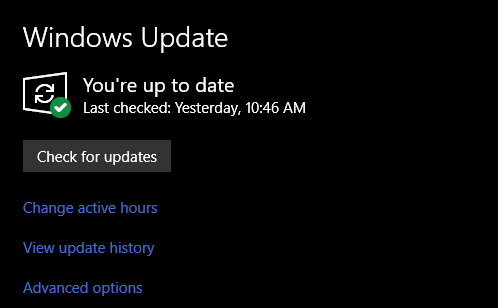
I also View Update History and no updates failed in its log. Checked drivers as well (at bottom of list). Windows has not recorded any driver updates.
- 신규로 표시
- 북마크
- 구독
- 소거
- RSS 피드 구독
- 강조
- 인쇄
- 부적절한 컨텐트 신고
- 신규로 표시
- 북마크
- 구독
- 소거
- RSS 피드 구독
- 강조
- 인쇄
- 부적절한 컨텐트 신고
Sorry David I missed that. So I checked today. Sure enough got the same failure today, two in a row. Definitely not at boot, I sleep my computer and I had been on the machine for two hours. As I don't know when it fails I can't relate to specific task. Sooooo.. I decided to open event viewer and see. Picture attached from System Log.
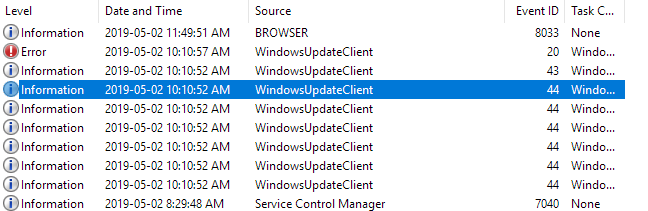
Windows Update Client is driving. So it starts to download the update six times. This is the only update listed in Reliability History so it starts six times. Event ID 44's.
Then code 43, the installation starts. Then 20, Installation fails.
I assume this is something in the Store ?? If you look at Update History in Start > Settings > Update & Security > View Update History this failure is not listed. View Update History must be OS updates, other products and drivers but not Store Updates.
- 신규로 표시
- 북마크
- 구독
- 소거
- RSS 피드 구독
- 강조
- 인쇄
- 부적절한 컨텐트 신고
- 신규로 표시
- 북마크
- 구독
- 소거
- RSS 피드 구독
- 강조
- 인쇄
- 부적절한 컨텐트 신고
Thanks David. So the support assistant tool is of no use on all Asus and likely all the other systems. Then why suggest people use tool. Sort of disappointing.
If I deleted all present drivers for graphics could I then use Intel's tool. Thinking DDU. (Display Driver Uninstall) to clean and then apply.
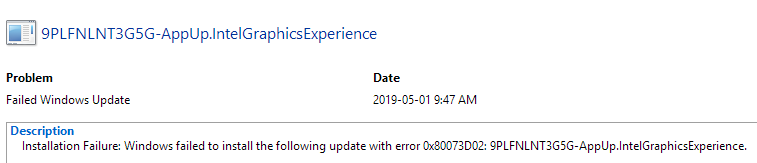
Can you suggest file that I would rename to get rid of this error as it is different from the app we started with. This is the Intel Graphics experience.
- 신규로 표시
- 북마크
- 구독
- 소거
- RSS 피드 구독
- 강조
- 인쇄
- 부적절한 컨텐트 신고
- 신규로 표시
- 북마크
- 구독
- 소거
- RSS 피드 구독
- 강조
- 인쇄
- 부적절한 컨텐트 신고
