
- Mark as New
- Bookmark
- Subscribe
- Mute
- Subscribe to RSS Feed
- Permalink
- Report Inappropriate Content
Edition Windows 10 Home Windows 10 May 2021 Update (21H1) I'm trying to turn on Core Isolation and I'm getting a message that says igdkmd64.sys Incompatible and will not turn on. Is there an update to this and where is it?
DMH681
Link Copied

- Mark as New
- Bookmark
- Subscribe
- Mute
- Subscribe to RSS Feed
- Permalink
- Report Inappropriate Content
Hello DMH681, Thank you for posting in the Intel® Communities Support.
In order for us to provide the most accurate assistance, we just wanted to confirm a few details about your system:
What is the model of the motherboard?
If this is a laptop, what is the model of it?
Is this a new computer?
The core isolation feature, was it working fine before?
When did the issue start?
Did you make any recent hardware/software changes?
Does the problem happen at home or in the work environment?
Please attach the SSU report so we can verify further details about the components in your platform, please check all the options in the report including the one that says "3rd party software logs":
Any questions, please let me know.
Regards,
Albert R.
Intel Customer Support Technician

- Mark as New
- Bookmark
- Subscribe
- Mute
- Subscribe to RSS Feed
- Permalink
- Report Inappropriate Content
Albert R/Sir:
I am having similar problem with igdkmd64.sys on my home desktop computer. I have an Intel MB 1671-1672 using Intel I3-3220 [email protected] (bought it used and recently installed it) with MS 21H2 Pro 64 bit OS . Device security will not activate because of two drivers with same name (but three listed): version 10.18.10.5161, dated 8/5/2020, Published name oem6.inf and version 10.18.10.4358 dated 12/20/2015, Published name oem10.inf. I have used the intel driver support app and it did not help as it just reloaded same drivers. How do I remedy this? Is it safe to delete these drivers and rely on MS? Do you have updated drivers available? Thanks in advance.
Koiman

- Mark as New
- Bookmark
- Subscribe
- Mute
- Subscribe to RSS Feed
- Permalink
- Report Inappropriate Content
incompatible driver: igdkmd64.sys
Hello Albert or Intel Moderator,
I am having an issue with my Dell Computer where this driver igdkmd64.sys is coming up as incompatible and not allowing my core isolation to come on. I need my MS Core Isolation turned back on asap. I have attached my computer CPU below for you to see my home pc.
Please tell me the way to fix this error.
Thanks

- Mark as New
- Bookmark
- Subscribe
- Mute
- Subscribe to RSS Feed
- Permalink
- Report Inappropriate Content
upgraded from windows 8 to windows10 same incompatible drivers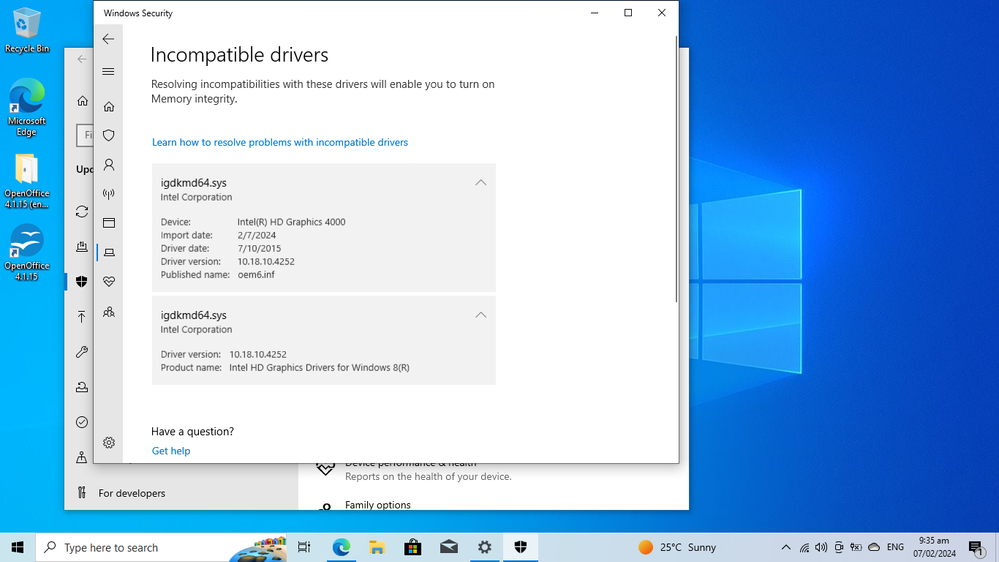
- Mark as New
- Bookmark
- Subscribe
- Mute
- Subscribe to RSS Feed
- Permalink
- Report Inappropriate Content
IMPORTANT
"This update requires 250 MB of free space in the recovery partition to install successfully. If the recovery partition does not have sufficient free space, this update will fail. In this case, you will receive the following error message:
0x80070643 - ERROR_INSTALL_FAILURE
To avoid this error or recover from this failure, please follow the Instructions to manually resize your partition to install the WinRE update and then try installing this update. "
I suspect its a malware injected into RAM to prevent opening the core isolation protect . it makes us vulnerable to hacking if it is turned off. Hackers, scammers on line are free to manipulate our PC, free to abuse our data information like. credit card details etc. also compromising our email password , our social media accounts too...as they are on the background, note that your PC function very very slow .
Hope you we can communicate this to Microsoft insiders. I cannot use my previous password ,(even wrote it on a piece of paper yet its incorrect. Need to reset all over again.
- Mark as New
- Bookmark
- Subscribe
- Mute
- Subscribe to RSS Feed
- Permalink
- Report Inappropriate Content
Please note that KB5034441 is 2024-01 Security update for windows 10 version 22H2 for x64-based system, yet failed to install? that's worrisome.

- Mark as New
- Bookmark
- Subscribe
- Mute
- Subscribe to RSS Feed
- Permalink
- Report Inappropriate Content
@Tintin Your posts make no sense in this context.
Doc (not an Intel employee or contractor)
[Maybe Windows 12 will be better]
- Mark as New
- Bookmark
- Subscribe
- Mute
- Subscribe to RSS Feed
- Permalink
- Report Inappropriate Content
Tried deleting and reinstall drivers nothing happens, still cannot turn on core isolation. same incompatible drivers. maybe you should communicate this with Microsoft insider. I felt its like a disguise to insert malicious malware or something. Tell you, I had tried to format and reinstall many times, but it doesn't help. My worries was every time I hit caps lock , a sort of sound like Morse code that was like sending signal to whoever...that I am on line. and then when I tried to open a note pad or even an explorer, you can witness that it is typing characters at one point saw a capital "Q" typing continuously.
Hope you can help,
Thank you
Tin

- Mark as New
- Bookmark
- Subscribe
- Mute
- Subscribe to RSS Feed
- Permalink
- Report Inappropriate Content
@Alberto_R_Intel wrote:Hello DMH681, Thank you for posting in the Intel® Communities Support.
In order for us to provide the most accurate assistance, we just wanted to confirm a few details about your system:
What is the model of the motherboard?
If this is a laptop, what is the model of it?
Is this a new computer?
The core isolation feature, was it working fine before?
When did the issue start?
Did you make any recent hardware/software changes?
Does the problem happen at home or in the work environment?
Please attach the SSU report so we can verify further details about the components in your platform, please check all the options in the report including the one that says "3rd party software logs":
https://downloadcenter.intel.com/download/25293/Intel-System-Support-Utility-for-Windows-?product=91600
Any questions, please let me know.
Regards,
Albert R.
Intel Customer Support Technician
I’m running into the exact same issue on my system. I’m also on Windows 10 Home (21H1) and when I try to enable Core Isolation, I get the same “igdkmd64.sys incompatible” message, and it refuses to turn on. It’s frustrating because everything else seems up to date, but there’s no obvious update that fixes this or lets me enable the feature.
I’ve been looking for an updated driver or a patch that resolves this compatibility problem, but I haven’t found anything definitive yet. If anyone knows where the updated driver for igdkmd64.sys might be or how to get around this error so Core Isolation can be enabled, I’d really appreciate the guidance.

- Mark as New
- Bookmark
- Subscribe
- Mute
- Subscribe to RSS Feed
- Permalink
- Report Inappropriate Content
- Mark as New
- Bookmark
- Subscribe
- Mute
- Subscribe to RSS Feed
- Permalink
- Report Inappropriate Content
@ayit The latest and last driver for your 5th gen processor can be found here:
https://www.intel.com/content/www/us/en/download/18369/intel-graphics-driver-for-windows-15-40.html
Doc (not an Intel employee or contractor)
[CoPilot is a virus, W11 is a keystroke logger, all from MicroSlop]
- Mark as New
- Bookmark
- Subscribe
- Mute
- Subscribe to RSS Feed
- Permalink
- Report Inappropriate Content
- Mark as New
- Bookmark
- Subscribe
- Mute
- Subscribe to RSS Feed
- Permalink
- Report Inappropriate Content

- Mark as New
- Bookmark
- Subscribe
- Mute
- Subscribe to RSS Feed
- Permalink
- Report Inappropriate Content
So the Intel customer support technicians can have more information about your system, download and run the Intel System Support Utility (https://downloadcenter.intel.com/download/25293/Intel-System-Support-Utility-for-Windows- ) for Windows. Select all data categories and then have it generate a report. Next, have the tool Save the report to a text file (don't try to use the Submit capability; it doesn't work). Finally, using the Drag and drop here or browse files to attach dialog below the edit box for the body of your response post, upload and attach this file to the response post.
Doc (not an Intel employee or contractor)
[CoPilot is a virus, W11 is a keystroke logger, all from MicroSlop]
- Mark as New
- Bookmark
- Subscribe
- Mute
- Subscribe to RSS Feed
- Permalink
- Report Inappropriate Content
sent email reply back to you with all requested info.. Thanks
- Mark as New
- Bookmark
- Subscribe
- Mute
- Subscribe to RSS Feed
- Permalink
- Report Inappropriate Content
Hello DMH681, Thank you very much for your response.
Just to let you know, one of the purposes of the Intel® forums support is to make the cases visible as well as the solutions, so other peers that are watching the thread and might have the same problem will also have the solution to try it with their systems.
I did not receive your email, If you do not want to share that information publicly, I can always send you an email for you to provide the details in there, please let me know.
Regards,
Albert R.
Intel Customer Support Technician
- Mark as New
- Bookmark
- Subscribe
- Mute
- Subscribe to RSS Feed
- Permalink
- Report Inappropriate Content
@Alberto_R_Intel wrote:
Hello DMH681, Thank you very much for your response.
Just to let you know, one of the purposes of the Intel® forums support is to make the cases visible as well as the solutions, so other peers that are watching the thread and might have the same problem will also have the solution to try it with their systems.
I did not receive your email, If you do not want to share that information publicly, I can always send you an email for you to provide the details in there, please let me know.
Regards,
Albert R.
Intel Customer Support Technician
Hi Albert,
Yes, if you could send me an email that I can reply to with the info you requested that would be great. I'd be happy to share the solution in this forum/community if we find a fix...
Thanks
DMH681
- Mark as New
- Bookmark
- Subscribe
- Mute
- Subscribe to RSS Feed
- Permalink
- Report Inappropriate Content
Hi DMH681, Thank you very much for your response.
Sure, no problem at all, I just send you a private email with that same information, please verify your inbox.
Regards,
Albert R.
Intel Customer Support Technician
- Mark as New
- Bookmark
- Subscribe
- Mute
- Subscribe to RSS Feed
- Permalink
- Report Inappropriate Content
Hi Albert,
I just replied to it with all the info attached from the SSU app.
- Mark as New
- Bookmark
- Subscribe
- Mute
- Subscribe to RSS Feed
- Permalink
- Report Inappropriate Content
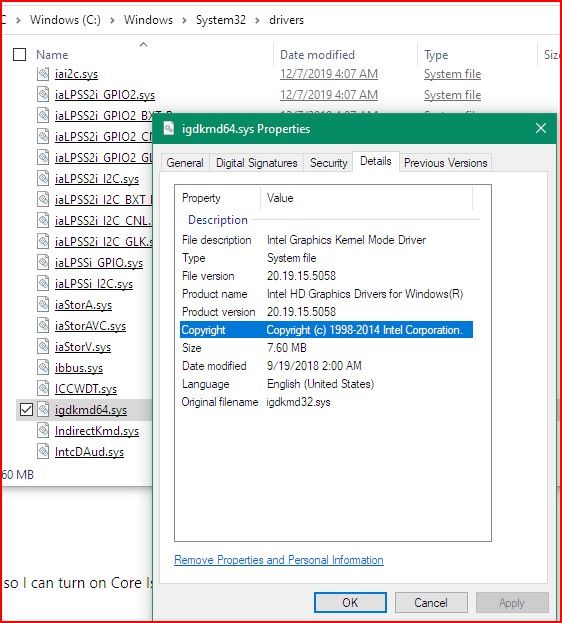
I found that file and it is old. Is there not a newer version?


- Subscribe to RSS Feed
- Mark Topic as New
- Mark Topic as Read
- Float this Topic for Current User
- Bookmark
- Subscribe
- Printer Friendly Page