
- 신규로 표시
- 북마크
- 구독
- 소거
- RSS 피드 구독
- 강조
- 인쇄
- 부적절한 컨텐트 신고
The NCSDK 1.12 works fine in Ubuntu 16.04 with virtual box however when I upgraded it to NCSDK 2.05 I cannot even get the hello_ncs example to run. It continues to give me an NCS not found error and disconnects the device which requires me to unplug and plug back for it to be detected. I tried various settings for the USB in virtual box and under linux but nothing works. As soon as I downgrade back to 1.12 everything works, even for the multistick examples (I have 4 of them now).
Ubuntu has been updated and upgraded (just in case this was the issue). All of the examples in the NCSDK 2.05 will compile but not run.
Is there anything I can do to try and get the NCSDK 2.05 to work?
- 태그:
- Movidius
링크가 복사됨
- 신규로 표시
- 북마크
- 구독
- 소거
- RSS 피드 구독
- 강조
- 인쇄
- 부적절한 컨텐트 신고
Yeah it seems to be completely broken - see my comments here: https://ncsforum.movidius.com/discussion/886/neural-compute-sdk-version-2-05-has-been-released#latest
- 신규로 표시
- 북마크
- 구독
- 소거
- RSS 피드 구독
- 강조
- 인쇄
- 부적절한 컨텐트 신고
Dear colleagues,
I have the same issue mentioned above, I tried to make run the video-objects app from ncappzoo v2:
--2018-07-01 21:41:28-- https://raw.githubusercontent.com/nealvis/media/master/traffic_vid/police_car_6095_shortened_960x540.mp4
Resolving raw.githubusercontent.com (raw.githubusercontent.com)… 151.101.92.133
Connecting to raw.githubusercontent.com (raw.githubusercontent.com)|151.101.92.133|:443… connected.
HTTP request sent, awaiting response… 416 Range Not Satisfiable
The file is already fully retrieved; nothing to do.
--2018-07-01 21:41:28-- https://raw.githubusercontent.com/nealvis/media/master/traffic_vid/scooters_5638_shortened_960x540.mp4
Resolving raw.githubusercontent.com (raw.githubusercontent.com)… 151.101.92.133
Connecting to raw.githubusercontent.com (raw.githubusercontent.com)|151.101.92.133|:443… connected.
HTTP request sent, awaiting response… 416 Range Not Satisfiable
The file is already fully retrieved; nothing to do.
making run_py
python3 ./video_objects.py
E: [ 0] dispatcherEventSend:738 Write failed -1
E: [ 0] dispatcherEventReceive:200 dispatcherEventReceive() Read failed -1
please see below the result of hello_ncs_py:
making run
python3 hello_ncs.py;
Hello NCS! Device opened normally.
E: [ 0] dispatcherEventReceive:200 dispatcherEventReceive() Read failed -1
Goodbye NCS! Device closed normally.
NCS device working.
and lsusb:
Bus 002 Device 001: ID 1d6b:0003 Linux Foundation 3.0 root hub
Bus 001 Device 022: ID 03e7:2150
Bus 001 Device 019: ID 80ee:0021 VirtualBox USB Tablet
Bus 001 Device 004: ID 0bda:5756 Realtek Semiconductor Corp.
Bus 001 Device 001: ID 1d6b:0002 Linux Foundation 2.0 root hub
Thanks in advance for the support!
- 신규로 표시
- 북마크
- 구독
- 소거
- RSS 피드 구독
- 강조
- 인쇄
- 부적절한 컨텐트 신고
- 신규로 표시
- 북마크
- 구독
- 소거
- RSS 피드 구독
- 강조
- 인쇄
- 부적절한 컨텐트 신고
I'm having issues too, can't get any of the apps to run-
Here is an example from classifier-GUI
ImportError: /usr/local/lib/python3.5/dist-packages/pygraphviz/_graphviz.cpython-35m-x86_64-linux-gnu.so: undefined symbol: Agundirected
Makefile:80: recipe for target 'compile' failed
make[1]: *** [compile] Error 1
make[1]: Leaving directory '/home/rob/ncsdk/ncappzoo/caffe/GoogLeNet'
Makefile:17: recipe for target 'googlenet' failed
make: *** [googlenet] Error 2
Here is an example from Gender_age
ImportError: /usr/local/lib/python3.5/dist-packages/pygraphviz/_graphviz.cpython-35m-x86_64-linux-gnu.so: undefined symbol: Agundirected
Makefile:34: recipe for target 'compile' failed
make[1]: *** [compile] Error 1
make[1]: Leaving directory '/home/rob/ncsdk/ncappzoo/caffe/GenderNet'
cp: cannot stat '../../caffe/GenderNet/graph': No such file or directory
Makefile:9: recipe for target 'gendernet' failed
make: *** [gendernet] Error 1
rob@rob-VirtualBox:~/ncsdk/ncappzoo/apps/gender_age_lbp$
Help would be appreciated!
- 신규로 표시
- 북마크
- 구독
- 소거
- RSS 피드 구독
- 강조
- 인쇄
- 부적절한 컨텐트 신고
Update got it resolve just by chaning the Virtualbox version from 5.1.26 to 5.1.34 and updating the extension pack,
So did basically
https://download.virtualbox.org/virtualbox/5.2.2/VirtualBox-5.2.2-119230-Win.exe
https://download.virtualbox.org/virtualbox/5.2.2/Oracle_VM_VirtualBox_Extension_Pack-5.2.2-119230.vbox-extpack
and in gues install vbox -additions.
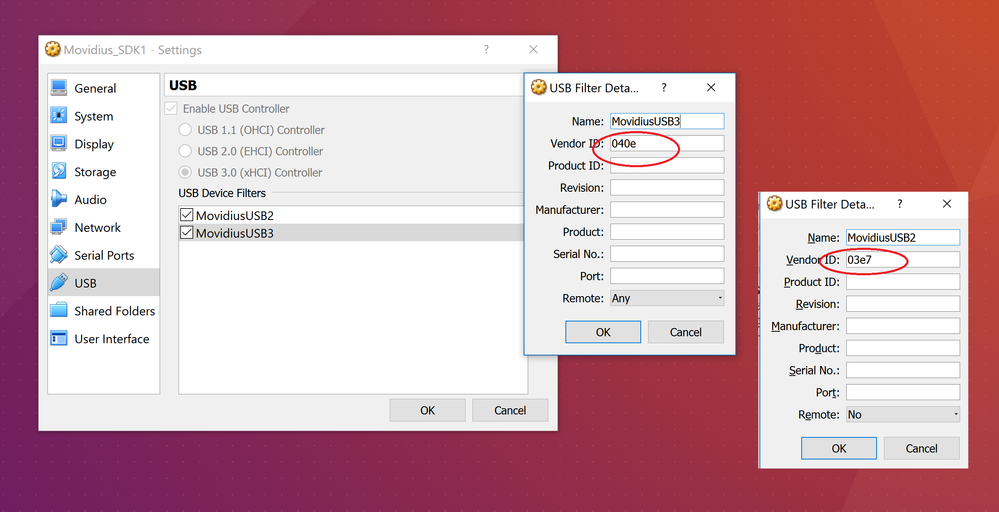
Add a new USB filter with Vendor ID: 03e7
The other filter fields can be blank.
Add a new USB filter with Vendor ID: 040e
The other filter fields can be blank.
Install the NCSDK
- 신규로 표시
- 북마크
- 구독
- 소거
- RSS 피드 구독
- 강조
- 인쇄
- 부적절한 컨텐트 신고
Hi all,
I'm using virtualbox version 5.2.12 r122591, since this is above the mentioned by @alokprasad it seems to be a diferente issue.
@Tome_at_Intel any News about the fix for our issue?
Thanks in advance!
- 신규로 표시
- 북마크
- 구독
- 소거
- RSS 피드 구독
- 강조
- 인쇄
- 부적절한 컨텐트 신고
Hello,
I am on VirtualBox version 5.2.12. Linux Ubuntu 16.06 LTS. VM is running on MacOSX.
I experienced the same issue as initially posted, BUT in my case I can attach the USB via the Devices>USB settings menu. I am also able to run once the hello_ncs_cpp and the dongle gets detached after that.
:~/workspace/ncsdk/examples/apps/hello_ncs_cpp/cpp$ ./hello_ncs_cpp
Hello NCS! Device opened normally.
Goodbye NCS! Device Closed normally.
NCS device working.
~/workspace/ncsdk/examples/apps/hello_ncs_cpp/cpp$ ./hello_ncs_cpp
Error - Could not open NCS device.
mvncStatus value: -2
If I want to run the application again, I need to manually attach the dongle again via the settings.
- 신규로 표시
- 북마크
- 구독
- 소거
- RSS 피드 구독
- 강조
- 인쇄
- 부적절한 컨텐트 신고
Hi renhanchi,
Thank you for the suggestion. I just tried, it is actually worst. The connection is unstable with USB2.0 and USB1.1. At least with the USB3 I can run the example once.
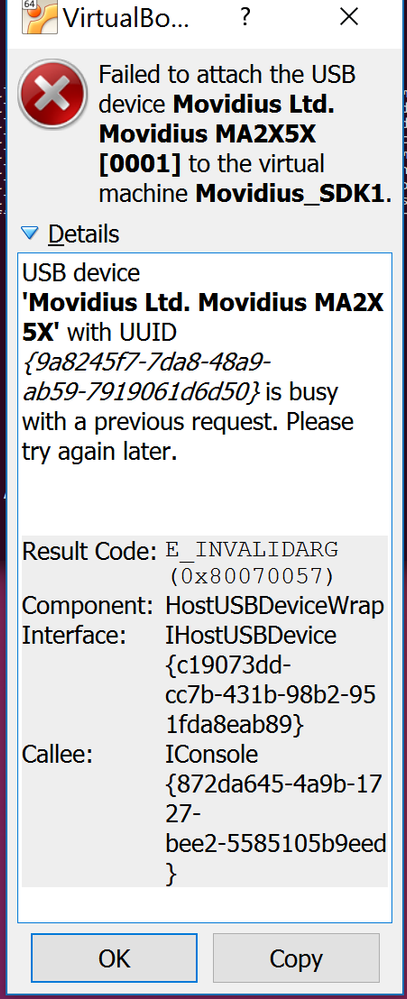
I have a pop-up message in VirtualBox saying: "Failed to attach the USB device Movidius VSC Loopback Device [0100] to the virtual machine Ubuntu 16.04 - Computer Vision".
The hello_ncs_cpp returns: "Error - Could not open NCS device. mvncStatus value: -2"
- 신규로 표시
- 북마크
- 구독
- 소거
- RSS 피드 구독
- 강조
- 인쇄
- 부적절한 컨텐트 신고
Works under NCSDK V1 but not V2. For V2, running the python3 hello_ncs.py produces the following: Error - Could not open NCS device.
Received similar errors when executing: make examples. The VM >> Devices >> USB shows a connection to Intel Corporation VSC Loopback Device (0100) instead of the Movidius LTD. Movidius MA2x5x [00001]? V1 works ok through this point. Using V1, the USB Device its always set to the Movidius LTD. Movidius MA2x5x [00001]. There is something definitely something incompatible with V2 NCSDK software and the VM.
After removing the NCSDK V2 and reinstalling V1, everything works!
I set up the VM 5.1.34 based on the Intel instructions and their acknowledgment it works under windows 10.
Any suggestions?
- 신규로 표시
- 북마크
- 구독
- 소거
- RSS 피드 구독
- 강조
- 인쇄
- 부적절한 컨텐트 신고
I am still waiting for a fix for this very same issue. V1 works just fine, going to V2 is just broken. None of the suggestions, settings, etc. make any difference. So currently I have to stick to V1 or have four very useless devices.
- 신규로 표시
- 북마크
- 구독
- 소거
- RSS 피드 구독
- 강조
- 인쇄
- 부적절한 컨텐트 신고
Hi everyone,
Please refer to my solution for this problem. I can't garantee it it the fix for everybody but it seems to correspond to most people's description of the problem. See this link: https://software.intel.com/en-us/forums/computer-vision/topic/798725
- 신규로 표시
- 북마크
- 구독
- 소거
- RSS 피드 구독
- 강조
- 인쇄
- 부적절한 컨텐트 신고
So awareness of the issue for more than 4 months and not yet even updated https://movidius.github.io/ncsdk/vm_config.html
Because there it clearly says:
- tested with 5.1.34 but other releases should work
which is not so quite true as it seems to be known that other releases don't really work…
I guess it will be helpful to at least update the docs with the known limitations as most probably not all customers like to figure the limits out the hard way.
