
- Mark as New
- Bookmark
- Subscribe
- Mute
- Subscribe to RSS Feed
- Permalink
- Report Inappropriate Content
Since I've moved to IVF 2017 Composer Edition, my fixed width fonts don't seem to be fixed with anymore. They displayed correctly under 2016 version. Any suggestions? I'm running under vs 2013 community. I'm using Coutier New.
Thx,
Brooks
Link Copied

- Mark as New
- Bookmark
- Subscribe
- Mute
- Subscribe to RSS Feed
- Permalink
- Report Inappropriate Content
Is this while editing your Fortran source, or in an application that you've written?
- Mark as New
- Bookmark
- Subscribe
- Mute
- Subscribe to RSS Feed
- Permalink
- Report Inappropriate Content
Ian, This is in a graphical application that I wrote, which worked fine in v2016 but not in v2017. All on a Win 10 Intel i7 computer with 32 GB RAM and 3 TB HDs.
Brooks

- Mark as New
- Bookmark
- Subscribe
- Mute
- Subscribe to RSS Feed
- Permalink
- Report Inappropriate Content
Did you also change Visual Studio versions? I'm struggling to imagine any aspect of the Fortran product install that would have an effect on fonts. Can you come up with a small sample application that shows the difference? Screenshots (before and after) would also help.
- Mark as New
- Bookmark
- Subscribe
- Mute
- Subscribe to RSS Feed
- Permalink
- Report Inappropriate Content
The code snioit is:
      write(Info(3),150) avg
      write(Info(4),151) sqrt(cm2)
      write(Info(5),152) LnK
      write(Info(6),154) Mean2
      write(Info(7),155) Lower
      write(Info(8),156) Upper
      write(Info(9),158) AbsErr
      write(Info(10),159) Mode2
      write(Info(11),160) Median
      write(Info(12),161) Skew
      write(Info(13),162) Kurt
      write(Info(14),163) Cntr
      write(Info(15),164) Beta2
      write(info(16),165) Kappa
      call Date_And_Time(Date, Time, Zone, Values)
      write(Info(17),166) values(5), values(6), values(7)
      write(Info(18),167) values(3), values(2), values(1)
 150  format('Mean: ', sp, es15.7)
 151  format('Sigma:', sp, es15.7)
 152  format('Ln K: ', sp, es15.7)
 154  format('Mean2:', sp, es15.7)
 155  format('Lower:', sp, es15.7)
 156  format('Upper:', sp, es15.7)
 158  format('AbsErr:',sp, es14.1)
 159  format('Mode2:', sp, es15.7)
 160  format('Median:',sp, es14.7)
 161  format('Skew: ', sp, es15.7)
 162  format('Kurt: ', sp, es15.7)
 163  format('SubDiv:', i10 )
 164  format('Beta2:', sp, es15.7)
 165  format('Kappa:', sp, es15.7)
 166  format('Time:       ', i2.2, ':', i2.2, ':', i2.2)
 167  format('Date:     ', i2.2, '/', i2.2, '/', i4)
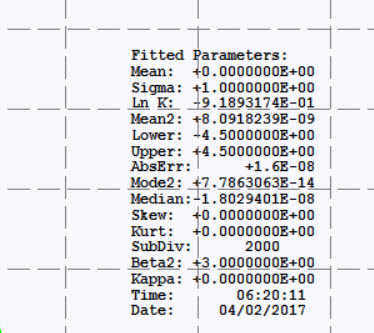
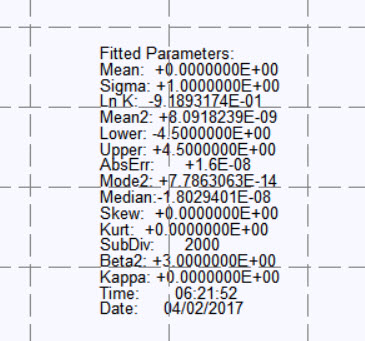
And using vs 2013 I got attachment 1 with IVF 2016 Composer edition and Picture 2 with 2017 ivf.
Brooks

- Mark as New
- Bookmark
- Subscribe
- Mute
- Subscribe to RSS Feed
- Permalink
- Report Inappropriate Content
Hello
It seems that the problem lies in the output panel.

- Mark as New
- Bookmark
- Subscribe
- Mute
- Subscribe to RSS Feed
- Permalink
- Report Inappropriate Content
Are info(xx) and array of character strings? If so how are those written to the screen? What font selection process is used?
- Mark as New
- Bookmark
- Subscribe
- Mute
- Subscribe to RSS Feed
- Permalink
- Report Inappropriate Content
Andrew, per your request:
Module zData
!$=Zdata                                         Copyright (C) (2016) by BVH LLC
!$                                               01/07/2016
!$
!$ Zdata            is invoked by:
!$    Boxit            Compare          Dlgchanged       Dographs
!$    Dogrids          Dohisto          Domycolor        Fitout
!$    Fitsamp          Kolmo            M2r              Mytextout
!$    Newcurv          Winmain          Plotcdf          Plotedf
!$    Plothist         Plotpdf          Purge            Radiochanged
!$    Saveall          Setplots         Typei            Typeii
!$    Typeiii          Typeiv           Typev            Typevi
!$    Typevii          Typeviii
!$
!$ Zdata            invokes:
!$    Module Ifwinty
!$
!$=Zdata
Use IFWINTY

Integer(4), Parameter :: zNd = 200              ! Number GUI points
Integer(4), Parameter :: zHis =100              ! Max number of Histogram bins
Integer(4), Parameter :: zLbs = 50              ! Max dim of zLabels
Integer(4), Parameter :: zIn = 25               ! Max dim of Info

Integer(4),Save,Public::  zNG = 0               ! current number of bins
Integer(4),Save,Public::  zTop = 0              ! largest histogram bin
Integer(4),Save,Public :: zHist(0:zHis+1)       ! Histogram bins
Integer(4),Save,Public::  zDF                   ! Chi-square statistic deg of freedom
Integer(4),Save,Public::  zMem = 0
Integer(4),Save,Public::  zType = 0             ! curve type for plotted data
Integer(4),Save,public::  zNst, zMxI = 0
Logical(4),Save,public::  $Curv = .False.
Real(8),Save,Public ::    zHXs(0:zHis+1)        ! category initial points
Real(8),Save,public::     zChi                  ! Chi-square statistic
Real(8),Save,Public::     zAlpha                ! alpha corrsponding to the zChi**2
Real(8),Save,Public::     zDelX                 ! width of a bin on x-axis
Real(8),Save,Public::     zMedian = 0           ! median in the histogram
Real(8),Save,Public ::    zPdf(0:zNd+1)         ! PDF plot points
Real(8),Save,Public ::    oCdf(0:zNd+1)         ! CDF plot points for comparison curve
Real(8),Save,Public ::    oPdf(0:zNd+1)         ! PDF plot points for comparison curve
Real(8),Save,Public ::    zCdf(0:zNd+1)         ! CDF plot points
Real(8),Save,Public ::    zXs(0:zNd+1)          ! x-Vals for PDF, CDF and EDF
Real(8),Save,Public::     zEDF(0:zNd+1)         ! Emprrical Distribution function
Real(8),Save,Public ::    zLeft, zRight         ! Plot x-boundaries
Real(8),Save,Public ::    zXmin, zXMax, zYMin, zYMax ! PDF bounds for grid
Character(120),Save,Public :: zLabels(zLbs)     ! Unit 3 itype info
Character(120),Save,Public::Info(zIn)           ! Text info on the parameters
Character(120),Save,Public::oInfo(7)            ! Text info on the parameters
Type (T_RECT)::           zRect

End Module zData
And the routine that writes it to the screen is:
Subroutine MyTextOut (hDC)
!$=Mytextout                                     Copyright (C) (2016) by BVH LLC
!$                                               01/07/2016
!$
!$ Mytextout        is invoked by:
!$    Dogrids
!$
!$ Mytextout        invokes:
!$    Func   Createpen      Func   Deleteobject   Module Gdi32          Subr   Getlength
!$    Func   Gettextmetric  Module Ifwbase        Module Ifwin          Module Ifwinty
!$    Module Kernel32       Module Myscreen       Module Pearsonglobal  Func   Rgb_dword
!$    Func   Selectobject   Func   Textout        Func   Trim           Module User32
!$    Subr   V2p            Func   Validaterect   Module Zdata
!$
!$=Mytextout
    use ifwinty
    use ifwin
    use user32
    use ifwbase
    use gdi32
    use kernel32
    use PearsonGlobals
    use zData
    use MyScreen

Implicit None

Integer(HANDLE),Intent(inout):: hDC

Integer(4)::          x, y, cl, cm, cr, left, ys, ix, iy
Integer(4)::          i, lenx, lnth
Integer(HANDLE),Save:: hOPen, hOFnt
Integer(HANDLE)::      hDF
Integer(BOOL)::       bret
TYPE (T_TEXTMETRIC):: ta
Character(120)::       myBuffer

      bret = DeleteObject(ghPen)
      ghPen = CreatePen(PS_SOLID, DOT2, RGB(0,0,0))   ! semi-thick black Pen
      hOPen = SelectObject(hDC, ghPen)

!     (0,0) in upper left corner of screen
      left = xZero
      cm = Left + width / 2
      cl = left + width / 3  - 50
      cr = left + (2 * width) / 3 - 50
      hDF = SelectObject(hDC,hmyFont24)
      bret = GetTextMetrics(hDC, ta)
      myBuffer = 'Distribution Statistics'
      Call GetLength(myBuffer,lnth)
      lenx = ta%tmAveCharWidth * lnth
      x = 500 - lenx / 2
      y = 1000
      Call V2P (x, y, ix, iy)
      iy = iy - 40
      bret = textOut(hDC, ix, iy, myBuffer, lnth)
      myBuffer = Info(1)
      Call GetLength(myBuffer,lnth)
      lenx = ta%tmAveCharWidth * lnth / 2
      x = cm - lenx + 2
      y = Rectg%top + 100
      bret = textOut(hDC, x, y, myBuffer, lnth)
      y = y + 35
      myBuffer = Info(2)
      Call GetLength(myBuffer,lnth)
      lenx = ta%tmAveCharWidth * lnth / 2
      x = cm - lenx
      bret = textOut(hDC, x, y, myBuffer, lnth)
      y = y + 50
      ys = y
      hDF = SelectObject(hDC, hMyFont16)
      bret = GetTextMetrics(hDC, ta)
      myBuffer = 'Fitted Parameters:'
      Call GetLength(myBuffer,lnth)
      lenx = ta%tmAveCharWidth * lnth / 2
      x = cl
      y = y + 25
      if (zMxI > 2) Then
         bret = textOut(hDC, x, y, myBuffer, lnth)
         do i = 3, zMxI
            myBuffer = Info(i)
            Call GetLength(myBuffer,lnth)
            lenx = ta%tmAveCharWidth * lnth / 2
            If (lnth > 12) Then
               x = cl
               y = y + 20
               bret = textOut(hDC, x, y, myBuffer, lnth)
            End If
         end do
      End If
      y = ys
      If (zNst > 2) Then
         do i = 1, zNst
            myBuffer = Trim(AdjustL(zLabels(i)))
            Call GetLength(myBuffer,lnth)
            lenx = ta%tmAveCharWidth * lnth / 2
            If (lnth >= 12) Then
               x = cr
               y = y + 20
               bret = TextOut(hDC, x, y, myBuffer, lnth)
            End If
         end do
      End If
      bret = ValidateRect(ghWndMain, rectf)
      hOPen = SelectObject(hDC, hOPen)
      hOFnt = SelectObject(Hdc, hOFnt)
      bret = DeleteObject(ghPen)

      return

End Subroutine MyTextOut
The fonts are selected by:
FUNCTION CreateSimpleFont (faceName, size, bold, italic)
!DEC$ ATTRIBUTES STDCALL, ALIAS : 'CreateSimpleFont' :: CreateSimpleFont

! Creates a font with simple characteristics. The face name and size
! are provided, along with bold and italic flags. Returns a handle
! to the new font, or 0 on failiure.

    use IFWIN

    Integer(Handle):: CreateSimpleFont
    CHARACTER(LEN=*), INTENT(IN)   :: faceName
    INTEGER(4), INTENT(IN)         :: size
    LOGICAL(4), INTENT(IN)         :: bold
    LOGICAL(4), INTENT(IN)         :: italic

    TYPE(T_LOGFONT)                :: logfont
    INTEGER(HANDLE)                :: hfont

    logfont%lfHeight		= size
    logfont%lfWidth			= 0
    logfont%lfEscapement	= 0
    logfont%lfOrientation	= 0
    IF (bold) THEN
        logfont%lfWeight = FW_BOLD
    ELSE
        logfont%lfWeight = FW_NORMAL
    END IF
    logfont%lfItalic			   = italic
    logfont%lfUnderline			= .FALSE.
    logfont%lfStrikeout			= .FALSE.
    logfont%lfCharSet			= ANSI_CHARSET
    logfont%lfOutPrecision		= OUT_DEFAULT_PRECIS
    logfont%lfClipPrecision	= CLIP_DEFAULT_PRECIS
    logfont%lfQuality			= DEFAULT_QUALITY
    logfont%lfPitchAndFamily	= IOR(DEFAULT_PITCH, FF_DONTCARE)
    logfont%lfFaceName			= faceName

    hfont = CreateFontIndirect (logfont)

    CreateSimpleFont = hfont
    return

END FUNCTION CreateSimpleFont
It is invoked by:
         If (hMyFont12 == NULL) Then
            hMyFont12 = CreateSimpleFont( "Courier New"C, mas, .FALSE., .FALSE.)
            mas = mas + 2
            hMyFont16 = CreateSimpleFont( "Courier New"C, mas, .FALSE., .FALSE.)
            mas = mas + 4
            hMyFont20 = CreateSimpleFont( "Courier New"C, mas, .FALSE., .FALSE.)
            mas = mas + 8
            hMyFont24 = CreateSimpleFont( "Courier New"C, mas, .TRUE., .FALSE.)
            mas = mas + 10
            hMyFont36 = CreateSimpleFont( "Courier New"C, mas, .TRUE., .FALSE.)
         end if
- Mark as New
- Bookmark
- Subscribe
- Mute
- Subscribe to RSS Feed
- Permalink
- Report Inappropriate Content
Inside the function that creates the font, there are a number of logical variables and literal constants being assigned to integer components. That's fragile.

- Mark as New
- Bookmark
- Subscribe
- Mute
- Subscribe to RSS Feed
- Permalink
- Report Inappropriate Content
The first problem is that that STDCALL attribute mungs up the value that gets passed to faceName in function CreateSimpleFont. This is further complicated by the fact that you don't ask for a monospaced font via logfont%lfPitchAndFamily. I have taken the liberty to rewrite your function with a structure constructor, which I consider much safer than separate assignments to members. Also I have written code that extracts the name of the font that actually gets used. Please experiment with my example a little so that you can more clearly see what's going on.
module M
   use IFWIN
   implicit none
   contains
      function CreateSimpleFont(faceName, size, bold, italic)
!!DEC$ ATTRIBUTES STDCALL, ALIAS: 'CreateSimpleFont' :: CreateSimpleFont
         integer(HANDLE) CreateSimpleFont
         character(*), intent(IN) :: faceName
         integer, intent(IN) :: size
         logical, intent(IN) :: bold
         logical, intent(IN) :: italic

         type(T_LOGFONT) logfont

         logfont = T_LOGFONT( &
            lfHeight = size, &
            lfWidth = 0, &
            lfEscapement = 0, &
            lfOrientation = 0, &
            lfWeight = merge(FW_BOLD,FW_NORMAL,bold), &
            lfItalic = merge(TRUE,FALSE,italic), &
            lfUnderline = FALSE, &
            lfStrikeOut = FALSE, &
            lfCharSet = ANSI_CHARSET, &
!            lfOutPrecision = OUT_DEFAULT_PRECIS, &
            lfOutPrecision = OUT_TT_ONLY_PRECIS, &
            lfClipPrecision = CLIP_DEFAULT_PRECIS, &
!            lfQuality = DEFAULT_QUALITY, &
            lfQuality = CLEARTYPE_QUALITY, &
            lfPitchAndFamily = IOR(FIXED_PITCH, FF_MODERN), &
!            lfPitchAndFamily = IOR(DEFAULT_PITCH, FF_DONTCARE), &
!            lfPitchAndFamily = IOR(VARIABLE_PITCH, FF_DECORATIVE), &
            lfFaceName = transfer(faceName,logfont%lfFaceName))
write(*,*) logfont%lfFaceName(:index(logfont%lfFaceName,achar(0))-1)
         CreateSimpleFont = CreateFontIndirect(logfont)
      end function CreateSimpleFont
end module M

program P
   use IFWIN
   use M
   implicit none
   integer :: mas(5) = [12,16,20,24,36]
   integer(HANDLE) hMyFont(size(mas))
   logical :: bold(5) = [.FALSE.,.FALSE.,.FALSE.,.TRUE.,.TRUE.]
   integer i
   do i = 1, size(mas)
      write(*,*) i,mas(i)
      hMyFont(i) = CreateSimpleFont("Courier New"//achar(0),mas(i),bold(i),.FALSE.)
      BLOCK
         type(T_LOGFONT) logfont
         integer result4
         integer(HANDLE) DC
         integer(HANDLE) hGDIobj
         character(32) TextFace

         DC = GetDC(NULL)
         hGDIobj = SelectObject(DC,hMyFont(i))
         result4 = GetTextFace(DC,len(TextFace),TextFace)
         write(*,*) TextFace(:index(TextFace,achar(0))-1)
      END BLOCK
   end do
end program P
EDIT: Reading the ifort docs, it looks like you could have unmunged faceName by changing your attributes to
!DEC$ ATTRIBUTES STDCALL, REFERENCE, ALIAS: 'CreateSimpleFont' :: CreateSimpleFont
That REFERENCE attribute on the enclosing function and not on the argument means that the whole actual argument gets passed along with its LEN. If you need the other arguments to get passed by value, you would then have to say so with another !DEC$ ATTRIBUTES statement. I forget whether this makes the calling convention actually different for them, because ifort has two ways to pass by value.
It seems that you were just picking up the first font on a list, and when you installed software, another font got ahead of the one you like on the list. Had you gotten zapfdingbats on the first try, you would have known something was wrong right away!
- Mark as New
- Bookmark
- Subscribe
- Mute
- Subscribe to RSS Feed
- Permalink
- Report Inappropriate Content
Thanks Repeat Offender. Two lineschanged and it works as it did before.
Brooks


- Mark as New
- Bookmark
- Subscribe
- Mute
- Subscribe to RSS Feed
- Permalink
- Report Inappropriate Content
A comment to Repeat Offender post #10,
I understand the program P can be build as a console application, so for my own curiosity I copied the text and tried to build it, - without success. Would be nice if you had a look at the logfile attached and commented back..
The "small button" you refer to, I cannot see, is in VS ?
- Mark as New
- Bookmark
- Subscribe
- Mute
- Subscribe to RSS Feed
- Permalink
- Report Inappropriate Content
I pretty much never use Visual Studio. Everything from the command line. The small button I was referring to is the one that appears when you move the mouse cursor over my Fortran code in Quote #10. You have to be logged in to the forum to see it, I think. Clicking on the leftmost of the 3 choices there gives you an about:blank window from which you can copy the code cleanly with <CTRL>+A, then <CTRL>+C, and then paste into your Fortran source, SetFont.f90.
However, your source looks pretty clean so you evidently did this already or something equivalent but more tedious. The problem as best as I can judge is that you are using a relatively old version of Intel Fortran:
Compiling with Intel(R) Visual Fortran Compiler XE 14.0.4.237 [IA-32]...
That may be old enough that the BLOCK construct was not supported. I don't know how to determine when such support was added, but that's my best guess without a lot more research on my part.

- Subscribe to RSS Feed
- Mark Topic as New
- Mark Topic as Read
- Float this Topic for Current User
- Bookmark
- Subscribe
- Printer Friendly Page