
- 新着としてマーク
- ブックマーク
- 購読
- ミュート
- RSS フィードを購読する
- ハイライト
- 印刷
- 不適切なコンテンツを報告
I started with installing MS Visual Studio 2017 without any workloads then I installed Intel Parallels Studio.
I then tried creating a Fortran project in MS VS, but it doesn't see the library or give me an option to do so.
I then modified the VS installation and added the C++ workload per https://software.intel.com/en-us/articles/installing-microsoft-visual-studio-2017-for-use-with-intel-compilers
Still was not able to get it working.
Then I followed https://software.intel.com/en-us/articles/troubleshooting-fortran-integration-issues-with-visual-studio
I found out that the integration files were not present.
Repaired the installation of Intel Parallel Studio to no avail.
Any help would be greatly appreciated.
Thank you.
コピーされたリンク

- 新着としてマーク
- ブックマーク
- 購読
- ミュート
- RSS フィードを購読する
- ハイライト
- 印刷
- 不適切なコンテンツを報告
Did you repeat the Parallel Studio install (doing a Change/Modify) after adding the C++ support to VS2017? You need to do that. Pay careful attention to any warning messages the Intel install shows you.
- 新着としてマーク
- ブックマーク
- 購読
- ミュート
- RSS フィードを購読する
- ハイライト
- 印刷
- 不適切なコンテンツを報告
I performed a repair. When I modify the install, what do I need to modify exactly?
- 新着としてマーク
- ブックマーク
- 購読
- ミュート
- RSS フィードを購読する
- ハイライト
- 印刷
- 不適切なコンテンツを報告
You don't have to select anything - just run through the modify version of the install. It should pick up VS2017 automatically.
Just to make sure - what is the exact file name of the Intel installer executable you are using?
- 新着としてマーク
- ブックマーク
- 購読
- ミュート
- RSS フィードを購読する
- ハイライト
- 印刷
- 不適切なコンテンツを報告
Okay, I will give it a shot.
name is "parallel_studio_xe_2019_update3_cluster_edition_setup"
- 新着としてマーク
- ブックマーク
- 購読
- ミュート
- RSS フィードを購読する
- ハイライト
- 印刷
- 不適切なコンテンツを報告
Ok - was just making sure that you weren't installing a product that didn't include Fortran.
- 新着としてマーク
- ブックマーク
- 購読
- ミュート
- RSS フィードを購読する
- ハイライト
- 印刷
- 不適切なコンテンツを報告
I will give it a try on Monday and report back.

- 新着としてマーク
- ブックマーク
- 購読
- ミュート
- RSS フィードを購読する
- ハイライト
- 印刷
- 不適切なコンテンツを報告
I am having the same problem with parallel_studio_xe_2019_update3_professional_edition_setup and Visual Studio 2017 community edition.
It all worked fine on my old computer with Visual Studio 2015 community edition
- 新着としてマーク
- ブックマーク
- 購読
- ミュート
- RSS フィードを購読する
- ハイライト
- 印刷
- 不適切なコンテンツを報告
Martin, please make sure you followed the steps at https://software.intel.com/en-us/articles/intel-c-fortran-compilers-for-windows-integration-into-microsoft-visual-studio-2017 and then reran the Parallel Studio XE install.
- 新着としてマーク
- ブックマーク
- 購読
- ミュート
- RSS フィードを購読する
- ハイライト
- 印刷
- 不適切なコンテンツを報告
Thanks Steve
I did ask for the C++ component to be installed when I installed VS2017 (setting up a new computer and switching from VS2015)
In VS2017, if I click on Help and then About, the Intel C++ compiler shows up, but not the Fortran
In VS2017, if I click on Help and then Intel Compilers and Libraries, both the Intel C++ and Fortran compilers show up.
In VS2017, if I try to initiate a new project, there is no template for Intel Fortran
I will uninstall everything and try again (maybe with update 2 first, which someone else indicated installed OK with VS2017, and then update 3)
I had no problem on my old computer with VS2015 and update 3. I can always try that if nothing else works.
- 新着としてマーク
- ブックマーク
- 購読
- ミュート
- RSS フィードを購読する
- ハイライト
- 印刷
- 不適切なコンテンツを報告
Hi Steve,
I uninstalled everything and started over.
VS2017 and update3 installed OK, but I had to run a repair on VS2017.
Thanks for your time.

- 新着としてマーク
- ブックマーク
- 購読
- ミュート
- RSS フィードを購読する
- ハイライト
- 印刷
- 不適切なコンテンツを報告
Hey steve,
I have been having a similar issue installing parallel XE 2019 update 3 finishes installing and gives the following error
Microsoft Visual Studio* 2017 software integration failed to install correctly. Some of Intel(R) Parallel Studio XE 2019 Update 3 Composer Edition for Fortran Windows* components may not be available in Microsoft Visual Studio* 2017 software. Please refer to https://software.intel.com/en-us/articles/intel-software-development-tools-integration-to-vs2017-issue for more information.
I don't see any thing obvious in the log file, but i doesn't integrate with VS2017 after modifying the install to include the C++ package
- 新着としてマーク
- ブックマーク
- 購読
- ミュート
- RSS フィードを購読する
- ハイライト
- 印刷
- 不適切なコンテンツを報告
Paul, I usually suggest uninstalling and reinstalling. First try just the Intel product, and if that doesn't work, uninstall both Intel and Microsoft, reboot, and reinstall VS then Intel Parallel Studio. Haven't heard of a failure yet with this method.

- 新着としてマーク
- ブックマーク
- 購読
- ミュート
- RSS フィードを購読する
- ハイライト
- 印刷
- 不適切なコンテンツを報告
Hy Steve.
I've installed Visual Studio 2019 and Parallel Studio XE 2019 to write Fortran codes. Following Intel procedure, I was not able to open a Fortran Project in VS 2019 to start because there was not the correct option to click.
- 新着としてマーク
- ブックマーク
- 購読
- ミュート
- RSS フィードを購読する
- ハイライト
- 印刷
- 不適切なコンテンツを報告
Roberto, can you explain more what you were doing? Maybe show a screenshot? Are you trying to create a new project or open an existing one? In Visual Studio, do Help > About, then Copy Info. Paste the result into a reply here. (You may need to say "Continue without code" to get to Help.)

- 新着としてマーク
- ブックマーク
- 購読
- ミュート
- RSS フィードを購読する
- ハイライト
- 印刷
- 不適切なコンテンツを報告
Dear Roberto
VS 2019 and Intel Fortran 2019 do not play nice if you are trying to create a solution. At the moment you need to create the solution in VS 2017 and then it will work in 2019 - I know because I just created one and it runs.
My opinion is the change in startup for VS 2019 is still being adjusted to by Intel. Why Microsoft introduced the extra screen is beyond me and it is a pain.
John
- 新着としてマーク
- ブックマーク
- 購読
- ミュート
- RSS フィードを購読する
- ハイライト
- 印刷
- 不適切なコンテンツを報告
It does work. I just did a test, using VS2019 16.2.4 and Intel Parallel Studio XE 19.0.4. The problem is that when you ask VS2019 to create a new project, it's not obvious where the Fortran projects are. You need to scroll down through "all" project types to find them;
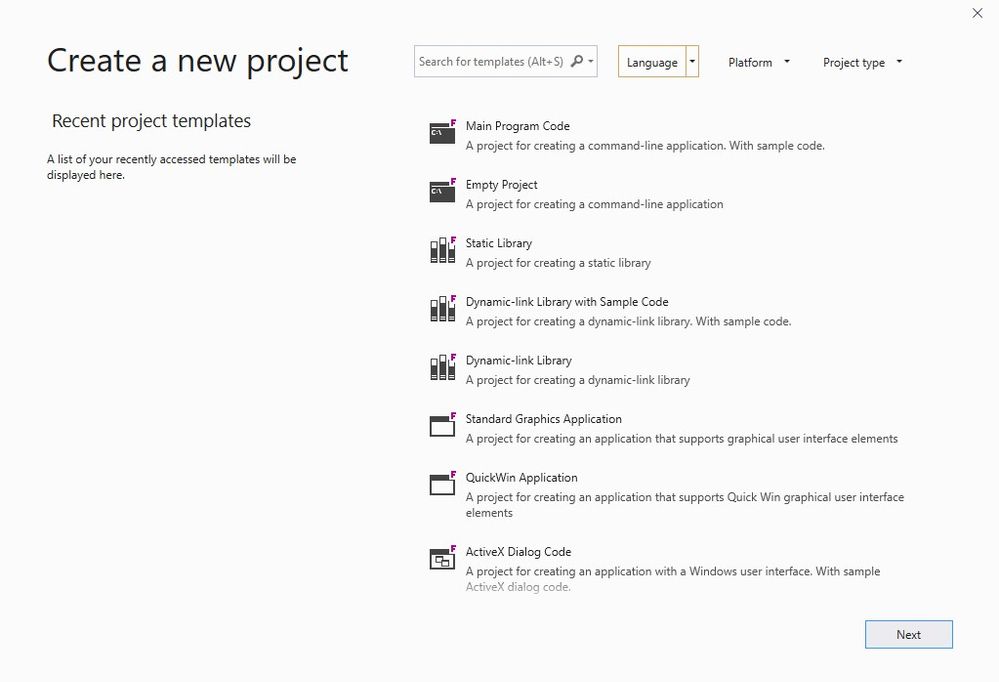
This is better in the "2020" beta (compiler 19.1), where Fortran shows in the language dropdown. Look for the project icons with the F in the upper right corner.
