
- Mark as New
- Bookmark
- Subscribe
- Mute
- Subscribe to RSS Feed
- Permalink
- Report Inappropriate Content
In my debug version or even release where I specify line numbers, can I access a specific line number during execution? + I want towrite a bit of debugging so I can tell what line number I'm on when an error occurs -- maybe not a bad error -- just some error. I've tried to put in line numbers using the editor but as I add or delete things the numbers are off. I remember in the old days, IBM's FORTRAN IV had something that got compiled into a statement that referred to the line number.
Thanks,
Brooks Van Horn

- Mark as New
- Bookmark
- Subscribe
- Mute
- Subscribe to RSS Feed
- Permalink
- Report Inappropriate Content
I am not sure if this is what you asked for, but the __LINE__ macro can be used as a member of an I/O list if the /fpp compiler option is used:
write(*,*)' Line number: ',__LINE__
You can add any other I/O list items that you think useful, and you can specify your own format if you wish.
Link Copied

- Mark as New
- Bookmark
- Subscribe
- Mute
- Subscribe to RSS Feed
- Permalink
- Report Inappropriate Content
No, but you can call TRACEBACKQQ to get a traceback at any point in the program (needs to be compiled with /traceback in order to get source location.)
- Mark as New
- Bookmark
- Subscribe
- Mute
- Subscribe to RSS Feed
- Permalink
- Report Inappropriate Content
I am not sure if this is what you asked for, but the __LINE__ macro can be used as a member of an I/O list if the /fpp compiler option is used:
write(*,*)' Line number: ',__LINE__
You can add any other I/O list items that you think useful, and you can specify your own format if you wish.
- Mark as New
- Bookmark
- Subscribe
- Mute
- Subscribe to RSS Feed
- Permalink
- Report Inappropriate Content
The macro is defined in gFortran, C, and C++ but not IVF. I looked for it in IntelSWTools and below but the macro is not defined. Steve's suggestion is impractical in my case, Nut, Steve, can we get the source to TRACEBACKQQ or at least the structure that it uses for obtaining the traceback?
Steve,
I've also uncovered a bug that I don't know will also be in the 2017 version. Here it is:
character(60):: buffer
write(buffer,'(a,2x,sp,es15.7)') 'hello', 3.14159
gice a runtime error but
write(buffer,100) 'Hello', 3.14159
100 format(a, 2x, sp, es15.7)
works as designed.
I don't know how to report bugs.
Brooks
- Mark as New
- Bookmark
- Subscribe
- Mute
- Subscribe to RSS Feed
- Permalink
- Report Inappropriate Content
Sorry Steve, thay was But, Steve. Not NUT
- Mark as New
- Bookmark
- Subscribe
- Mute
- Subscribe to RSS Feed
- Permalink
- Report Inappropriate Content
Brooks Van Horn wrote:
The macro is defined in gFortran, C, and C++ but not IVF. I looked for it in IntelSWTools and below but the macro is not defined.
With the current release (16.0.3), I see that __LINE__ is defined, but only if you use the C-style pre-processor option /fpp. Here is a short test program:
program xbvh
implicit none
integer i,j
do i=10,20
   j=i*i-13*i+12
   if(j.eq.0)then
      write(*,*)' j = 0 for i = ',i,' at line ',__LINE__
   end if
end do
end program
Compiling with /fpp and running gives:
j = 0 for i = 12 at line 7
As for the other bug that you named, i.e., "write(buffer,'(a,2x,sp,es15.7)') 'hello', 3.14159", I see no error with IFort 16.0.3. I think that you need to state the compiler version, the OS version, and the compiler options that you used.
- Mark as New
- Bookmark
- Subscribe
- Mute
- Subscribe to RSS Feed
- Permalink
- Report Inappropriate Content
We have to fill out all that info when we submit these forum comments -- they should be made available to respondees. But here goes... I'm running Win 10 Ent with an Intel i7-4770 wit at 3.4GHz with 32GB RAM and 2 TB HD and the OS on a 150GB SSD. I am using MSVS 2013 freeby with the Intel Parallel Studio XE edition (2016) using the Update 3.
 Build Log
 Build started: Project: PDC, Configuration: Debug|x64

windir=C:\WINDOWS
__iflSearch=C:\Program Files (x86)\IntelSWTools\compilers_and_libraries_2016\windows\bin\Intel64;C:\Program Files (x86)\Microsoft Visual Studio 12.0\Common7\ide;C:\Program Files (x86)\Microsoft Visual Studio 12.0\VC\bin\amd64;C:\Program Files (x86)\Microsoft Visual Studio 12.0\VC\bin;C:\Program Files (x86)\Microsoft Visual Studio 12.0\Common7\Tools;C:\Program Files (x86)\Microsoft Visual Studio 12.0\Common7\Tools\bin;C:\Windows\Microsoft.NET\Framework\v4.0.30319;C:\Program Files (x86)\Windows Kits\8.1\bin\x86;D:\Intel\TamperProtectionToolkit_0.2.0\bin\win-x86_64;C:\Program Files (x86)\Common Files\Intel\Shared Libraries\redist\intel64_win\mpirt;C:\Program Files (x86)\Common Files\Intel\Shared Libraries\redist\intel64_win\compiler;C:\Program Files (x86)\Common Files\Intel\Shared Libraries\redist\ia32_win\mpirt;C:\Program Files (x86)\Common Files\Intel\Shared Libraries\redist\ia32_win\compiler;C:\Program Files (x86)\Intel\iCLS Client\;C:\Program Files\Intel\iCLS Client\;C:\WINDOWS\system32;C:\WINDOWS;C:\WINDOWS\System32\Wbem;C:\WINDOWS\System32\WindowsPowerShell\v1.0\;C:\Program Files\Intel\Intel(R) Management Engine Components\DAL;C:\Program Files (x86)\Intel\Intel(R) Management Engine Components\DAL;C:\Program Files\Intel\Intel(R) Management Engine Components\IPT;C:\Program Files (x86)\Intel\Intel(R) Management Engine Components\IPT;C:\Program Files\IDM Computer Solutions\UltraEdit;C:\Program Files\Microsoft SQL Server\110\Tools\Binn\;C:\Program Files\Microsoft SQL Server\120\Tools\Binn\;C:\Program Files (x86)\Windows Kits\8.1\Windows Performance Toolkit\;C:\Program Files (x86)\Skype\Phone\;C:\Program Files\IDM Computer Solutions\UltraCompare;C:\Program Files (x86)\Windows Kits\10\Windows Performance Toolkit\;D:\Simply_Fortran\mingw-w64\bin;D:\Simply_Fortran\mingw-w64\x86_64-w64-mingw32\lib32;D:\Simply_Fortran\mingw-w64\x86_64-w64-mingw32\lib64;C:\Program Files (x86)\Microsoft SDKs\TypeScript\1.0\;C:\Program Files\IDM Computer Solutions\UltraFinder;c:\dislin\win

Output

Compiling with Intel(R) Visual Fortran Compiler 16.0 [Intel(R) 64]...
ifort /nologo /debug:minimal /Od /Qipo /Qdiag-error-limit:100 /stand:f90 /Qdiag-disable:6413 /warn:none
 /Qsave /Qinit:zero /fp:precise /fp:except /fpconstant /assume:minus0 /Qfp-stack-check /module:"x64\Debug\\"
 /object:"x64\Debug\\" /Fd"x64\Debug\vc120.pdb" /list:"x64\Debug\ChkReg.lst" /traceback /check:bounds
 /check:uninit /check:format /check:output_conversion /check:arg_temp_created /check:stack /libs:dll /threads
 /dbglibs /winapp /c /Qlocation,link,"C:\Program Files (x86)\Microsoft Visual Studio 12.0\VC\\bin\amd64"
 "C:\Users\Brooks\Desktop\Projects\Pearson\Pearson\ChkReg.f90"
C:\Program Files (x86)\IntelSWTools>ifort
Intel(R) Visual Fortran Intel(R) 64 Compiler for applications running on Intel(R) 64, Version 16.0.0.110 Build 20150815
Copyright (C) 1985-2015 Intel Corporation. All rights reserved.
- Mark as New
- Bookmark
- Subscribe
- Mute
- Subscribe to RSS Feed
- Permalink
- Report Inappropriate Content
You are missing one essential option (for the present issue): /fpp . This is the option that I mentioned in #3 and #6. Unless it is specified, C-style pre-processor directives are unlikely to work.
- Mark as New
- Bookmark
- Subscribe
- Mute
- Subscribe to RSS Feed
- Permalink
- Report Inappropriate Content
OK, I used your program and got this:
1>------ Build started: Project: test, Configuration: Debug Win32 ------
1>Compiling with Intel(R) Visual Fortran Compiler 16.0 [IA-32]...
1>Source1.f90
1>C:\Users\Brooks\Desktop\Projects\test\test\Source1.f90(7): error #5192: Lead underscore not allowed
1>C:\Users\Brooks\Desktop\Projects\test\test\Source1.f90(7): error #6404: This name does not have a type, and must have an explicit type. [__LINE__]
1>compilation aborted for C:\Users\Brooks\Desktop\Projects\test\test\Source1.f90 (code 1)
1>
1>Build log written to "file://C:\Users\Brooks\Desktop\Projects\test\test\Debug\BuildLog.htm"
1>test - 3 error(s), 0 warning(s)
========== Build: 0 succeeded, 1 failed, 0 up-to-date, 0 skipped ==========
See attachment for options selected.
Brooks

- Mark as New
- Bookmark
- Subscribe
- Mute
- Subscribe to RSS Feed
- Permalink
- Report Inappropriate Content
Instead of using the Write Statement can you pass the LINE data to a subroutine - would be useful for debugging the large matrix generators
!****************************************************************************
    !
    !  PROGRAM: LineNumbers
    !
    !  PURPOSE:  Entry point for the console application.
    !
    !****************************************************************************

    program LineNumbers

    implicit none

    integer i,j
    do i=10,20
        j=i*i-13*i+12
        if(j.eq.0)then
            write(*,*)' j = 0 for i = ',i,' at line ',__LINE__

        end if

    end do


    end program LineNumbers
- Mark as New
- Bookmark
- Subscribe
- Mute
- Subscribe to RSS Feed
- Permalink
- Report Inappropriate Content
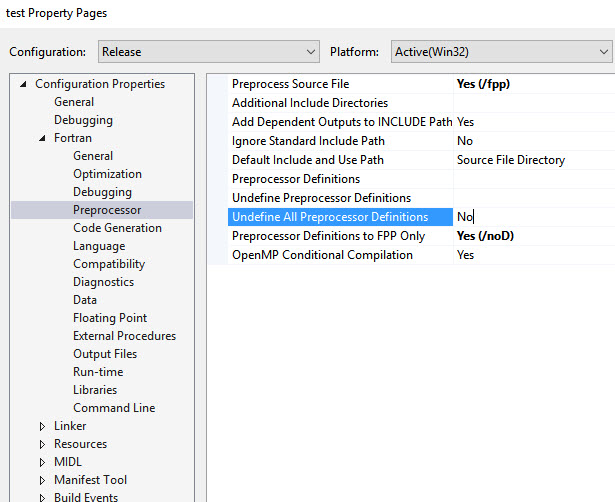
The output shown in #9 is for a Debug-Win32 configuration, whereas the screenshot is for a Release-Win32 configuration.
Please check if you have the same /fpp option specified in the Debug-Win32 configuration, or do a build in the Release configuration. If it still fails, please attach the resulting Buildlog.htm file.

- Mark as New
- Bookmark
- Subscribe
- Mute
- Subscribe to RSS Feed
- Permalink
- Report Inappropriate Content
mecej4 wrote:
You are missing one essential option (for the present issue): /fpp . This is the option that I mentioned in #3 and #6. Unless it is specified, C-style pre-processor directives are unlikely to work.
It works for me with /fpp, brooks, just a guess do you have C installed in VS?
- Mark as New
- Bookmark
- Subscribe
- Mute
- Subscribe to RSS Feed
- Permalink
- Report Inappropriate Content
John Nichols wrote:
Instead of using the Write Statement can you pass the LINE data to a subroutine - would be useful for debugging the large matrix generators.
We may be drifting off-topic here, but here is the answer to your question: the output of a pre-processor is what gets handed to the compiler for compiling (and linking, perhaps). Therefore, as long as your pre-processor outputs valid Fortran code, it can do anything that it is capable of. For example, you may have a Cobol->Fortran preprocessor (there are plenty of reasons why such a preprocessor may be unlikely to exist, but let us save a discussion of that for another day). The NAG Fortran compiler converts F2003/F2008 input code to C, which is then compiled by GCC.
program xbvh
implicit none
integer i,j,k
character(60):: buffer
!
write(buffer,'(a,2x,sp,es15.7)') 'hello', 3.14159
write(*,*)buffer
!
do i=10,20
   j=i*i-13*i+12
   if(j.eq.0)then
      k= __LINE__ * __LINE__
	  call prlin(k)
   end if
end do
end program

subroutine prlin(i)
implicit none
integer, intent(in) :: i
integer l
l=sqrt(i*1.000001)-2
write(*,*)' Line number where problem occurred was ',l
return
end subroutine
- Mark as New
- Bookmark
- Subscribe
- Mute
- Subscribe to RSS Feed
- Permalink
- Report Inappropriate Content
John, di the above compile and run without errors?
Brooks

- Mark as New
- Bookmark
- Subscribe
- Mute
- Subscribe to RSS Feed
- Permalink
- Report Inappropriate Content
RE: #9 --- the screen shot shows a RELEASE configuration, but the error messages show a DEBUG configuration.
The other clue is that the error messages are referencing "source1.f90", but the intermediate file created by the FPP utility has the ".i90" file extension.
--Lorri
- Mark as New
- Bookmark
- Subscribe
- Mute
- Subscribe to RSS Feed
- Permalink
- Report Inappropriate Content
Yes it ran and complied for me - make sure you tick the box for FPP in the preprocessor page on the properties tab.
I only run in debug as I am the only one who uses this usually
John
- Mark as New
- Bookmark
- Subscribe
- Mute
- Subscribe to RSS Feed
- Permalink
- Report Inappropriate Content
Thanks to all. I got it to work!!!
Brooks

- Subscribe to RSS Feed
- Mark Topic as New
- Mark Topic as Read
- Float this Topic for Current User
- Bookmark
- Subscribe
- Printer Friendly Page