
- 신규로 표시
- 북마크
- 구독
- 소거
- RSS 피드 구독
- 강조
- 인쇄
- 부적절한 컨텐트 신고
Quickwin GETSTRQQ or simply READ(5,*) causes program crash using Intel Fortran 2020 compiler.
As soon as this code is encountered program will crash within a second. Error message is 0xc0000005
THis method of getting keyboard input has been used for years and works fine with previous version of INTEL compiler (2011 version).
What has changed and what is fix to use simple keyboard input to a Quickwin program?
- 신규로 표시
- 북마크
- 구독
- 소거
- RSS 피드 구독
- 강조
- 인쇄
- 부적절한 컨텐트 신고
Steve and Andrew: I have now upgraded to compiler 2021.11.0 and I now can see the IFORT and IFX options for the 64 bit. So, now recompiling the test program above in 32 and 64 bit, now there is no longer a crash for either case. However now the cursor is missing in the dialog box! I'll take the non crashing compile version above and move forward and have made this change to my original software and it is now working fine (except for the cursor). It looks like the crash is compiler version specific. Thanks very much for your help. FSXXX
링크가 복사됨

- 신규로 표시
- 북마크
- 구독
- 소거
- RSS 피드 구독
- 강조
- 인쇄
- 부적절한 컨텐트 신고
If you could post a small test program the reproduces the issue you will get a better response. We could speculate on a thousand reason why it might fail.

- 신규로 표시
- 북마크
- 구독
- 소거
- RSS 피드 구독
- 강조
- 인쇄
- 부적절한 컨텐트 신고
we will need the compiler version. You can add compiler option -V to get that.
Also, we need to know which version of Visual Studio: Help, About can give the details of the version and update numbers.
- 신규로 표시
- 북마크
- 구독
- 소거
- RSS 피드 구독
- 강조
- 인쇄
- 부적절한 컨텐트 신고
Visual Fortran Compiler 19.1.3.311
Microsoft Visual Studio Professional 2019
Version 16.11.22
Problem does not occur when GETSTRQQ is called in Main before DO WHILE(.TRUE.) is called.
Problem occurs when GETSTRQQ is called from a dialog box. Thanks.

- 신규로 표시
- 북마크
- 구독
- 소거
- RSS 피드 구독
- 강조
- 인쇄
- 부적절한 컨텐트 신고
Please provide a sample program that demonstrates the problem. Attach the source file to a reply here.
- 신규로 표시
- 북마크
- 구독
- 소거
- RSS 피드 구독
- 강조
- 인쇄
- 부적절한 컨텐트 신고
Here is Qwickwin program that shows the problem. When compiled and run with 2019 version referenced above, it crashes.
When compiled and run with 2011 version it works correctly as it has for years. Thanks, FSXXX
- 신규로 표시
- 북마크
- 구독
- 소거
- RSS 피드 구독
- 강조
- 인쇄
- 부적절한 컨텐트 신고
Thanks for that. Your sample needs to declare the variable CURSOR as INTEGER*2, and there was also a warning about the long string assigned to SETUPNAME, but these don't affect the problem.
What I see is a floating point assertion (not error) in the call to GETSTRQQ inside SETUPFLUIDS, but only in a 64-bit configuration; 32-bit (using IFORT) is fine. The Intel folk will have to investigate further, but you can continue for now by right clicking on the project, selecting Intel Compiler > IFORT.
- 신규로 표시
- 북마크
- 구독
- 소거
- RSS 피드 구독
- 강조
- 인쇄
- 부적절한 컨텐트 신고
Steve, Thanks for that. I see the program will run on 64 bit and that is good to see.
I have searched for where to declare IFORT but am not given any place in my installation either under Tools/Intel COmpilers etc (just latest and 19.1.3.311 or under Intel Compiler or in the Properties / General. I am missing something. Thanks, FSXXX
- 신규로 표시
- 북마크
- 구독
- 소거
- RSS 피드 구독
- 강조
- 인쇄
- 부적절한 컨텐트 신고
I will get the team to look at this problem. Thank you for producing QWin_Keyboard_main.for. I've changed the declaration of CURSOR as Steve advised. We'll use that as our reproducer.

- 신규로 표시
- 북마크
- 구독
- 소거
- RSS 피드 구독
- 강조
- 인쇄
- 부적절한 컨텐트 신고

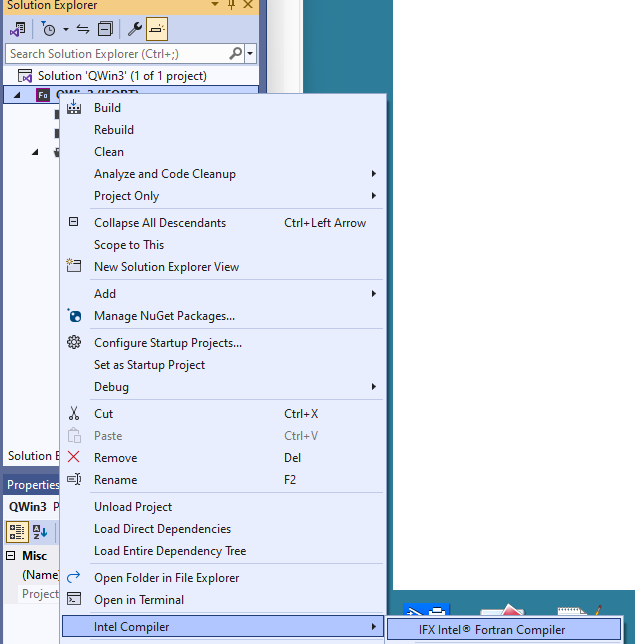
What Steve was saying was right click the Fn button and down the bottom of the menu you can change Intel Compilers. No idea why they hid it in an obscure spot, but then again it is findable.
- 신규로 표시
- 북마크
- 구독
- 소거
- RSS 피드 구독
- 강조
- 인쇄
- 부적절한 컨텐트 신고
JohnNichols: That option does not show up for me. Don't see any way to change this except as I note above. So if there is a workaround I am trying to implement it somehow but don't see what you have done. Any more ideas? Thanks, FSXXX
- 신규로 표시
- 북마크
- 구독
- 소거
- RSS 피드 구독
- 강조
- 인쇄
- 부적절한 컨텐트 신고
In solution explorer right click on the project, it pops a menu, "Intel Compilers" is an option on it.
- 신규로 표시
- 북마크
- 구독
- 소거
- RSS 피드 구독
- 강조
- 인쇄
- 부적절한 컨텐트 신고
andrew_4619: I have "Intel Compiler" but there is no compiler option there in my setup. THere are other things like Guided Parallelism Code Coverage but no compiler options. Thanks, FSXXX
- 신규로 표시
- 북마크
- 구독
- 소거
- RSS 피드 구독
- 강조
- 인쇄
- 부적절한 컨텐트 신고
Reading back up your thread what Fortran version are you using I see 2020, why not use a current version. Does your version even have IFX installed?
- 신규로 표시
- 북마크
- 구독
- 소거
- RSS 피드 구독
- 강조
- 인쇄
- 부적절한 컨텐트 신고
What I wrote was that the error occurs in 64-bit mode, but not 32-bit. Change the configuration to 32-bit, and it will automatically switch to ifort. However, this is NOT an ifx vs. ifort issue, but 32-bit vs. 64-bit. I admit I don't understand what that assert error is about, but that's what they pay the Intel folk for.
That said, if you are in a 64-bit configuration, you can right click on the project and select Intel Compiler to switch between IFX and IFORT.
- 신규로 표시
- 북마크
- 구독
- 소거
- RSS 피드 구독
- 강조
- 인쇄
- 부적절한 컨텐트 신고
Steve and Andrew: I have now upgraded to compiler 2021.11.0 and I now can see the IFORT and IFX options for the 64 bit. So, now recompiling the test program above in 32 and 64 bit, now there is no longer a crash for either case. However now the cursor is missing in the dialog box! I'll take the non crashing compile version above and move forward and have made this change to my original software and it is now working fine (except for the cursor). It looks like the crash is compiler version specific. Thanks very much for your help. FSXXX
