Intel® Fortran Compiler
Build applications that can scale for the future with optimized code designed for Intel® Xeon® and compatible processors.
29348 Discussions

Recurring Visual Studio -> Exception from HRESULT: 0x80040200

TommyNorthAL
Beginner
7,801 Views

I don't know if I have missed something, but I get this IDE exception very often (dozens of times per day) when I try to build a solution and the only remedy is to close the solution and reopen it. Anything else and the exception just repeats, and compilation is not possible. It is not even possible to use clean at this point.

Visual Studio 17.3.6, IFORT 2021.7.0 Build 20220726_000000

I tried completely uninstalling Intel Fortran and reinstalling it, but this doesn't help.

Visual Studio with IFORT is working great except for this.

What little I have been able to search out on this from Visual Studio side says this is not a VS issue but is from the integration. It shows in the Build Output window so I assume it is coming from IFORT or the integration with VS. The IFORT command line build still works fine.

I just am coming up empty finding any mention of the problem from IFORT side, so just asking is this an individual issue.

Labels (1)
0 Kudos
13 Replies
jimdempseyatthecove
Honored Contributor III
7,796 Views

Can you post the Build Log? (when error occurs)

Jim Dempsey


0 Kudos
TommyNorthAL
Beginner
7,788 Views

BuildLog.htm doesn't get updated with this exception.

The Build window in Visual Studio shows:

Build started...
1>Error: Exception from HRESULT: 0x80040200
========== Build: 0 succeeded, 1 failed, 0 up-to-date, 0 skipped ==========

and that's it.

I appreciate any advice as to where to look further.

0 Kudos
Steve_Lionel
Honored Contributor III
7,780 Views

In Visual Studio, what does it say for Intel Fortran Compiler when you do Help > About? That particular error is a COM error, so yeah, the Fortran integration could be involved. I haven't seen this reported before.

Can you create and build a new sample project without the error, or is it only this one solution?

0 Kudos
TommyNorthAL
Beginner
7,774 Views

It is any solution, not just the one.  I created just a simple one and built it and it threw after about the third compile. The Build Log just shows the previous build, no errors, worked fine. Then when I select Rebuild, in this case, it immediately throws exception.

If this is unusual, not experienced by others, should I completely uninstall Visual Studio and Fortran and start over? It would not be difficult, and I am not currently using the C# stuff so I can install clean C++ Desktop with Fortran and see if there is a conflict that gets resolved. Maybe my installation, over time, is at fault; it has changed a bit in the last couple months.

Output window:

Rebuild started...
1>Error: Exception from HRESULT: 0x80040200
========== Rebuild All: 0 succeeded, 1 failed, 0 skipped ==========

About Visual Studio:

Microsoft Visual Studio Community 2022
Version 17.3.6
VisualStudio.17.Release/17.3.6+32929.385
Microsoft .NET Framework
Version 4.8.09032

Installed Version: Community

Visual C++ 2022 00482-90000-00000-AA550
Microsoft Visual C++ 2022

ASP.NET and Web Tools 17.3.376.3011
ASP.NET and Web Tools

Azure App Service Tools v3.0.0 17.3.376.3011
Azure App Service Tools v3.0.0

C# Tools 4.3.0-3.22470.13+80a8ce8d5fdb9ceda4101e2acb8e8eb7be4ebcea
C# components used in the IDE. Depending on your project type and settings, a different version of the compiler may be used.

Intel® Fortran Compiler Package ID: w_oneAPI_2022.2.0.9540
Intel® Fortran Compiler – toolkit version: 2022.3.0, extension version 22.0.0068.17, Package ID: w_oneAPI_2022.2.0.9540, Copyright © 2002-2022 Intel Corporation. All rights reserved.
* Other names and brands may be claimed as the property of others.

Microsoft JVM Debugger 1.0
Provides support for connecting the Visual Studio debugger to JDWP compatible Java Virtual Machines

Microsoft MI-Based Debugger 1.0
Provides support for connecting Visual Studio to MI compatible debuggers

NuGet Package Manager 6.3.0
NuGet Package Manager in Visual Studio. For more information about NuGet, visit https://docs.nuget.org/

Test Adapter for Boost.Test 1.0
Enables Visual Studio's testing tools with unit tests written for Boost.Test. The use terms and Third Party Notices are available in the extension installation directory.

Test Adapter for Google Test 1.0
Enables Visual Studio's testing tools with unit tests written for Google Test. The use terms and Third Party Notices are available in the extension installation directory.

Visual Basic Tools 4.3.0-3.22470.13+80a8ce8d5fdb9ceda4101e2acb8e8eb7be4ebcea
Visual Basic components used in the IDE. Depending on your project type and settings, a different version of the compiler may be used.

Visual Studio IntelliCode 2.2
AI-assisted development for Visual Studio.

0 Kudos
FortranFan
Honored Contributor III
7,742 Views

@TommyNorthAL ,

See this thread at this forum: https://community.intel.com/t5/Intel-Fortran-Compiler/Integrate-C-DLL-in-Fortran-Code/m-p/1411688/highlight/true#M162662

If you look at the bottom of the comment there, you will find a zip file with a sample Visual Studio solution with two projects, one toward a (unmanaged i.e., native) C++ DLL and another for a calling Fortran program.  You can try to download the zip, extract the files to a folder, give it a try with your version of Visual Studio 2022 and Intel Fortran 2021.7, and see if even this project gives you the HRESULT exception error.  I was the author of that sample Visual Studio solution who put it together to help another reader here.  

Now I just retried that solution on a workstation running v17.3.5 of Visual Studio 2022 and Intel Fortran 2021.7 and I did NOT get any errors from Visual Studio or Intel Fortran's COM modules or any other component at all, each time it worked as expected.

So if you get errors with the solution in the above zip file, chances are high it is something with installation / setup that may be conflicting or throwing an exception and in which case, uninstalling, cleaning the environment, and reinstalling might be the way to go.  But now if you don't get errors with the the solution in the above zip file after repeated attempts, the issue may be elsewhere with your C# solution or some such.  Just some food for thought with things you can try.

0 Kudos
TommyNorthAL
Beginner
7,723 Views

Thanks. I downloaded it and it worked fine. My problem does not usually occur immediately, so I made changes or just cleaned the build and rebuilt it, and after about a dozen iterations I got the exception.  I am going to try a clean install starting with VS and then Fortran and see if that helps.

Thanks everyone for suggestions.

0 Kudos
TommyNorthAL
Beginner
7,708 Views

I did a complete removal of VS and Fortran and reinstalled fresh. As I understand the instructions, I installed VS with C++ Desktop workflow and then installed Fortran.

Same problem recurred within less than 10 builds later. It occurs on all projects, so I don't think it is project related. Are there components of build, which is where it happens, that are outside the scope of installing VS that might be at fault? 

Appreciate any advice. Otherwise I'll just live with it for a while.

0 Kudos
jimdempseyatthecove
Honored Contributor III
7,703 Views

You may have something goofy in your DLL load path(s) such than an old/incorrect DLL is being loaded. What may be of interest is to determine which DLL's are loaded by VS during build.

From: https://stackoverflow.com/questions/11953960/log-dlls-loaded-by-a-process

You may write your own tool, which will use "debugging" features. This tool must

  1. Start new process suspended
  2. Attach to created process as debugger
  3. Process debugging events, as I remember, you need LOAD_DLL_DEBUG_EVENT

http://msdn.microsoft.com/en-us/library/windows/desktop/ms679302(v=vs.85).aspx


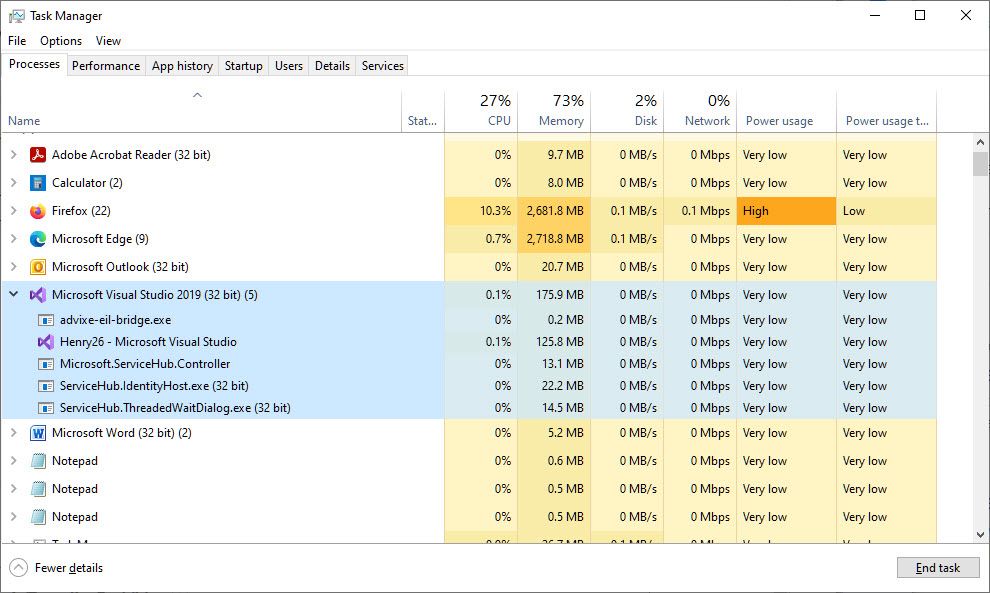
Note, MS VS starts multiple processes:

2022-10-31_10-58-23.jpg

Note 5 processes. It is unclear as to which one would be throwing the error. Start with the... - Microsoft Visual Studio process.

Jim Dempsey

0 Kudos
TommyNorthAL
Beginner
7,627 Views

I appreciate the advice on this.  FYI, I think the advice that something in my system was messed up was apropos.  I took the opportunity to do a complete clean reinstall of windows and everything, and that seems to have cleaned the problem. There are elements used by Visual Studio/Intel Fortran that are obviously not installed by those packages. I have it back working well now, appreciate all the advice.

0 Kudos
jimdempseyatthecove
Honored Contributor III
274 Views

Windows did an update last night and 0x80040200 is back.

The error occurs in one project in a solution with 25 projects.

@Steve_Lionel Has your Windows system performed an update and are now experiencing the same error?

The probability of this may be low as this occurs in on project out of 25 (with 100's of source files).


The first issue noticed this morning was:

1) Noticed new background and not signed in (I leave system signed in and MS VS open)

2) Sign in

3) Wait for re-opening of programs that it can, one of which is MS VS

4) MS-VS requests to recover last file I was editing (apparently I did not save this), I request recover

5) I add a few  more lines to the program

6) I try a Build all, MS VS hangs on the re-compile of the just edited file

7) Cancel Build

Try Compile of just the offending source, hangs, but no Cancel Compile option, Issue Build, Cancel Build to get back to IDE edit mode

In various permutations of the above the Build completes, but with one error: 0x80040200


I will experiment on how to get out of this mess.


Jim Dempsey

0 Kudos
jimdempseyatthecove
Honored Contributor III
257 Views

I have the build worked out. The problem has gone away, as to if this is fixed or not - who knows.


The problematic issue relates to a subroutine with contains procedures .AND. where a contained procedure has a forward reference to another procedure in the same contains section. By changing the order of the contained procedures the problem goes away;

subroutine foo()
 ...
contains
subroutine fooA()
 ...
 call fooB() ! this forward reference seems to cause the hang
 ...
end subroutine fooA()

subroutine fooB()
 ...
end subroutine fooB
end subroutine foo

Jim Dempsey

0 Kudos
jimdempseyatthecove
Honored Contributor III
255 Views

BTW

I've had other contains procedures in other procedures with forward references without error.

In the hanging case, I've also had an undeclared variable in the forward referenced procedure.

This may be a convergence issue in the compiler to resolve forward referenced procedures and where the forward referenced procedures won't compile. IOW the forward referenced procedures with in a contains is an infinate loop that does not break on error.


Jim Dempsey

0 Kudos
Steve_Lionel
Honored Contributor III
247 Views

I have not seen a problem with a fully updated Windows and VS.

0 Kudos
Reply