
- Mark as New
- Bookmark
- Subscribe
- Mute
- Subscribe to RSS Feed
- Permalink
- Report Inappropriate Content
Link Copied

- Mark as New
- Bookmark
- Subscribe
- Mute
- Subscribe to RSS Feed
- Permalink
- Report Inappropriate Content
Hi Yiling,
Sorry that the MFX decode/encode metric is not showing up for you.
Are you trying to view the metric with system analyzer or the HUD? Are you using "analyze application" or using the automatic detection to find the application?
While you are getting back to me about that, I will test a couple things on my end to see if I can reproduce this issue.
Best,
Seth
- Mark as New
- Bookmark
- Subscribe
- Mute
- Subscribe to RSS Feed
- Permalink
- Report Inappropriate Content
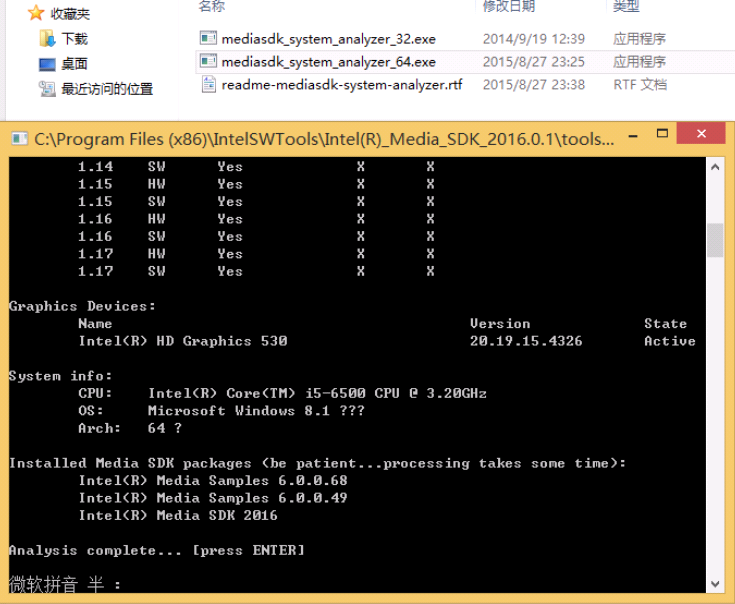
- Mark as New
- Bookmark
- Subscribe
- Mute
- Subscribe to RSS Feed
- Permalink
- Report Inappropriate Content
- Mark as New
- Bookmark
- Subscribe
- Mute
- Subscribe to RSS Feed
- Permalink
- Report Inappropriate Content
Hi Yiling,
Thanks for the detailed reproduction steps. I am working with another engineer on the GPA on this. I'll keep you up to date on the status.
Best,
Seth
- Mark as New
- Bookmark
- Subscribe
- Mute
- Subscribe to RSS Feed
- Permalink
- Report Inappropriate Content
Hi Yiling,
We just released a new version of GPA that had some media fixes in it. Could you please try the new version of GPA (2015 R4)?
Let me know if you are still seeing zero!
Best,
Seth
- Mark as New
- Bookmark
- Subscribe
- Mute
- Subscribe to RSS Feed
- Permalink
- Report Inappropriate Content
Hi Yiling,
We found out that this is an issue when rendering with DX11, if you use the DX9 render path you should be able to see metrics. A fix is currently in progress. I'll post back here when the issue has been resolved
Best,
Seth
- Mark as New
- Bookmark
- Subscribe
- Mute
- Subscribe to RSS Feed
- Permalink
- Report Inappropriate Content
Hi Seth, has there been any progress?
as you say, i try it using D3D to decode,but get same reslut.
command line:
sample_decode h265 -i 3_CrowdRun_1080p50_speed.h265 -p 33a61c0b4c27454ca8d85dde757c6f8e -hw -d3d -f 60 -wall 2 1 1 0 1 100000
- Mark as New
- Bookmark
- Subscribe
- Mute
- Subscribe to RSS Feed
- Permalink
- Report Inappropriate Content
Hi Yiling,
Using the GPA 2016 R1 version I am not able to reproduce this issue using the -d3d command. Are you still using 15.3 or have you upgraded?
Seth
- Mark as New
- Bookmark
- Subscribe
- Mute
- Subscribe to RSS Feed
- Permalink
- Report Inappropriate Content

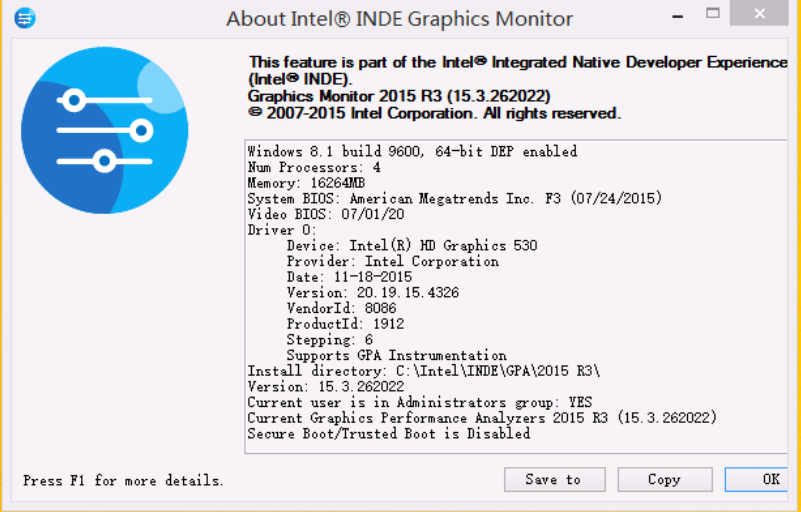


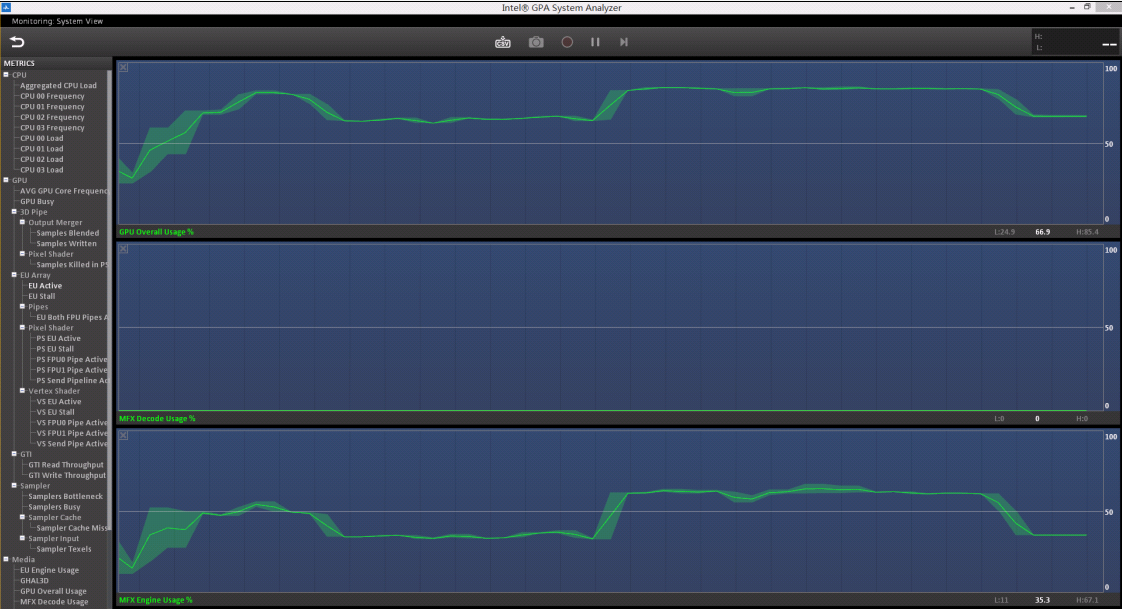
- Mark as New
- Bookmark
- Subscribe
- Mute
- Subscribe to RSS Feed
- Permalink
- Report Inappropriate Content
Hi,
Has this been resolved? I am also seeing this problem and I am running GPA 2016 R1 and Intel Media SDK R2.
sample_decode.exe h264 -i 720p.h264 -o amp.yuv -hw -d3d shows 0.0 % decode usage
sample_decode.exe h264 -i 720p.h264 -o amp.yuv -hw -d3d11 shows 0.0 % decode usage
MFX Engine Usage goes up some percentage but decode is always zero.
CPU info:
Intel(R) HD Graphics 530
Driver Version: 20.19.15.4444
Operating System: Windows* 10 Pro (10.0.10586)
Physical Memory: 16168 MB
Vendor ID: 8086
Device ID: 1912
Device Revision: 06
Video BIOS: 1024.3
// Carl
- Mark as New
- Bookmark
- Subscribe
- Mute
- Subscribe to RSS Feed
- Permalink
- Report Inappropriate Content
Hi Carl, Yiling,
I'm sorry but this has still not been resolved. Engineering is still working on a solution, but let me see what I can do to expedite the process.
Thank you for your patience!
Best,
Seth

- Subscribe to RSS Feed
- Mark Topic as New
- Mark Topic as Read
- Float this Topic for Current User
- Bookmark
- Subscribe
- Printer Friendly Page