
- Mark as New
- Bookmark
- Subscribe
- Mute
- Subscribe to RSS Feed
- Permalink
- Report Inappropriate Content
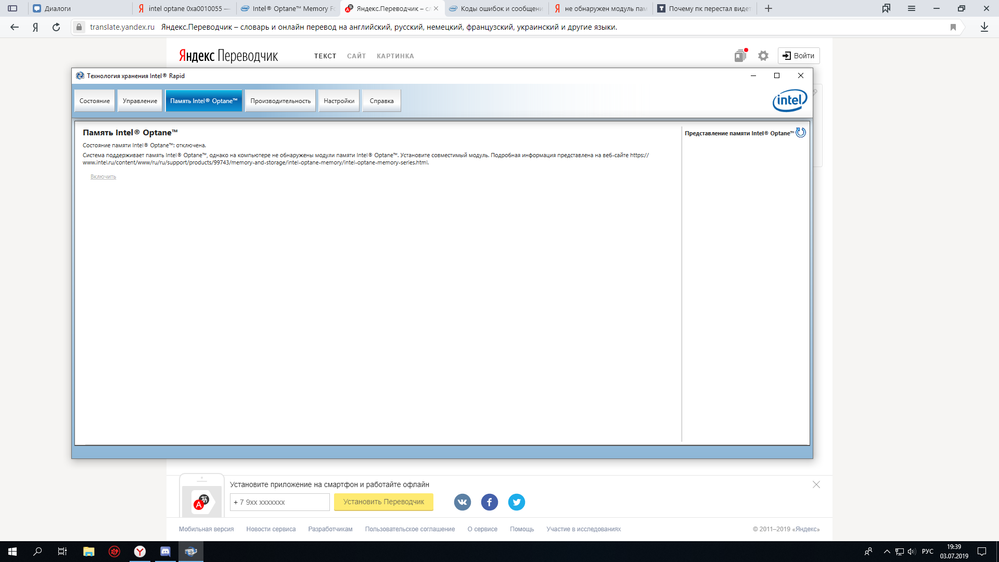
The program does not see the intel optane memory module, I changed the M2 slots, but still in programs for Intel Optane gives an error that does not see the memory module Intel Optane, although it is written that the system is suitable for Intel Optane

- Mark as New
- Bookmark
- Subscribe
- Mute
- Subscribe to RSS Feed
- Permalink
- Report Inappropriate Content
Hello @PSmir2 ,
- Be careful how to change the SATA mode. In order to have your system bootable, before changing SATA mode, you have to set your Windows into SAFE mode.
- While in Windows, press Windows key + r. Run msconfig
- Chose Boot tab and check Safe boot. Reboot your system. Windows should boot in SAFE mode.
- Now you may enter bios and change the SATA mode. Disregard the Warning you will get while booting to Windows.
- While in Windows, press Windows key + r. Run msconfig
- Chose Boot tab and uncheck Safe boot. Reboot your system. Windows should boot in Normal mode.
Leon
Link Copied

- Mark as New
- Bookmark
- Subscribe
- Mute
- Subscribe to RSS Feed
- Permalink
- Report Inappropriate Content
Ok, what is your device model number and manufacturer?
Do you know if it supports Optane?
What is your processor model number?
Did you correctly set the proper SATA mode in the BIOS?
What Operating system and version are you running? Windows 10 1903? Other?
Doc
- Mark as New
- Bookmark
- Subscribe
- Mute
- Subscribe to RSS Feed
- Permalink
- Report Inappropriate Content
its results SSU, if you need anything else, tell me what
- Mark as New
- Bookmark
- Subscribe
- Mute
- Subscribe to RSS Feed
- Permalink
- Report Inappropriate Content
Ok, let us try this again:
Do you know if it supports Optane?
Did you correctly set the proper SATA mode in the BIOS?
Rather than make me do the research, you tell me if your device supports optane.
Doc
- Mark as New
- Bookmark
- Subscribe
- Mute
- Subscribe to RSS Feed
- Permalink
- Report Inappropriate Content
motherboard supports intel optane, how to check if I set SATA mode correctly in BIOS
- Mark as New
- Bookmark
- Subscribe
- Mute
- Subscribe to RSS Feed
- Permalink
- Report Inappropriate Content
Ah, how to check the bios... I do not know as I do not have that board. You need to look in the bios for your sata mode. It should have AHCI, RAID, and INTEL RST as the modes. To use Optane, you need to use INTEL RST.
Now, the bigger question - what will happen to your boot drive if you change the sata mode? You may have to reinstall the OS. So, backup the drive and any data before you proceed.
Also, it would not hurt to make certain you are at the latest bios level.
Doc
- Mark as New
- Bookmark
- Subscribe
- Mute
- Subscribe to RSS Feed
- Permalink
- Report Inappropriate Content
- Mark as New
- Bookmark
- Subscribe
- Mute
- Subscribe to RSS Feed
- Permalink
- Report Inappropriate Content
Hello @PSmir2 ,
- Be careful how to change the SATA mode. In order to have your system bootable, before changing SATA mode, you have to set your Windows into SAFE mode.
- While in Windows, press Windows key + r. Run msconfig
- Chose Boot tab and check Safe boot. Reboot your system. Windows should boot in SAFE mode.
- Now you may enter bios and change the SATA mode. Disregard the Warning you will get while booting to Windows.
- While in Windows, press Windows key + r. Run msconfig
- Chose Boot tab and uncheck Safe boot. Reboot your system. Windows should boot in Normal mode.
Leon

- Subscribe to RSS Feed
- Mark Topic as New
- Mark Topic as Read
- Float this Topic for Current User
- Bookmark
- Subscribe
- Printer Friendly Page