
- Mark as New
- Bookmark
- Subscribe
- Mute
- Subscribe to RSS Feed
- Permalink
- Report Inappropriate Content

- Mark as New
- Bookmark
- Subscribe
- Mute
- Subscribe to RSS Feed
- Permalink
- Report Inappropriate Content
This issue has been resolved and we will no longer respond to this thread. If you require additional assistance from Intel, please start a new thread. Any further interaction in this thread will be considered community only
Link Copied
- Mark as New
- Bookmark
- Subscribe
- Mute
- Subscribe to RSS Feed
- Permalink
- Report Inappropriate Content
Do you see the problem with some specific routine description or everywhere?
- Mark as New
- Bookmark
- Subscribe
- Mute
- Subscribe to RSS Feed
- Permalink
- Report Inappropriate Content
Everywhere. All code boxes are stretched-out much more that required.
- Mark as New
- Bookmark
- Subscribe
- Mute
- Subscribe to RSS Feed
- Permalink
- Report Inappropriate Content
hmm, I don't see the problem on my end: win10, Chrome (Version 84.0.4147.105 (Official Build) (64-bit)).
- Mark as New
- Bookmark
- Subscribe
- Mute
- Subscribe to RSS Feed
- Permalink
- Report Inappropriate Content
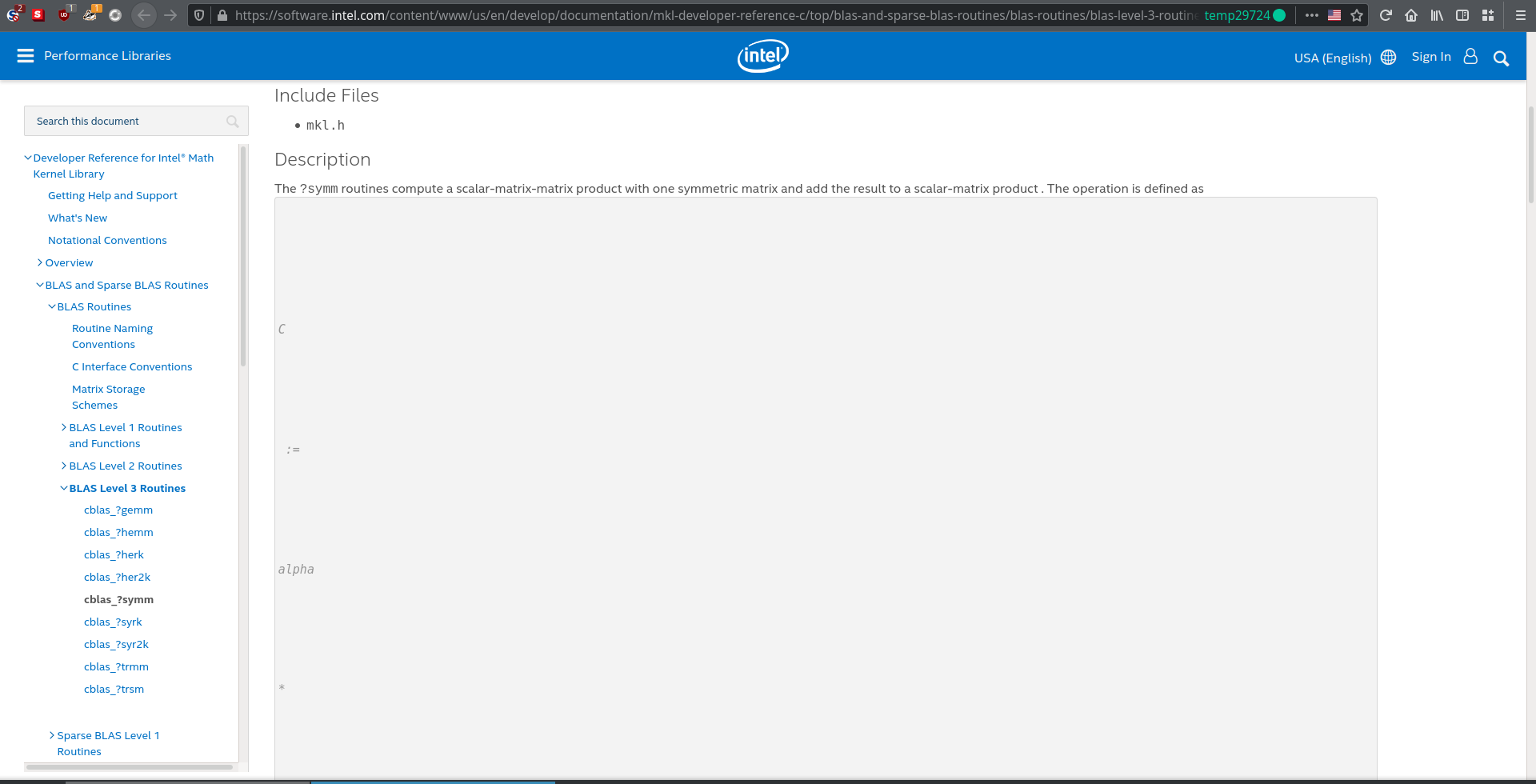
I am pretty sure this is an issue with the HTML in the website, because I reported it to webcompat, and they tested it with a few other browsers and found the same issue. Take a look:

- Mark as New
- Bookmark
- Subscribe
- Mute
- Subscribe to RSS Feed
- Permalink
- Report Inappropriate Content
Gennady, I see the problem that Vishnu reported with all the browsers that I have: Edge, Firefox, Chrome and Opera. Please open the link
and scroll down to the code box after "Description". You will see the code box almost empty, with only a few characters near the left edge of the box.
- Mark as New
- Bookmark
- Subscribe
- Mute
- Subscribe to RSS Feed
- Permalink
- Report Inappropriate Content
thanks, mecej4! That's strange, it works on my side, but I asked my team to check the issue and they confirmed the same issue as you and Vishnu reported. We will ask our technical writers to check the problem on their side.
- Mark as New
- Bookmark
- Subscribe
- Mute
- Subscribe to RSS Feed
- Permalink
- Report Inappropriate Content
here is what I hear from our IT persons: they are aware of this issue and they recommend "If users are still experiencing the issue, please ask them to clear cache and verify the issue is persistent. "
- Mark as New
- Bookmark
- Subscribe
- Mute
- Subscribe to RSS Feed
- Permalink
- Report Inappropriate Content
I tried that. It does not seem to change anything, and the issue does persist.
Also, folks who've never opened this website before have reported this issue, so it is unlikely that is the cause.
- Mark as New
- Bookmark
- Subscribe
- Mute
- Subscribe to RSS Feed
- Permalink
- Report Inappropriate Content
I always clear cache after logging into the Intel site, and that does not resolve the issue. The problem regarding the MKL documentation is still very much present.

- Mark as New
- Bookmark
- Subscribe
- Mute
- Subscribe to RSS Feed
- Permalink
- Report Inappropriate Content
- Mark as New
- Bookmark
- Subscribe
- Mute
- Subscribe to RSS Feed
- Permalink
- Report Inappropriate Content
Maybe try clearing your cache?
But either way, lots of people have independently verified that this problem exists, so I hope that is not still in question. It would be really nice if the folks in-charge of maintaining the documentation website could look into why this is happening.
- Mark as New
- Bookmark
- Subscribe
- Mute
- Subscribe to RSS Feed
- Permalink
- Report Inappropriate Content
May be for you, but for many of us, including me (I just checked after clearing cache and refreshing page on Chrome, Edge and Opera), it is still a major problem.

- Mark as New
- Bookmark
- Subscribe
- Mute
- Subscribe to RSS Feed
- Permalink
- Report Inappropriate Content
I don't see any problem with the link mentioned above. However, I do see problem with link:
on both explorer and chrome.
- Mark as New
- Bookmark
- Subscribe
- Mute
- Subscribe to RSS Feed
- Permalink
- Report Inappropriate Content
The issue seems to be fixed now, with all code-boxes displaying properly for me. @mecej4 Can you check if it is okay for you too? If so, then there was something fixed by the folks maintaining the website.
- Mark as New
- Bookmark
- Subscribe
- Mute
- Subscribe to RSS Feed
- Permalink
- Report Inappropriate Content
Yes, the problems have gone away and we appear to be back to normal again.
Thanks to the people who got the problem taken care of.
- Mark as New
- Bookmark
- Subscribe
- Mute
- Subscribe to RSS Feed
- Permalink
- Report Inappropriate Content
This issue has been resolved and we will no longer respond to this thread. If you require additional assistance from Intel, please start a new thread. Any further interaction in this thread will be considered community only
- Mark as New
- Bookmark
- Subscribe
- Mute
- Subscribe to RSS Feed
- Permalink
- Report Inappropriate Content
The problem is back again today (30 August 2020). See, for example, https://software.intel.com/content/www/us/en/develop/documentation/mkl-developer-reference-fortran/top/blas-and-sparse-blas-routines/sparse-blas-level-2-and-level-3-routines/routines-and-supported-operations.html
and look at the text in the box after "computing the vector product between a sparse matrix and a dense vector".
The problem can be seen in Chrome and Edge on Windows.

- Subscribe to RSS Feed
- Mark Topic as New
- Mark Topic as Read
- Float this Topic for Current User
- Bookmark
- Subscribe
- Printer Friendly Page