
- Mark as New
- Bookmark
- Subscribe
- Mute
- Subscribe to RSS Feed
- Permalink
- Report Inappropriate Content
I went back to an earlier version (VS 2010) which does the Fortran source code routines fine -
But I still cannot make it attach an entry point routine in the MKL library.
Steve mentioned an option in the LINKER (project properties) to tell it to attach the MKL library,
but for some reason, that option is not available (at least not to me), I cant find it anywhere.
are you saying I should give up on Visual Studio entirely ?
I was kinda commited to using that for program development and debugging up till now - - - -
Link Copied
- Mark as New
- Bookmark
- Subscribe
- Mute
- Subscribe to RSS Feed
- Permalink
- Report Inappropriate Content
BTW, this appears to be more of a problem with Visual studio that it is with the MKL library,
but I could not find a forum for using Visual Studio per se.
Is that addressed anywhere ?
- Mark as New
- Bookmark
- Subscribe
- Mute
- Subscribe to RSS Feed
- Permalink
- Report Inappropriate Content
- Mark as New
- Bookmark
- Subscribe
- Mute
- Subscribe to RSS Feed
- Permalink
- Report Inappropriate Content
can I get paid support somewhere ?
I really need a straight answer from someone who is not guessing.

- Mark as New
- Bookmark
- Subscribe
- Mute
- Subscribe to RSS Feed
- Permalink
- Report Inappropriate Content
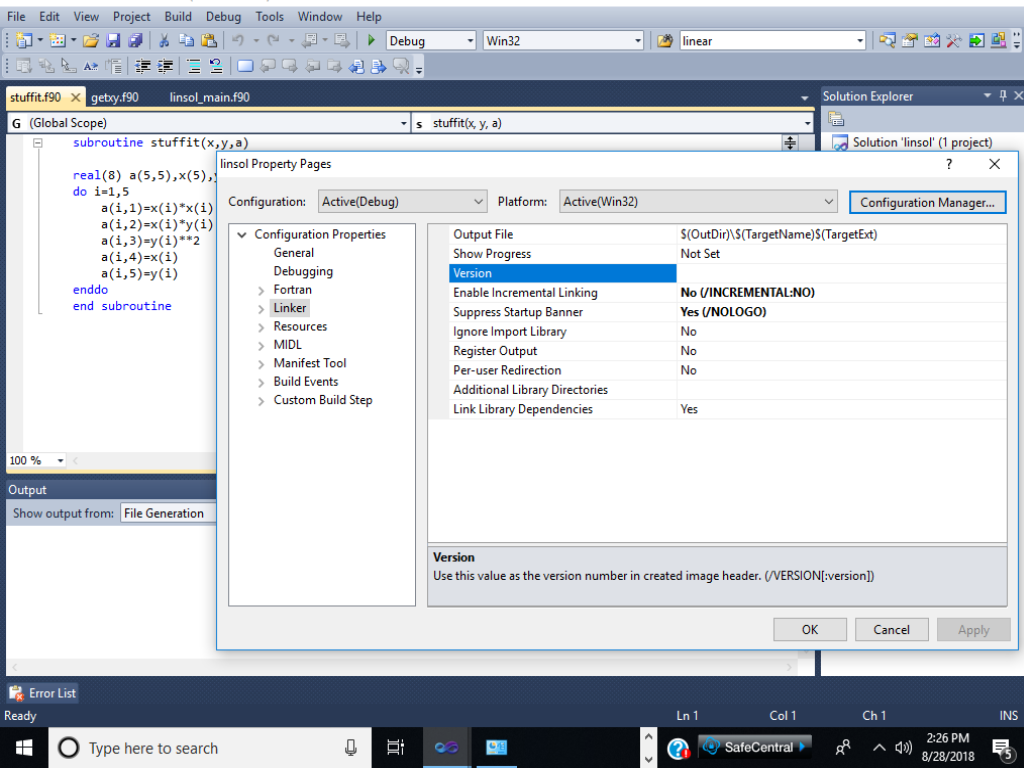
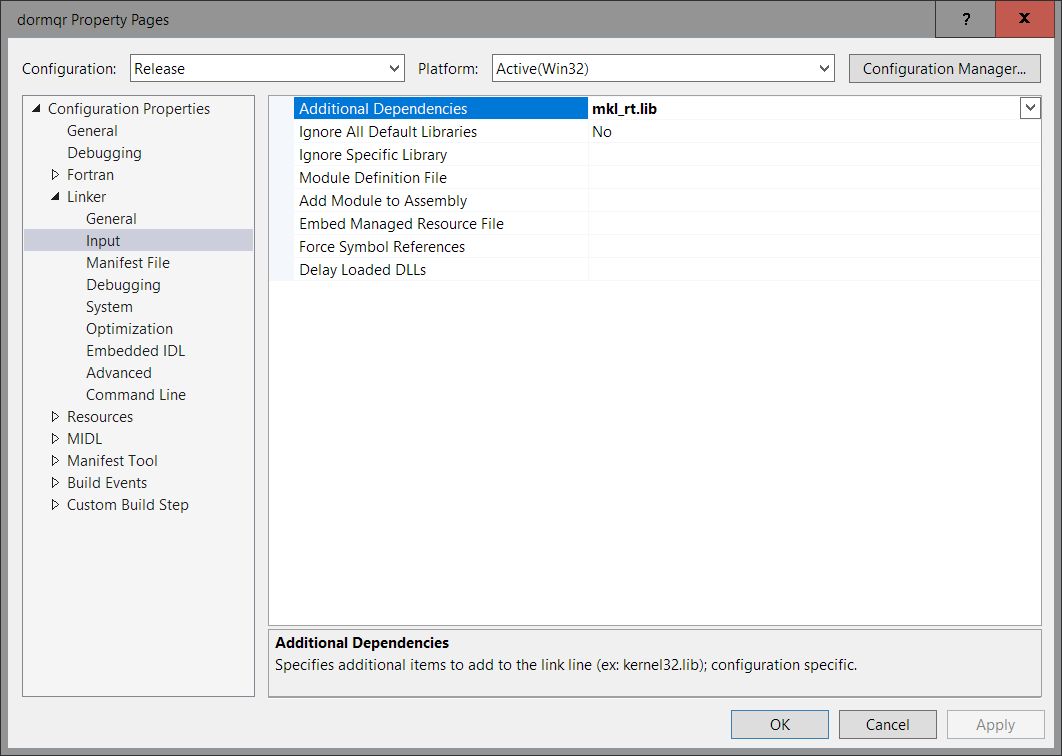
Your screenshot in #3 is the page for Linker → General. If you click on "Linker" you will cause the entry to be expanded; after "General", you will see "Input", click on "Input" (i.e., Linker→Input), and you will see a page where you can specify mkl_rt.lib as an additional dependency. That should make things work for you.
The attached screenshot is from VS2015, but VS2010's version should be similar.

- Mark as New
- Bookmark
- Subscribe
- Mute
- Subscribe to RSS Feed
- Permalink
- Report Inappropriate Content
Hi billsincl,
do you have option switch on in figure 1. in the article
https://software.intel.com/en-us/how-to-build-mkl-application-in-intel-visual-fotran-msvs ?
for example,
Open Project → Property Pages →Fortran → Libraries →Use Intel Math Kernel Library. Select the desired option, such as /Qmkl:parallel or /Qmkl:sequential. Once selected all of environment settings and required libraries are ready for your project. Proceed to build and run the application.
If no, you may follow the manual setting as the article.
.1. To add the include path manually refer to the MSVS* screenshot below. Open Project → Property Pages →Fortran →General. Type/Paste the library directory in the 'Additional Include Directories' field.
2. To add the library path manually refer to the MSVS* screenshot below. Open Project → Property Pages → Linker →General. Type/Paste the library directory in the 'Additional Library Directories' field.
Best Regards,
3. To add the required libraries manually refer to the MSVS* screenshot below. Open Project → Property Pages → Linker → Additional Dependencies. Paste the libraries from the Intel® Math Kernel Library Link Line Advisor.
Ying

- Subscribe to RSS Feed
- Mark Topic as New
- Mark Topic as Read
- Float this Topic for Current User
- Bookmark
- Subscribe
- Printer Friendly Page