
- Marcar como nuevo
- Favorito
- Suscribir
- Silenciar
- Suscribirse a un feed RSS
- Resaltar
- Imprimir
- Informe de contenido inapropiado
I have the windows 10 Version 10.0.14393 Build 14393 and the latest USB Chipset Driver Installed.
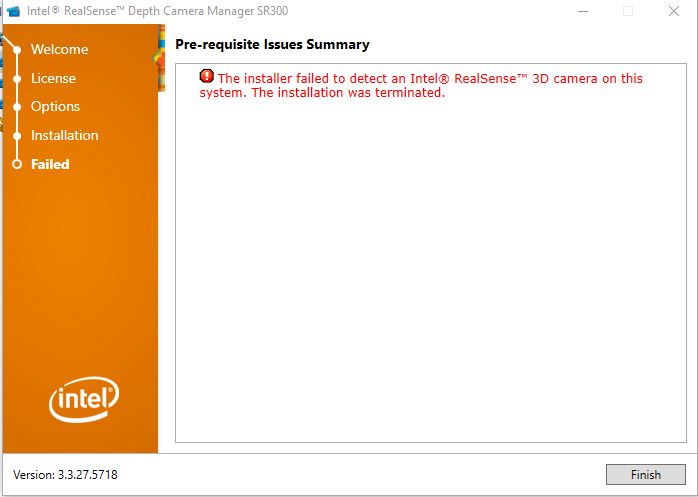
When I try to install the version DCM 3.3.27.5718, it keeps gives me the message:
"The installer failed to detect an Intel RealSense 3D camera on this system. The installation was terminated"
The Creative BlasterX Acoustic Engine Pro installed just fine and able to see the camera.
I have tried plug in different USB 3.0 ports but seems the results is the same.
Enlace copiado

- Marcar como nuevo
- Favorito
- Suscribir
- Silenciar
- Suscribirse a un feed RSS
- Resaltar
- Imprimir
- Informe de contenido inapropiado
You're issue may be related to this one:

- Marcar como nuevo
- Favorito
- Suscribir
- Silenciar
- Suscribirse a un feed RSS
- Resaltar
- Imprimir
- Informe de contenido inapropiado
Hi Wilson88Leung,
Do you still need assistance with this case? Were you able to install the DCM?
We'll be waiting for your response.
-Sergio
- Marcar como nuevo
- Favorito
- Suscribir
- Silenciar
- Suscribirse a un feed RSS
- Resaltar
- Imprimir
- Informe de contenido inapropiado
Yes, it is still the same. Nothing changed. Still not able to install the virtual driver.
- Marcar como nuevo
- Favorito
- Suscribir
- Silenciar
- Suscribirse a un feed RSS
- Resaltar
- Imprimir
- Informe de contenido inapropiado
We'll try to help you solve this issue so you can work with the SR300. First, it's important to check the requisites needed to install the DCM for the SR300.
The system requirements are the following:
6th Gen Intel® Core™ processor
Windows 10 Build 10586 or higher
Camera FW 3.17.0.0
Please confirm you're in compliance with these requisites.
The Depth and RGB devices appear under Imaging Devices?
After the previous requirements are met, you should be able to install the DCM for the SR300 from this website https://downloadcenter.intel.com/download/25044/Intel-RealSense-Depth-Camera-Manager https://downloadcenter.intel.com/download/25044/Intel-RealSense-Depth-Camera-Manager
Let us know your results.
-Sergio
- Marcar como nuevo
- Favorito
- Suscribir
- Silenciar
- Suscribirse a un feed RSS
- Resaltar
- Imprimir
- Informe de contenido inapropiado
Tried to download the 'Intel RealSense Depth Camera Manager SR300' and install, below is what I get.
-Wilson
- Marcar como nuevo
- Favorito
- Suscribir
- Silenciar
- Suscribirse a un feed RSS
- Resaltar
- Imprimir
- Informe de contenido inapropiado
Thanks for attaching the picture. Can you confirm that you're in compliance with the requisites posted in our previous reply? If the minimum requirements are not met then the DCM will not install properly.
If you've already checked this then the issue is probably because of the issue related to the link @Malvern_IT posted. That link pretty much says what's also reported here /message/447953# 447953 https://communities.intel.com/message/447953# 447953 . The link says that the RealSense and some Windows 10 builds have not been working properly. The fix is to use the build 15015.
Try this and let us know if you manage to install the DCM.
Regards,
Sergio
- Marcar como nuevo
- Favorito
- Suscribir
- Silenciar
- Suscribirse a un feed RSS
- Resaltar
- Imprimir
- Informe de contenido inapropiado
Yes, my system meet the minimum requirements.
Instead of build 15015, is there a hotfix that I can install on top of current build?

- Marcar como nuevo
- Favorito
- Suscribir
- Silenciar
- Suscribirse a un feed RSS
- Resaltar
- Imprimir
- Informe de contenido inapropiado
If you have automatic update installed in your update settings (in the Check For Updates window) then Windows will download and install fixes automatically as they are released, if they choose to release an individual patch for the issue. Apart from that, the only way to get a fix now may be to download the entire build.
Clicking the 'Update History' button on the Check For Updates window will list recent updates, telling you if a RealSense-related fix has been installed lately.
- Marcar como nuevo
- Favorito
- Suscribir
- Silenciar
- Suscribirse a un feed RSS
- Resaltar
- Imprimir
- Informe de contenido inapropiado
@Wilson88Leung-Yes, I agree with MartyG. For now, the best way to get a fix is using the build 15015. Let us know if there's anything else we can help you with.
@MartyG-Thanks for helping out!
-Sergio

- Suscribirse a un feed RSS
- Marcar tema como nuevo
- Marcar tema como leído
- Flotar este Tema para el usuario actual
- Favorito
- Suscribir
- Página de impresión sencilla