
- Mark as New
- Bookmark
- Subscribe
- Mute
- Subscribe to RSS Feed
- Permalink
- Report Inappropriate Content
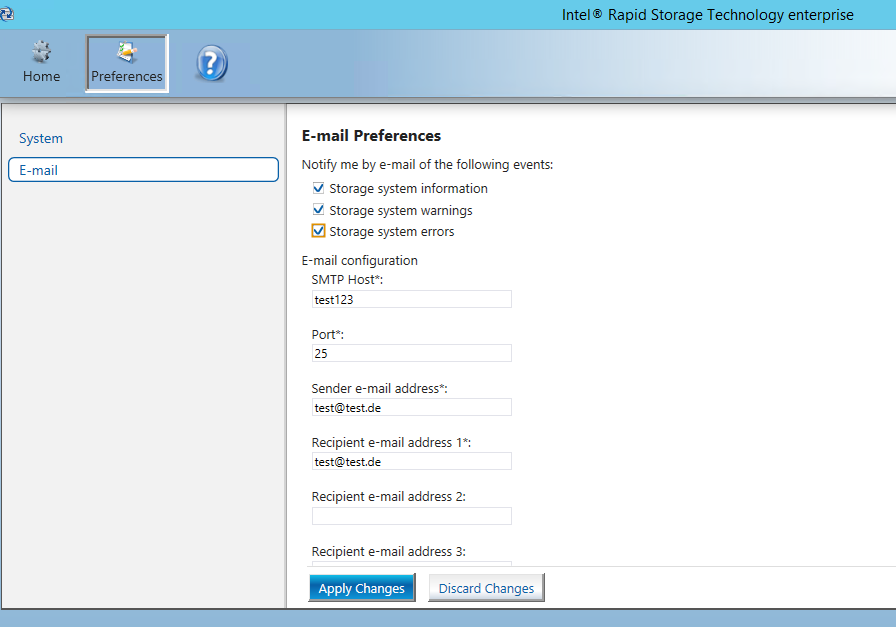
I'd like roll-out e-mail preferences of the RST tool (version 4.2.0) via a software distribution system (script based). But I couldn't figure out which configuration file or registry key is used to store these settings. Can somebody please help me to find the right location? Thanks
Link Copied
8 Replies

- Mark as New
- Bookmark
- Subscribe
- Mute
- Subscribe to RSS Feed
- Permalink
- Report Inappropriate Content
Hello febren,
Thank you for contacting Intel Communities.
Can you please provide the following information to better assist you?
Operating System:
Motherboard's brand and model number.
I hope to hear from you soon.
Regards,
Juan Carlos
- Mark as New
- Bookmark
- Subscribe
- Mute
- Subscribe to RSS Feed
- Permalink
- Report Inappropriate Content
Hello Juan Carlos,
it's Windows Storage Server 2012R2 running on:
Manufacturer Product SerialNumber VersionSupermicro X10SLH-F/X10SLM+-F 01234567891.01- Mark as New
- Bookmark
- Subscribe
- Mute
- Subscribe to RSS Feed
- Permalink
- Report Inappropriate Content
Hello febren,
Thank you for the information.
In this case, to avoid any major issues to the operating system, we don't recommend any changes in the registry.
Hopefully, any peer in the community will be able to give you any piece of advice.
Regards,
Juan Carlos
- Mark as New
- Bookmark
- Subscribe
- Mute
- Subscribe to RSS Feed
- Permalink
- Report Inappropriate Content
Hi Juan Carlos,
I understand that we need to do this on our own risk. But it would still be good to know where the RST email settings are stored. Thanks
- Mark as New
- Bookmark
- Subscribe
- Mute
- Subscribe to RSS Feed
- Permalink
- Report Inappropriate Content
Hello febren,
I will do my best to try to get the answer for you.
This post will be updated once I have further information.
Regards,
Juan Carlos
- Mark as New
- Bookmark
- Subscribe
- Mute
- Subscribe to RSS Feed
- Permalink
- Report Inappropriate Content
Hi febren,
Sorry for the delay.
I was running some tests and got the following for you:
The settings are stored in C:\Program Files (x86)\Common Files\Intel Corporation\IAStorUtil\SystemPreferences.xml
Bear in mind that the path may change depending on the folder you installed the IRSTe.
Hope this information helps.
Regards,
Juan Carlos
- Mark as New
- Bookmark
- Subscribe
- Mute
- Subscribe to RSS Feed
- Permalink
- Report Inappropriate Content
- Mark as New
- Bookmark
- Subscribe
- Mute
- Subscribe to RSS Feed
- Permalink
- Report Inappropriate Content
Hi febren,
I am glad to hear that.
Please don't hesitate in contacting us back if you need further assistance.
Regards,
JC

Reply
Topic Options
- Subscribe to RSS Feed
- Mark Topic as New
- Mark Topic as Read
- Float this Topic for Current User
- Bookmark
- Subscribe
- Printer Friendly Page