
- Mark as New
- Bookmark
- Subscribe
- Mute
- Subscribe to RSS Feed
- Permalink
- Report Inappropriate Content
- The App ID is "com.intel.appx.gobaby.xwalk10"
- The App Name is "AP Debug x10 gobaby"
- Application will be signed.
- Plugin "org.apache.cordova.device" (0.2.9) installed.
- Plugin "org.apache.cordova.splashscreen" (0.3.0) installed.
- Plugin "org.apache.cordova.camera" (0.2.9) installed.
- Plugin "org.apache.cordova.file" (1.3.3) installed.
- Plugin "cordova-plugin-geolocation" (1.0.1) installed.
- Plugin "com.intel.xdk.ppfa" (1.0) installed.
- Tags:
- HTML5
- Intel® XDK
Link Copied

- Mark as New
- Bookmark
- Subscribe
- Mute
- Subscribe to RSS Feed
- Permalink
- Report Inappropriate Content
I am having a similar issue +1

- Mark as New
- Bookmark
- Subscribe
- Mute
- Subscribe to RSS Feed
- Permalink
- Report Inappropriate Content
- Mark as New
- Bookmark
- Subscribe
- Mute
- Subscribe to RSS Feed
- Permalink
- Report Inappropriate Content
Another option to try is switching to CLI 4.1.2 rather than CLI 5.1.1 (or vice-versa) before building your debug module.

- Mark as New
- Bookmark
- Subscribe
- Mute
- Subscribe to RSS Feed
- Permalink
- Report Inappropriate Content
Matthew G, what's your app id? If you can share that we might be able to find the build log for it.

- Mark as New
- Bookmark
- Subscribe
- Mute
- Subscribe to RSS Feed
- Permalink
- Report Inappropriate Content
I am looking into the issue.
Can you do a test for me?
1 - Make a change (add and extra plugin), build again.
2 - Remove the extra plugin, build again.
Can you let me know what the results of that are?
Eric
- Mark as New
- Bookmark
- Subscribe
- Mute
- Subscribe to RSS Feed
- Permalink
- Report Inappropriate Content
@Shahab - this is log I'm getting:
- The App ID is "com.intel.appx.KendoUI.xwalk11"
- The App Name is "AP Debug x11 KendoUI"
- Application will be signed.
- Plugin "cordova-plugin-inappbrowser" (1.0.1) installed.
- Plugin "cordova-plugin-camera" (1.2.0) installed.
- Plugin "com.danielcwilson.plugins.googleanalytics" (0.6.1) installed.
- Plugin "cordova-plugin-file" (3.0.0) installed.
- Plugin "cordova-plugin-file-transfer" (1.2.1) installed.
- Plugin "cordova-plugin-device" (1.0.1) installed.
- Plugin "cordova-plugin-device-motion" (1.1.1) installed.
- Plugin "cordova-plugin-geolocation" (1.0.1) installed.
- Plugin "cordova-plugin-network-information" (1.0.1) installed.
- Plugin "cordova-plugin-splashscreen" (2.1.0) installed.
- Plugin "cordova-plugin-statusbar" (1.0.0) installed.
- Plugin "cordova-plugin-vibration" (1.2.0) installed.
- Plugin "com.intel.xdk.ppfa" (1.0) installed.
- Updated "package" to "com.intel.appx.KendoUI.xwalk11"
- App name updated to [AP Debug x11 KendoUI]
- Updated "minSdkVersion" with "14"
- Updated "targetSdkVersion" with "19"
- Updated "installLocation" to "auto"
- Updated "versionCode" to "1"
- Updated "versionName" to "0.0.1"
- Added "debuggable" to "false"
@Eric - Adding / removing a plugin does not produce any change in result
- Mark as New
- Bookmark
- Subscribe
- Mute
- Subscribe to RSS Feed
- Permalink
- Report Inappropriate Content
The debug module is built using Crosswalk. There is a known incompatibility with the newer version of the SplashScreen and Crosswalk. A call "webView.canGoBack()" is not currently in the Crosswalk API.
You can revert to an older version of the SplashScreen plugin (version 0.3.5) to get around the issue.
Eric
- Mark as New
- Bookmark
- Subscribe
- Mute
- Subscribe to RSS Feed
- Permalink
- Report Inappropriate Content
Matthew, did you try switching to CLLI 5.1.1?
- Mark as New
- Bookmark
- Subscribe
- Mute
- Subscribe to RSS Feed
- Permalink
- Report Inappropriate Content
I convert old project to new xdk version, then problem occurs.
My fix is to create a new project in new XDK version, then everything run.
thank everybody!
- Mark as New
- Bookmark
- Subscribe
- Mute
- Subscribe to RSS Feed
- Permalink
- Report Inappropriate Content
hi
I am facing issue like :
- Building a Cordova 5.4.1 Project Preview application with Crosswalk 18.
- Using platform cordova-android 5.0.0.
- The application name is "AP Debug x18 Gallery"
- The package name is "com.intel.appx.Gallery.xwalk18"
- Crosswalk version 18 is currently not supported in Project Preview for Applications.
Have any solution or suggestion
- Mark as New
- Bookmark
- Subscribe
- Mute
- Subscribe to RSS Feed
- Permalink
- Report Inappropriate Content
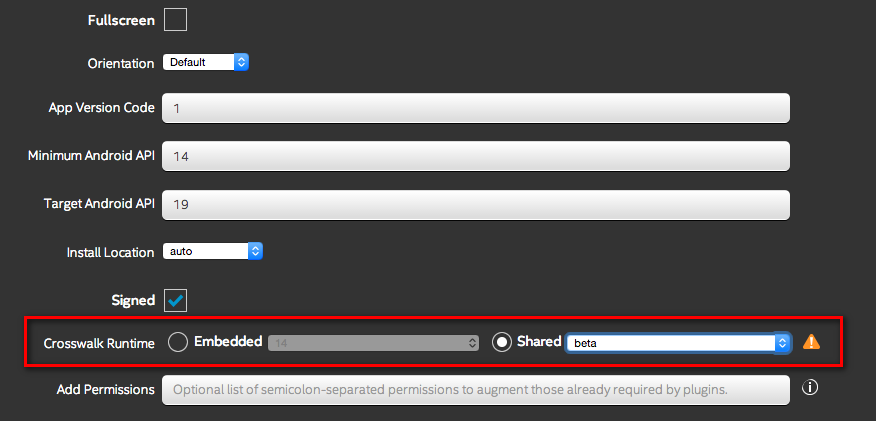
The Debug tab does not currently support building with CW18, this will be fixed with the next release. In the meantime, change your CW version in the Build Settings to CW17 and it should work.


- Mark as New
- Bookmark
- Subscribe
- Mute
- Subscribe to RSS Feed
- Permalink
- Report Inappropriate Content
I've never been able to use XDK Debug, it never worked for me. What I have done is to use Android Studio's logCat by filtering on error or info.

- Subscribe to RSS Feed
- Mark Topic as New
- Mark Topic as Read
- Float this Topic for Current User
- Bookmark
- Subscribe
- Printer Friendly Page