
- Mark as New
- Bookmark
- Subscribe
- Mute
- Subscribe to RSS Feed
- Permalink
- Report Inappropriate Content
Hi!
I am have some problems to setup and compile a code in Java using Eclipse. Someone can help to do an example, a simple example, step by step? There's some tutotial about it?
Thanks a lot
My best regards,
Eduardo.
Link Copied

- Mark as New
- Bookmark
- Subscribe
- Mute
- Subscribe to RSS Feed
- Permalink
- Report Inappropriate Content
Hi m8,
Before you configure eclipse create a folder, example: c:/rssdk/, and copy the libpxcclr.java, libpxcclr.jni32.dll and libpxcclr.jni64.dll from the RSSDK examples source.
In eclipse, create a user library which will point to the folder created previously. Then create a Java project, add the recently created lib into the build path. Copy one example from RSSDK into the project and execute, voilá!
good luck.
Regards.
- Mark as New
- Bookmark
- Subscribe
- Mute
- Subscribe to RSS Feed
- Permalink
- Report Inappropriate Content
Hi Rafael,
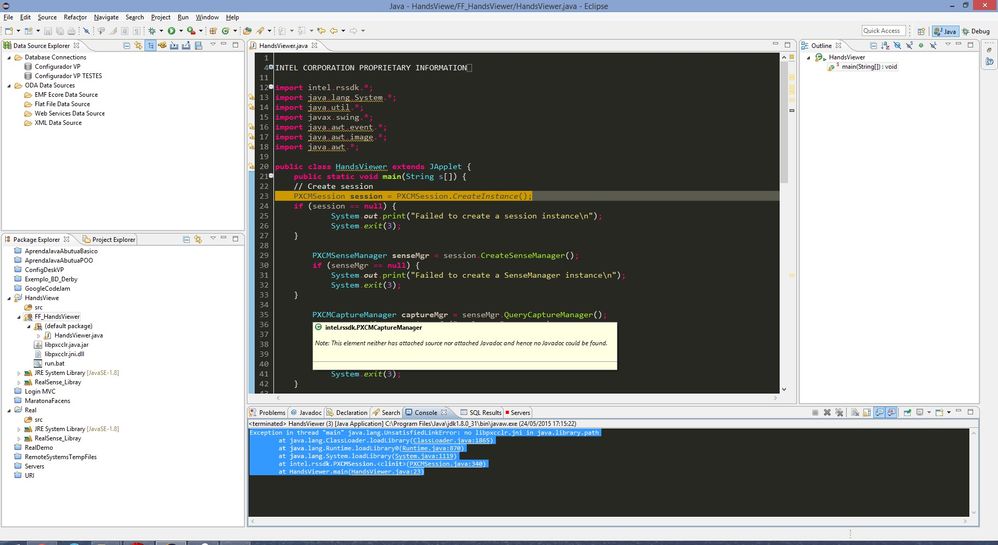
I follow your advice, but isn't work. Look the error that I receive:
Exception in thread "main" java.lang.UnsatisfiedLinkError: no libpxcclr.jni in java.library.path
at java.lang.ClassLoader.loadLibrary(ClassLoader.java:1865)
at java.lang.Runtime.loadLibrary0(Runtime.java:870)
at java.lang.System.loadLibrary(System.java:1119)
at intel.rssdk.PXCMSession.<clinit>(PXCMSession.java:340)
at HandsViewer.main(HandsViewer.java:23)
When I open the .class mentioned on the error text at intel.rssdk.PXCMSession.<clinit>(PXCMSession.java:340) I saw the code below:
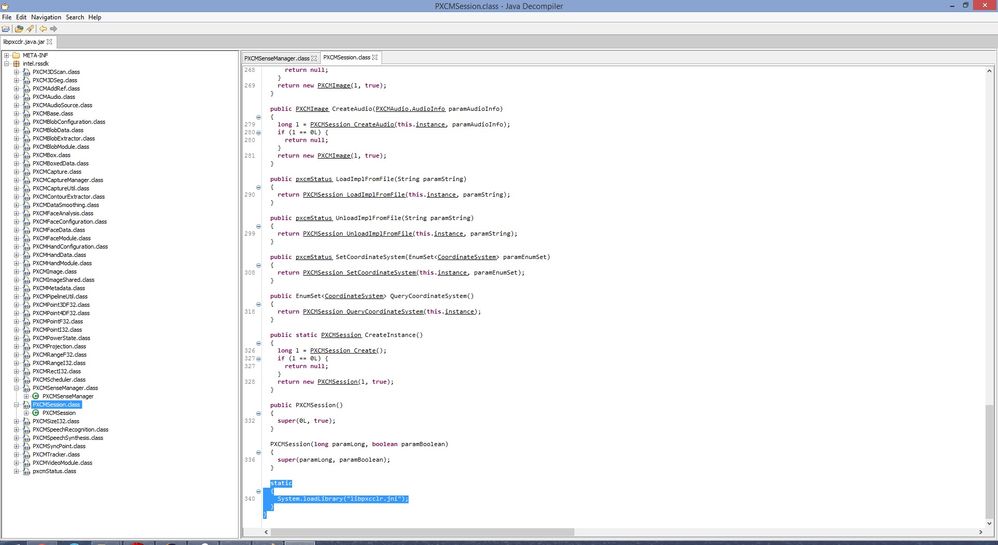
How can I fix this problem?
My best regards,
Eduardo

- Mark as New
- Bookmark
- Subscribe
- Mute
- Subscribe to RSS Feed
- Permalink
- Report Inappropriate Content
Hello Eduardo,
To fix this issue, please follow the below steps:
- Right click on the "JRE System Library" of your project, and click "Build Path" -> "Configure Build Path".
- Double click on "Native library location" which can be seen in the JRE System Library dropdown menu.
- Click on "Edit...", which will be the only button clickable in that general area.
- A file explorer will pop up. Navigate to the location of your *.dll and hit ok.
Thanks,
-MohanG

- Mark as New
- Bookmark
- Subscribe
- Mute
- Subscribe to RSS Feed
- Permalink
- Report Inappropriate Content

- Subscribe to RSS Feed
- Mark Topic as New
- Mark Topic as Read
- Float this Topic for Current User
- Bookmark
- Subscribe
- Printer Friendly Page