
- Mark as New
- Bookmark
- Subscribe
- Mute
- Subscribe to RSS Feed
- Permalink
- Report Inappropriate Content
hello
When I click a button and be connected to the Internet was faced with the message and not open page or sub page
Is there a way?
- Tags:
- HTML5
- Intel® XDK
Link Copied

- Mark as New
- Bookmark
- Subscribe
- Mute
- Subscribe to RSS Feed
- Permalink
- Report Inappropriate Content
Hello,
Is this on your phone or simulator? Android or iOS? Can you put a small sample so we understand how you do this?
Thank you
- Mark as New
- Bookmark
- Subscribe
- Mute
- Subscribe to RSS Feed
- Permalink
- Report Inappropriate Content
I want the internet to send an error message when no one is connecting and was pressing one of the buttons and then they face with the message which announces "you are not connected to the network " and the button won't work until you get connected
I want this application to be applied on android windows phone and iPhone
- Mark as New
- Bookmark
- Subscribe
- Mute
- Subscribe to RSS Feed
- Permalink
- Report Inappropriate Content
Check this plugin: https://cordova.apache.org/docs/en/latest/reference/cordova-plugin-network-information/
- Mark as New
- Bookmark
- Subscribe
- Mute
- Subscribe to RSS Feed
- Permalink
- Report Inappropriate Content
I installed the plugin but its task is only to notify.
I want it to notify when the button is pressed and it isn't connected to the network

- Mark as New
- Bookmark
- Subscribe
- Mute
- Subscribe to RSS Feed
- Permalink
- Report Inappropriate Content
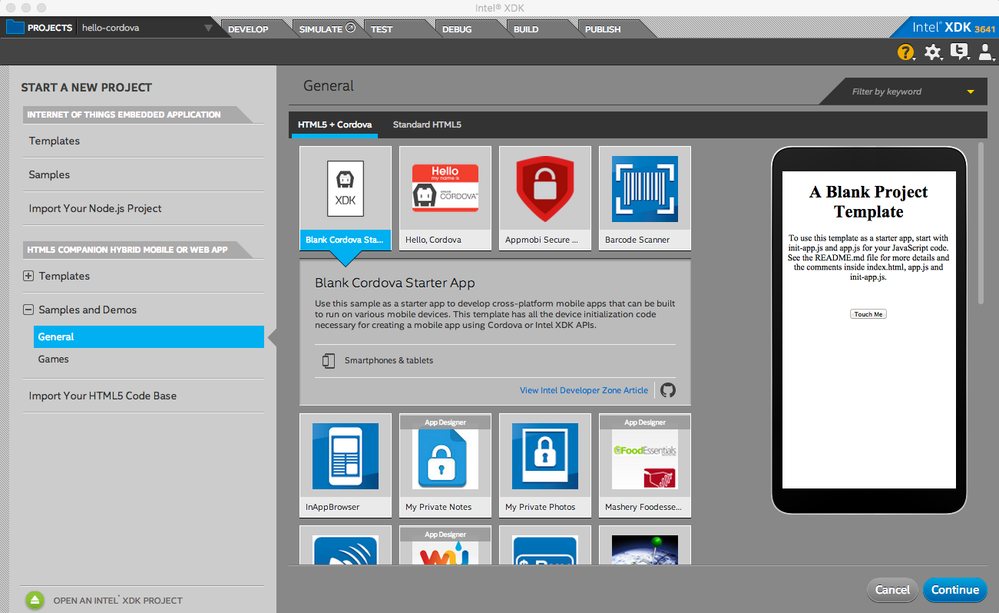
Ali -- you'll need to add some JavaScript logic on the button press to first detect your connection state before attempting to present your page. This requires that the "onclick" event associated with your button needs to point to a JavaScript function that you write to make these checks; rather than having it linked to an href (<a> tag). This sample contains a very simple illustration of what I mean > https://github.com/gomobile/template-blank-cordova-project < you can create a sample project from it by selecting the sample shown here:
- Mark as New
- Bookmark
- Subscribe
- Mute
- Subscribe to RSS Feed
- Permalink
- Report Inappropriate Content
thanks paul
i didn't get what you meant about javascript logic
could you clarify it ?
- Mark as New
- Bookmark
- Subscribe
- Mute
- Subscribe to RSS Feed
- Permalink
- Report Inappropriate Content
Please read this thread > https://software.intel.com/en-us/forums/intel-xdk/topic/696734#comment-1886932 <
- Mark as New
- Bookmark
- Subscribe
- Mute
- Subscribe to RSS Feed
- Permalink
- Report Inappropriate Content
paul
I was told that I did the description and actually install on my phone
But
Internet was cut off any alarm button did not
- Mark as New
- Bookmark
- Subscribe
- Mute
- Subscribe to RSS Feed
- Permalink
- Report Inappropriate Content
- Mark as New
- Bookmark
- Subscribe
- Mute
- Subscribe to RSS Feed
- Permalink
- Report Inappropriate Content
This means that no one really can not solve my problem? :(

- Mark as New
- Bookmark
- Subscribe
- Mute
- Subscribe to RSS Feed
- Permalink
- Report Inappropriate Content
Ali -
What Paul is saying is that your current button set up is using a link to notify - where you would NEED network connection to see. So, if you have no internet connection, your notification box that no connection is detected would not be made (as you, once again, need connection to make the notification). The only way to go around this is to create a JavaScript button, where you would have to hand code your button to check for internet connection and then create your own error. This is the part that you need to figure out.
We do not have the resources to walk you through how to create the internet connection check or how to create your notification, but the example Paul linked will help you create the button. You will then have to write the part that will check for internet connection and create a notification. I hope this makes a bit more sense.

- Subscribe to RSS Feed
- Mark Topic as New
- Mark Topic as Read
- Float this Topic for Current User
- Bookmark
- Subscribe
- Printer Friendly Page