
- Mark as New
- Bookmark
- Subscribe
- Mute
- Subscribe to RSS Feed
- Permalink
- Report Inappropriate Content
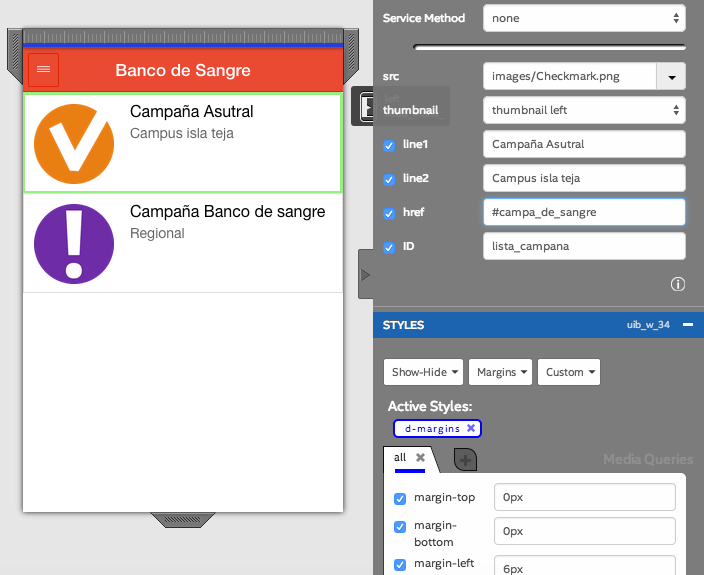
hi im building whit ionic as framework and i have some list "list item avatar" and i need them to link to other pages but i put in href "#otherpage" but it do nothing on emulator,
- Tags:
- HTML5
- Intel® XDK

- Mark as New
- Bookmark
- Subscribe
- Mute
- Subscribe to RSS Feed
- Permalink
- Report Inappropriate Content
For Ionic, an href isn't enough to go to a second page. The Ionic list items are not appearing in the Interactivity pane. This is fixed and will be available in the next release.
Fortunately, it is easy to work around.
1 - Add a button to your design.
2- In the Interactivity pane, link the button to the page you desire.
3 - Choose the button again in the Interactivity pane, and click the "Edit Script" button to go to its event handler. You'll see something like this there:
    /* button  Button */
    $(document).on("click", ".uib_w_6", function(evt)
    {
         /*global activate_page */
         activate_page("#second-page");
    });
4 - Find the uib class name for the list item you want to link. (It'll be "uib_w_XXX" for some XXX).
5 - Change (or duplicate) that handler registration above and use the list item uib class name, rather than the buttons.
Don't skip step #2, because the "activate_page" script will not be part of your project until you link something to a page in the Interactivity pane.
Hope this helps,
Chris
Link Copied
- Mark as New
- Bookmark
- Subscribe
- Mute
- Subscribe to RSS Feed
- Permalink
- Report Inappropriate Content
For Ionic, an href isn't enough to go to a second page. The Ionic list items are not appearing in the Interactivity pane. This is fixed and will be available in the next release.
Fortunately, it is easy to work around.
1 - Add a button to your design.
2- In the Interactivity pane, link the button to the page you desire.
3 - Choose the button again in the Interactivity pane, and click the "Edit Script" button to go to its event handler. You'll see something like this there:
    /* button  Button */
    $(document).on("click", ".uib_w_6", function(evt)
    {
         /*global activate_page */
         activate_page("#second-page");
    });
4 - Find the uib class name for the list item you want to link. (It'll be "uib_w_XXX" for some XXX).
5 - Change (or duplicate) that handler registration above and use the list item uib class name, rather than the buttons.
Don't skip step #2, because the "activate_page" script will not be part of your project until you link something to a page in the Interactivity pane.
Hope this helps,
Chris
- Mark as New
- Bookmark
- Subscribe
- Mute
- Subscribe to RSS Feed
- Permalink
- Report Inappropriate Content
thanks i will try and hopefully its works for me, when is the next release? ionic works for IOs also right?

- Mark as New
- Bookmark
- Subscribe
- Mute
- Subscribe to RSS Feed
- Permalink
- Report Inappropriate Content
Nicolas -- we are not allowed to publish release dates. We are testing release candidates, so the next release will be soon, but we cannot provide a specific date for the release because it is subject to slips.
- Mark as New
- Bookmark
- Subscribe
- Mute
- Subscribe to RSS Feed
- Permalink
- Report Inappropriate Content
thanks chris it works =D

- Subscribe to RSS Feed
- Mark Topic as New
- Mark Topic as Read
- Float this Topic for Current User
- Bookmark
- Subscribe
- Printer Friendly Page