
- 신규로 표시
- 북마크
- 구독
- 소거
- RSS 피드 구독
- 강조
- 인쇄
- 부적절한 컨텐트 신고
I've a netbook with 1024x600 display. Using intel official driver resolution is 1024x768 so how is possible to make a fake 768 in the emgd driver? If i set in ced 1024x768 i get a panning mode(like a zoom)..i want only to make windows recognize display with that resolution

- 신규로 표시
- 북마크
- 구독
- 소거
- RSS 피드 구독
- 강조
- 인쇄
- 부적절한 컨텐트 신고
Those are used by the driver at initialization to keep track of what is going on with the display settings. They are not "public" settings nor will they do what you are trying to do. Everything that is public is already documented in the User Guide. Anything beyond those items should not be touched and will likely change meaning from hardware to hardware and version to version.
링크가 복사됨

- 신규로 표시
- 북마크
- 구독
- 소거
- RSS 피드 구독
- 강조
- 인쇄
- 부적절한 컨텐트 신고
Hi Razak, welcome back! In this case, please contact your notbook manufacturer's support, they can provide you with the graphics driver you need. Computer manufacturers develop custom drivers specially for their hardware designs.
- 신규로 표시
- 북마크
- 구독
- 소거
- RSS 피드 구독
- 강조
- 인쇄
- 부적절한 컨텐트 신고
Probably i didn't explain my doubt correctly.
Using Intel Official GMA 500 driver is possible to select 1024x768 resolution also if monitor is 1024x600 (n.b. on official there isn't 1024x600 profile). This profile can run correctly apps that require 1024x768 resolution without change the display image.
Is possible to obtain the same thing with IEMGD?
I mean: If i set 1024x768 the driver ,correctly, add 768 but cut the windows start bar.
summary: How to make windows recognize a fake 1024x768 display without cut the windows bar?
- 신규로 표시
- 북마크
- 구독
- 소거
- RSS 피드 구독
- 강조
- 인쇄
- 부적절한 컨텐트 신고
IEGD and EMGD do not support down-scaling, just pan and scan as you have found. The driver is working as we have intended and does not support what you want to do. Sorry.
- 신규로 표시
- 북마크
- 구독
- 소거
- RSS 피드 구독
- 강조
- 인쇄
- 부적절한 컨텐트 신고
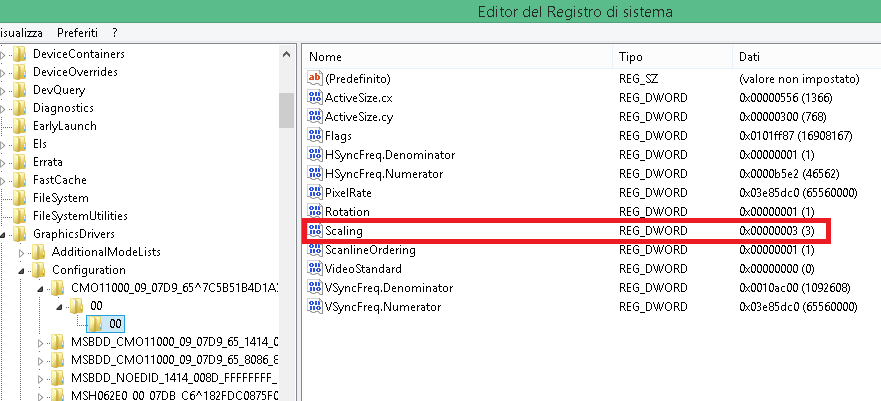
Really Thank you kirk and William! I don't know if you are the programmers or not but I was looking in the registry and EMGD creates two entries with Scaling:
-ScalingModeCtrl
-Scaling in the panel configuration
Do you know what these entries do?
(the resolution is of my other device)
- 신규로 표시
- 북마크
- 구독
- 소거
- RSS 피드 구독
- 강조
- 인쇄
- 부적절한 컨텐트 신고
Those are used by the driver at initialization to keep track of what is going on with the display settings. They are not "public" settings nor will they do what you are trying to do. Everything that is public is already documented in the User Guide. Anything beyond those items should not be touched and will likely change meaning from hardware to hardware and version to version.
- 신규로 표시
- 북마크
- 구독
- 소거
- RSS 피드 구독
- 강조
- 인쇄
- 부적절한 컨텐트 신고
Razak, there is no EMGD version 1.2, the latest version is 1.18. Download EMGD 1.18: E6xx (https://www-ssl.intel.com/content/www/us/en/intelligent-systems/intel-embedded-media-and-graphics-driver/emgd-for-intel-atom-systems-e6xx-eg20t-z5xx-sch.html Queens Bay) platform. You will have the option of EMGD version 1.18 for XP_Win7, Linux or WEC7.
- 신규로 표시
- 북마크
- 구독
- 소거
- RSS 피드 구독
- 강조
- 인쇄
- 부적절한 컨텐트 신고
Thank you LynnZ for the answer but i mean IEMGD 1.18 was released 1 year ago. So I'm asking if the driver developing for E6xx is ended. Have you any news?
- 신규로 표시
- 북마크
- 구독
- 소거
- RSS 피드 구독
- 강조
- 인쇄
- 부적절한 컨텐트 신고
Razak, if you want to speak to an Intel representative in your area, please go to Design Assistance at https://www-ssl.intel.com/content/www/us/en/forms/intelligent-systems/get-help-external.signedin.html https://www-ssl.intel.com/content/www/us/en/forms/intelligent-systems/get-help-external.signedin.html to complete the form. It will be routed based on your geographical location. Hope this helps! LynnZ.
- 신규로 표시
- 북마크
- 구독
- 소거
- RSS 피드 구독
- 강조
- 인쇄
- 부적절한 컨텐트 신고
Thank you. I will try to contact them.
P.S. For IEMGD 1.20 (i mean 1.19 anyway usually CED Package doesn't use odd numbers: 1.14->1.16->1.18)
