
- 新着としてマーク
- ブックマーク
- 購読
- ミュート
- RSS フィードを購読する
- ハイライト
- 印刷
- 不適切なコンテンツを報告
Thank you .

- 新着としてマーク
- ブックマーク
- 購読
- ミュート
- RSS フィードを購読する
- ハイライト
- 印刷
- 不適切なコンテンツを報告
Successfully installed driver from command line:
1) download .zip with driver and unpack it in C:\1 so Installer.exe must be located in C:\1
2) run this command line from Windows Terminal/PowerShell:
cd c:\1
./installer -b -o -s -f
If you want to run it from old command line cmd.exe type this line by line:
c:
cd \1
installer -b -o -s -f
3) computer will reboot after some time
コピーされたリンク

- 新着としてマーク
- ブックマーク
- 購読
- ミュート
- RSS フィードを購読する
- ハイライト
- 印刷
- 不適切なコンテンツを報告
You have not provided any information about your system.
So the Intel support engineers can have more information about your system, Download, run, and save the results of this utility as a text file:
https://downloadcenter.intel.com/download/25293/Intel-System-Support-Utility
Then ATTACH the text file using the instructions under the reply window ( Drag and drop here or browse files to attach ).
Doc (not an Intel employee or contractor)
[Windows 11 is the new Vista]

- 新着としてマーク
- ブックマーク
- 購読
- ミュート
- RSS フィードを購読する
- ハイライト
- 印刷
- 不適切なコンテンツを報告
This is known problem and Intel is taking care for it. Memory leak while installing driver versions 30.0.100.9667 and 30.0.100.9684
and Intel DCH Graphics Driver new INSTALLER (since 9684) memory leak and hang!
Leon
- 新着としてマーク
- ブックマーク
- 購読
- ミュート
- RSS フィードを購読する
- ハイライト
- 印刷
- 不適切なコンテンツを報告
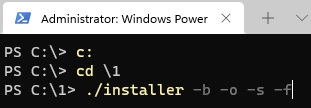
Successfully installed driver from command line:
1) download .zip with driver and unpack it in C:\1 so Installer.exe must be located in C:\1
2) run this command line from Windows Terminal/PowerShell:
cd c:\1
./installer -b -o -s -f
If you want to run it from old command line cmd.exe type this line by line:
c:
cd \1
installer -b -o -s -f
3) computer will reboot after some time
