

- 新着としてマーク
- ブックマーク
- 購読
- ミュート
- RSS フィードを購読する
- ハイライト
- 印刷
- 不適切なコンテンツを報告
Hello mucaka19,
Unfortunately, no. We checked about the third-party apps you used and searched for more details on the Monter website, but we didn't find useful information to provide. We have limitations since the software and Laptop are not designed by Intel*.
It has been a pleasure assisting you, if you need any additional information, please submit a new question as this thread will no longer being monitored.
Best regards,
Maria R.
Intel Customer Support Technician
コピーされたリンク
- 新着としてマーク
- ブックマーク
- 購読
- ミュート
- RSS フィードを購読する
- ハイライト
- 印刷
- 不適切なコンテンツを報告
Hello mucaka19,
Thank you for posting on the Intel* Community.
Our support is only provided on English, we used a translator to better assist you.
In order to provide you more accurate support, please run the following tools and attach the report generated.
Intel® System Support Utility (Intel® SSU)
- Intel® SSU Download
- Open the application and click on "Scan" to see the system and device information. By default, Intel® SSU will take you to the "Summary View".
- Click on the menu where it says "Summary" to change to "Detailed View".
- To save your scan, click on "Next", then "Save".
Provide the Intel* Graphics Command Center report:
>Go to the Intel Graphics Command Center
>Support
>System Diagnostic
>Generate report.
>Attach the report file.
Best regards,
Maria R.
Intel Customer Support Technician
- 新着としてマーク
- ブックマーク
- 購読
- ミュート
- RSS フィードを購読する
- ハイライト
- 印刷
- 不適切なコンテンツを報告
Hello mucaka19,
Thank you for the reports.
- Can you please send me a screenshot of the options the IGCC gives you under the Refresh rate?
- Are you trying to set 60p, lower than the one you are using (120p)? May I know more details about it, for example, if the 120p is giving you an error or bad performance.
Please try to adjust the Refresh rate with the Intel* Graphics Control Panel and let me know the outcome (if possible attach screenshots).
Best regards,
Maria R.
Intel Customer Support Technician
- 新着としてマーク
- ブックマーク
- 購読
- ミュート
- RSS フィードを購読する
- ハイライト
- 印刷
- 不適切なコンテンツを報告
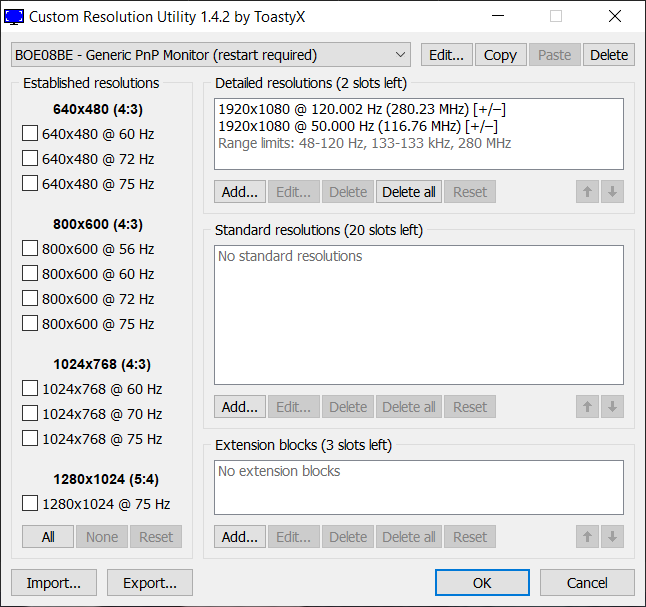
120p hız ayarı bana bir sorun yaratmıyor. pilden tasarruf etmek istiyorum ve ekran kartının daha fazla güç harcamasını istemiyorum. Sadece 120 hz ayarı var. CRU adlı 3. kişi uygulama ile özel ayar yapabiliyorum. 50p, 61p, 75p ve 120p ayarlarını 3. kişi yazılım ile yapabiliyorum. Ama ben bunu doğal olan İntel Grafik Kontrol Merkezinden yapmak istiyorum.
- 新着としてマーク
- ブックマーク
- 購読
- ミュート
- RSS フィードを購読する
- ハイライト
- 印刷
- 不適切なコンテンツを報告
Hello mucaka19,
Thank you for your response.
Can you please provide the specific version of the Intel Graphics Command Center you're using? You can find this under Support>System Diagnostic (you can attach a screenshot if you prefer)
As you are using a Laptop, which is a high-customized device, this can be a limitation from the Original Equipment Manufacturer (OEM).
To discard this, we want to recommend you the Intel Graphics Control Panel, this is the previous Intel* Graphics application that may help you to adjust the refresh rate. Please try with this app following the next steps:
- Download the Intel* Graphics Control Panel.
- Open the app and go to >Display
- Select the Built-in display.
- Under refresh rate, check the options available, select one.
- Press >Apply.
If possible, send us a screenshot of the available options for the refresh rate on the Intel* Graphics Control Panel.
Best regards,
Maria R.
Intel Customer Support Technician
- 新着としてマーク
- ブックマーク
- 購読
- ミュート
- RSS フィードを購読する
- ハイライト
- 印刷
- 不適切なコンテンツを報告
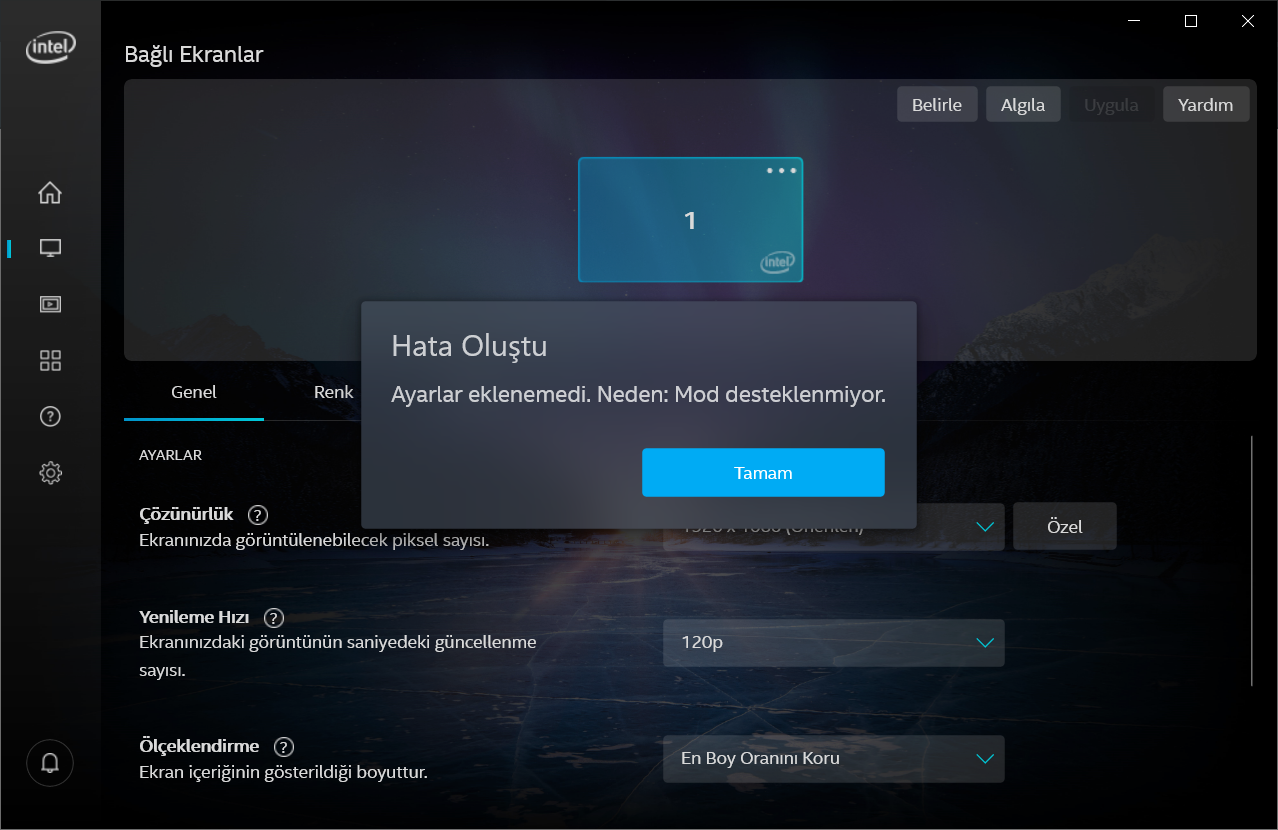
Sizin önerlilerinizi gerçekleştirdim. Eski intel grafik merkezinden özel çözünürlük ayarını yapmak istedim. Ama ekran fotoğrafındadaki hata ile karşılaştım. Sanıyorum ki bu işlemi sadece 3. yazılım programları ile yapabileceğim.
- 新着としてマーク
- ブックマーク
- 購読
- ミュート
- RSS フィードを購読する
- ハイライト
- 印刷
- 不適切なコンテンツを報告
Hello mucaka19,
Thank you for the information provided.
To better assist you, I would like to check this internally, for this I will need the below information:
- Provide the names of the third-party apps you use to change the refresh rate.
- If possible, test an external monitor, and verify if you are able to change the refresh rates of it. Please, let us know the outcome.
Best regards,
Maria R.
Intel Customer Support Technician
- 新着としてマーク
- ブックマーク
- 購読
- ミュート
- RSS フィードを購読する
- ハイライト
- 印刷
- 不適切なコンテンツを報告
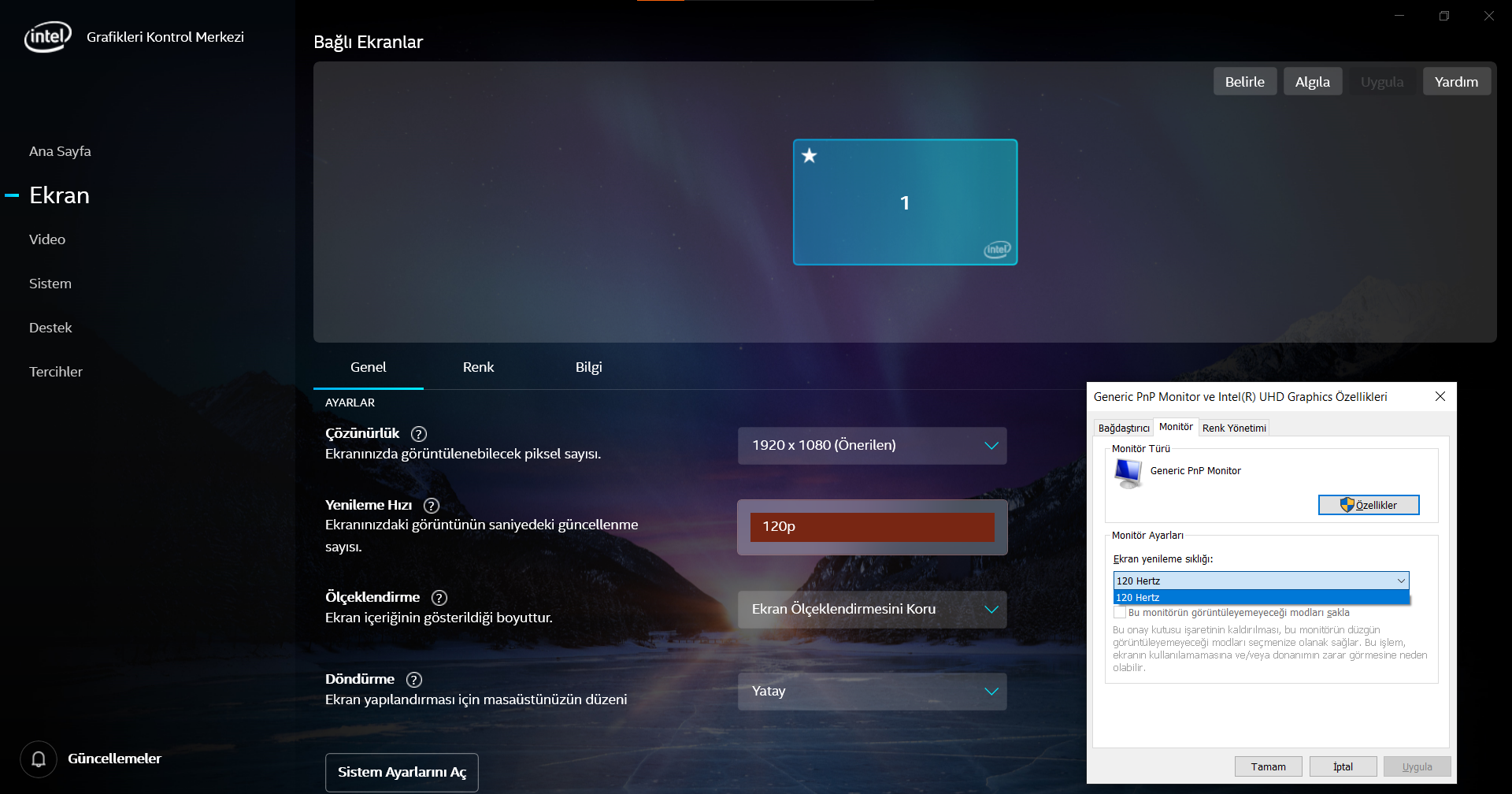
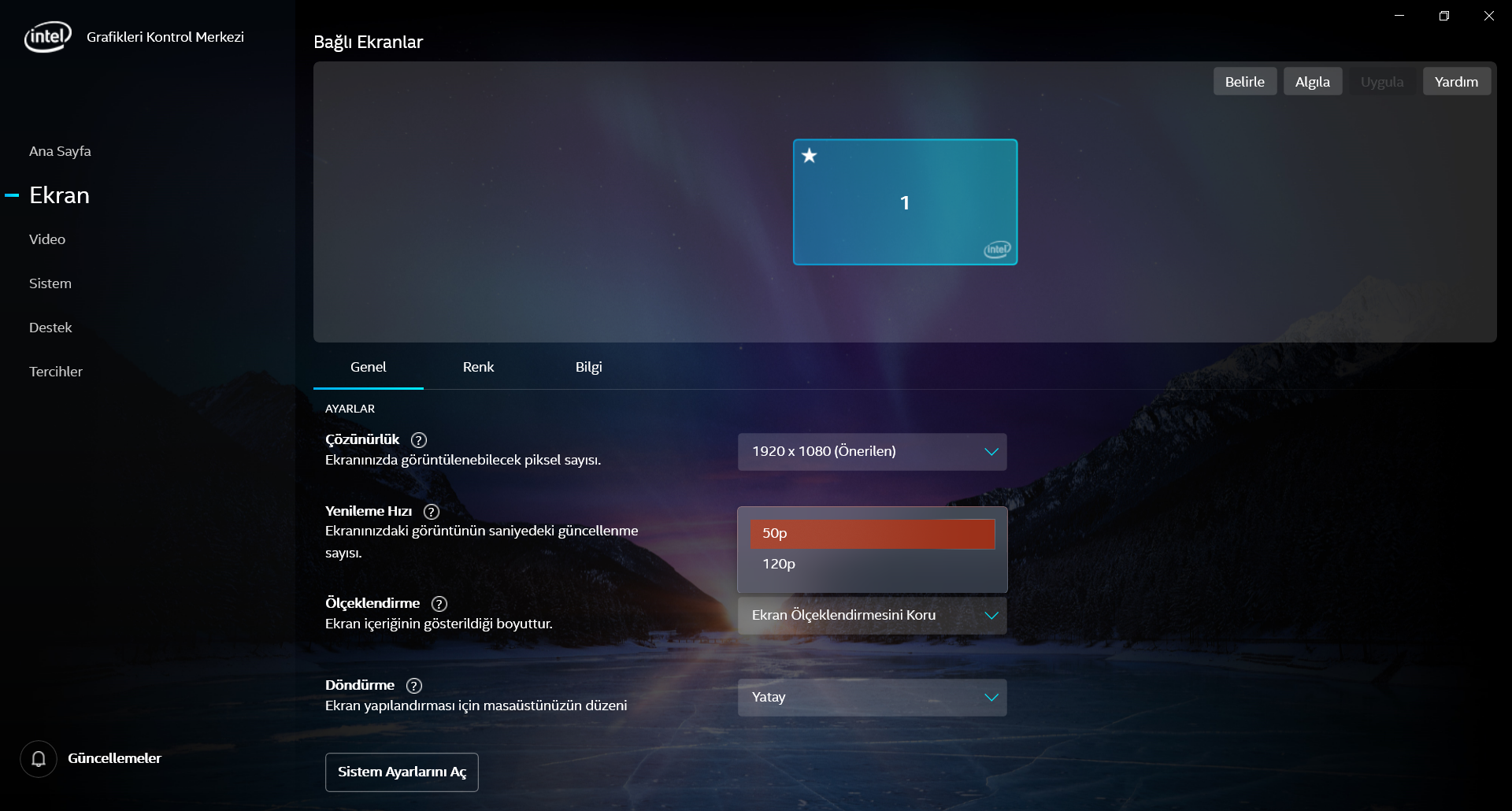
Harici 2. bir monitör kullandığım zaman ayarlarını değiştirebiliyorum. 3. taraf uygulamanın çalışır durumunu ekran fotoğrafını ekledim. 50p ayarını CRU isiminde 3. taraf uygulama ile yaptım. Generic PnP Monitör ve İntel Grafikleri Kontrol Merkezinde 50p görünen görünen ekran fofoğraflarını ekledim.
- 新着としてマーク
- ブックマーク
- 購読
- ミュート
- RSS フィードを購読する
- ハイライト
- 印刷
- 不適切なコンテンツを報告
Hello mucaka19,
Thank you for the information.
I would like to check this internally, I'll post back on this thread as soon as I have more details about it.
Best regards,
Maria R.
Intel Customer Support Technician






- 新着としてマーク
- ブックマーク
- 購読
- ミュート
- RSS フィードを購読する
- ハイライト
- 印刷
- 不適切なコンテンツを報告
Hello mucaka19,
Thank you for patiently waiting.
Please try the below steps:
- Go to IGCC -> System -> Power tab
- Check if you have 'Dynamic Refresh Rate Switching' and turn it on, you may have an option to go for a lower Refresh Rate for power saving.
If the option is not available or you're not able to change it, you'll need to consult with your laptop manufacturer as they may have blocked lower refresh rates from the display's EDID or Video BIOS (VBIOS).
Best regards,
Maria R.
Intel Customer Support Technician
- 新着としてマーク
- ブックマーク
- 購読
- ミュート
- RSS フィードを購読する
- ハイライト
- 印刷
- 不適切なコンテンツを報告
Sizin bahsettiğiniz özellik var ve açık şuan. Ancak manuel değiştirilebilen bir değer yok (60p,75p,120p) . Özellik aktif. Değer değiştirme özelliği yok.
- タグ:
- siz
- 新着としてマーク
- ブックマーク
- 購読
- ミュート
- RSS フィードを購読する
- ハイライト
- 印刷
- 不適切なコンテンツを報告
Hello mucaka19,
Thank you for let us know.
At this point, since the option is not available or you're not able to change it, the best course of action will be to consult with your laptop manufacturer as they may have blocked lower refresh rates from the display's EDID or Video BIOS (VBIOS).
Please, check with Monster* the refresh rate limitations of your system.
Best regards,
Maria R.
Intel Customer Support Technician
- 新着としてマーク
- ブックマーク
- 購読
- ミュート
- RSS フィードを購読する
- ハイライト
- 印刷
- 不適切なコンテンツを報告
Anladım. En başından beri ilgilendiğiniz için çok teşekkür ederim. Bir sorum var. 3. taraf yazılım ile bu ayar nasıl gerçekleşiyor ? Sizin bir bilginiz var mı ?
- 新着としてマーク
- ブックマーク
- 購読
- ミュート
- RSS フィードを購読する
- ハイライト
- 印刷
- 不適切なコンテンツを報告
Hello mucaka19,
Unfortunately, no. We checked about the third-party apps you used and searched for more details on the Monter website, but we didn't find useful information to provide. We have limitations since the software and Laptop are not designed by Intel*.
It has been a pleasure assisting you, if you need any additional information, please submit a new question as this thread will no longer being monitored.
Best regards,
Maria R.
Intel Customer Support Technician
