
- Mark as New
- Bookmark
- Subscribe
- Mute
- Subscribe to RSS Feed
- Permalink
- Report Inappropriate Content
Good Morning,
I hope this email finds you well,
I bought a new PC not long ago - and I have been encountering many issues while playing in 3 games so far..
The Finals, The Last of Us Part 1, Monster Hunter Rise as well as World and Jedi Survival won't open and in some of them I will get a message I don't have enough graphic memory - but I have a 4090 and 64gb ddr5 ram
The only way I make this games work was by installing Intel(R) Extreme Tuning Utility - and turn the Performance Core Ratio from 57x to 52x - is this normal? would this be always required? am I missing something?
Kind Regards,
Eli
- Tags:
- 14900k
Link Copied

- Mark as New
- Bookmark
- Subscribe
- Mute
- Subscribe to RSS Feed
- Permalink
- Report Inappropriate Content
Hello @Zlicer
Thank you for posting on the Intel️® communities.
We sincerely regret you are experiencing issues with your Intel® Core™ i9-14900KF Processor, we will be more than happy to assist you.
Please answer the following:
· Was it working before?
· Have you made any recent software change?
Also, in order to have more information about your system, please download, install and run Intel® System Support Utility for Windows. Make sure you check “Everything” before you scan, then save the report and attach it to your response.
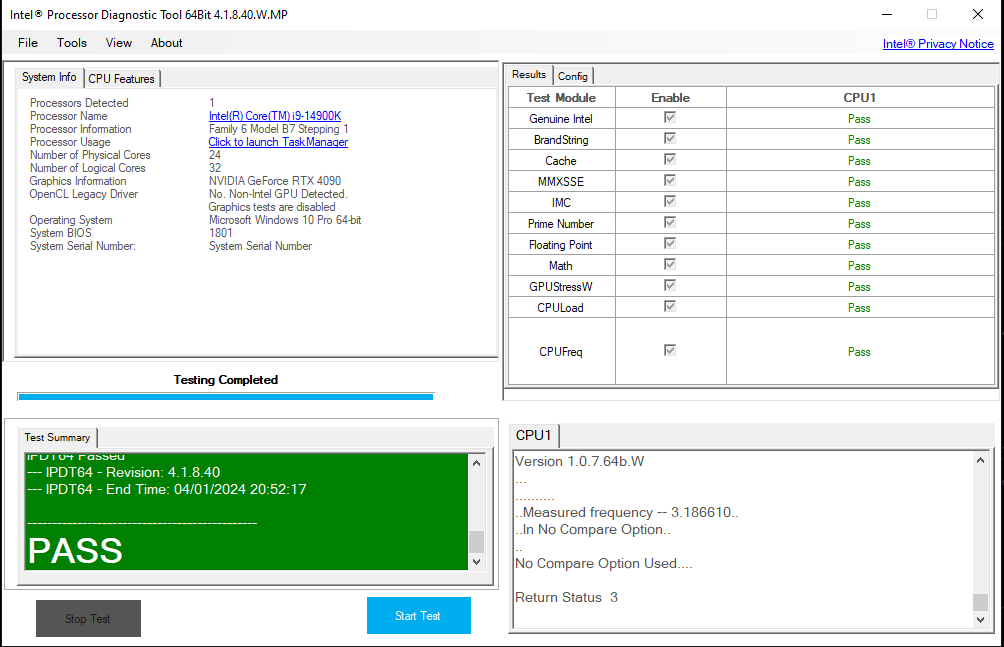
Then, please generate and attach the report from the Intel® Processor Diagnostic Tool.
Best regards,
Jose B.
Intel Customer Support Technician
- Mark as New
- Bookmark
- Subscribe
- Mute
- Subscribe to RSS Feed
- Permalink
- Report Inappropriate Content
Hello Jose,
Thanks for the answer,
Mine is a Intel® Core™ i9-14900K Processor without the F.
To your questions:
· Was it working before?
I don't think so, I purchased the computer 2 months ago, so possibly not.
· Have you made any recent software change?
I am not sure if I made any software changes to be honest - but as said below I can only play said games doing this
"installing Intel(R) Extreme Tuning Utility - and turn the Performance Core Ratio from 57x to 52x"
And I am not sure if that is normal.
Please find attached documents requested - the test from Diagnostic Tool - the first time Failed in the Prime Number - then I did it twice more and it was completely fine.
Kind Regards,
Eli

- Mark as New
- Bookmark
- Subscribe
- Mute
- Subscribe to RSS Feed
- Permalink
- Report Inappropriate Content
Same issue here something is wrong, several games dont run at the default performance cores = the intel XTU utility shows the performance core ration defualt at x57
many games just out right fail at that setting i have to move them to x54.
Borderlands 4 just recently released refuses to run at default only setting it to x54 will it run
helldivers 2 same issue
Anno 117 same issue.
Warframe Same Issue
cyberpunk 2077 same issue
I9-14900k - nvidia rtx 4090. windows 11. 32g ram.
and occasional game and or app crashing random on other things for no reason at all. everything drivers bios windows 11 latest 25h2 version released recently. no out of date items of any kind.
I had similar issues with my -9-13900k, that just kept crashing and eventually had to RMA that CPU went defective. i think this 19-14900k is heading in that same direction. seems to be getting more and more unstable like the 13900k issues i had worked well at 1st then just degraded to unusable over time. this 14900k is crashing alot more now like the 13900k i had to RMA for.
Nothing is over clocked that i can tell its all set to defaults in bios i typically dont run over clocks on my computers at all, just defaul speeds as i need stablity not a few extra unstable mhz faster.
Is the CPU going bad and needs a RMA, or is thier some bios micro code update can fix it ??
- Mark as New
- Bookmark
- Subscribe
- Mute
- Subscribe to RSS Feed
- Permalink
- Report Inappropriate Content
Hello Zlicer
Thank you for your reply and the reports.
We noticed that the configured memory clock speed is beyond Intel’s specifications, please disable any overclocking and set the frequency to the maximum supported (5600 MT/s) by your Intel® Core™ i9-14900K Processor.
Also, please make sure the graphics driver and Windows are up to date. Let us know the outcome.
Best regards,
Jose B.
Intel Customer Support Technician
- Mark as New
- Bookmark
- Subscribe
- Mute
- Subscribe to RSS Feed
- Permalink
- Report Inappropriate Content
Hello Jose,
Thank you very much for the above,
You are a lifesaver - so apparently the base speed for my CPU in the bios was set up as x57 or 5.7 Ghz - that probably caused the issue, which is weird in the Intel(R) Extreme Tuning Utility - shows x57 as default - but I haven't changed any of those settings, is there a way to put it as default?
How can I leave everything as I was when I bought it? - I think that probably would resolve every issue - as per picture attached is "Manually Tunned" - Perfomance Core Ratio x32 and Efficient Core Ratio x44.
Thank you very much for this again!, you really helped me here.
Kind Regards,
Eli
- Mark as New
- Bookmark
- Subscribe
- Mute
- Subscribe to RSS Feed
- Permalink
- Report Inappropriate Content
Hello Zlicer
Thank you for letting us know.
Please keep in mind that the default settings of Intel® XTU are found on the board's BIOS.
If a profile is set from the Intel® XTU with a specific value, follow the steps below:
1. Back up any Intel® XTU profile before reinstalling the program to avoid losing settings.
2. Reinstall Intel® XTU.
3. Load BIOS default to apply the default settings.
Best regards,
Jose B.
Intel Customer Support Technician
- Mark as New
- Bookmark
- Subscribe
- Mute
- Subscribe to RSS Feed
- Permalink
- Report Inappropriate Content
Hello Zlicer
We hope you are doing fine.
Were you able to follow the previous steps?
Let us know if you still need assistance.
Best regards,
Jose B.
Intel Customer Support Technician
- Mark as New
- Bookmark
- Subscribe
- Mute
- Subscribe to RSS Feed
- Permalink
- Report Inappropriate Content
Hello Jose,
Thank you very much for checking!, to be honest I haven't been able to fix this yet - as per the picture attached, bios show as modified by the AI but It's set up as normal, also I uninstalled the Armoury Crate as per Asus indications but still shows the CPU at 5700, so I am bit lost!
any help could be appreciated, would it work if I turn the computer and power off and remove the battery from the mother board? or that would be too much?
Kind Regards,
Eli
- Mark as New
- Bookmark
- Subscribe
- Mute
- Subscribe to RSS Feed
- Permalink
- Report Inappropriate Content
Hello Zlicer
Thank you for your reply.
Please keep in mind that the previous steps were recommended to have your system with the default settings, meaning no overclocking.
If you require further assistance with the motherboard settings, please contact the system manufacturer. https://rog.asus.com/us/support
Best regards,
Jose B.
Intel Customer Support Technician

- Mark as New
- Bookmark
- Subscribe
- Mute
- Subscribe to RSS Feed
- Permalink
- Report Inappropriate Content
Hello everyone, I seem to be having the same issue as Zlicer, I have an i9 14900KF and lots of games only seem to work if I set the Performance Core Ratio to 5.2.
These problems are happening in Call of Duty and Ready or Not for me as well. Can I get a quick check up to see what's the issue in my case and hopefully get a guide on how I would fix it? I didn't change anything from the stock settings, at least not on purpose.

- Mark as New
- Bookmark
- Subscribe
- Mute
- Subscribe to RSS Feed
- Permalink
- Report Inappropriate Content



- Mark as New
- Bookmark
- Subscribe
- Mute
- Subscribe to RSS Feed
- Permalink
- Report Inappropriate Content
Hello Intel team,
I have been running into the same gaming issues with my gaming PC which is a similar setup to many on here with 14900kf, Nvidia 4090 GPU and 64 GB RAM. I have updated my BIOS and all of my drivers but getting access violation errors on World of Warcraft and Final Fantasy 14.
Can you take a look at my attached report and let me know if anything is outside of recommended specification?
Also, if I need to make changes can you provide direction on what I need to do?
Thank you!

- Subscribe to RSS Feed
- Mark Topic as New
- Mark Topic as Read
- Float this Topic for Current User
- Bookmark
- Subscribe
- Printer Friendly Page