
- Отметить как новое
- Закладка
- Подписаться
- Отключить
- Подписка на RSS-канал
- Выделить
- Печать
- Сообщить о недопустимом содержимом
Hi
I have just downloaded and installed Intel Parallel Studio 2013 on Windows 7 Ultimate. I have Visual Studio Ultimate C++ 2012.
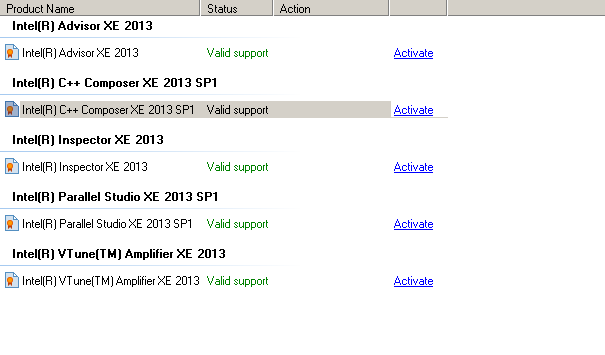
In the Intel Software Manager I see that all the evaluation subscriptions are active. See the inline image:

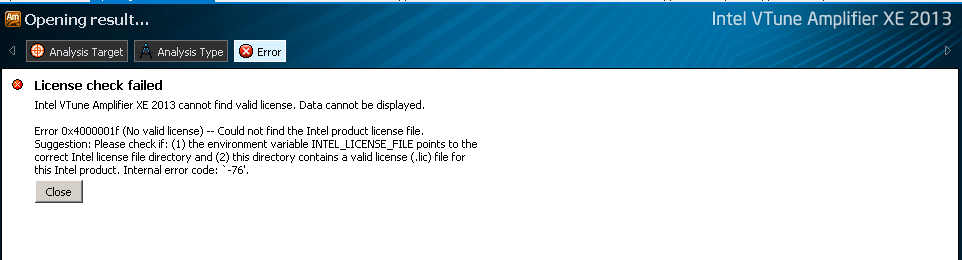
After running a hotspot analysis on my application in Visual Studi (attached to process), when I tried to open results, I get the following error:

So I went back to my email to check if I had received a valid ealuation license file, but there was none. Then i checked if there was any license file by default installed in the license folder location but there was no license file there. Since then I have searched several times on Intel Developer to find what is going wrong and if I can to download an evaluation license file. But I coudln't find anything.
Can someone help me as to how to get the evaluation version running ??
Thanks
V
PS: I had re-installed(without uninstalling) Intel Parallel Studio 2013 after restoring my Windows 7 from a restore point. Maybe that could be an issue, but I am not sure.
Ссылка скопирована
- Отметить как новое
- Закладка
- Подписаться
- Отключить
- Подписка на RSS-канал
- Выделить
- Печать
- Сообщить о недопустимом содержимом

- Подписка на RSS-канал
- Отметить тему как новую
- Отметить тему как прочитанную
- Выполнить отслеживание данной Тема для текущего пользователя
- Закладка
- Подписаться
- Страница в формате печати