
- 신규로 표시
- 북마크
- 구독
- 소거
- RSS 피드 구독
- 강조
- 인쇄
- 부적절한 컨텐트 신고
I have seen this issue with the 7260 ac card two years ago where play/pause button does not work from bluetooth devices, BUT next/previous track works.
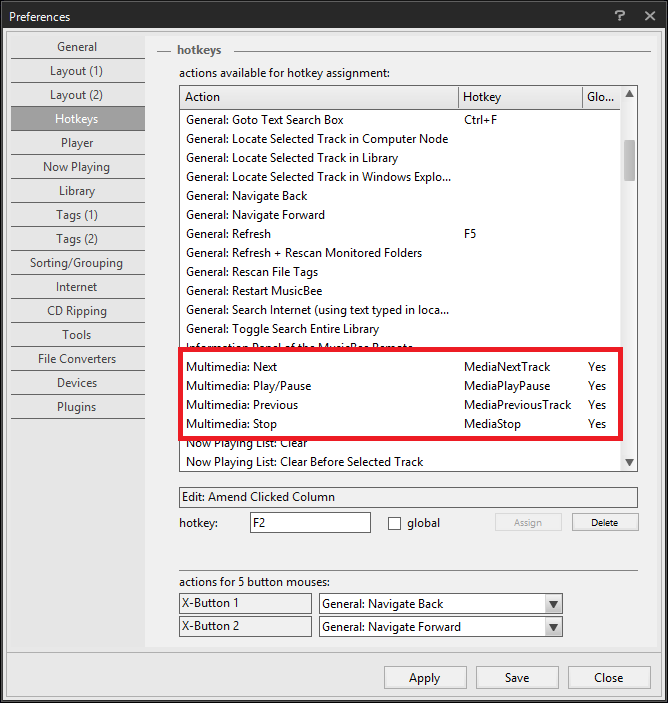
When I go to map the hotkeys within my media player, it does not pick up MediaPlayPause, but it does pick up MediaNextTrack and MediaPreviousTrack when I press the buttons on my bluetooth speaker.
This is not an issue with the media player as my bigfoot 1202 card is able to play/pause without any issues.
I gave up on this issue two years ago as no one else has ever asked about it.
This year, I bought a newer model of the 7260 ac, and I have different bluetooth speakers and a different laptop (Windows 8.1)
I was able to get play/pause to work randomly a few times, and it seems to only work when the media player is in the foreground. Next/Previous track button works always even if the media player is minimized.
I updated to the latest bluetooth drivers 17.1.1501.512 and still encountering the same issue.
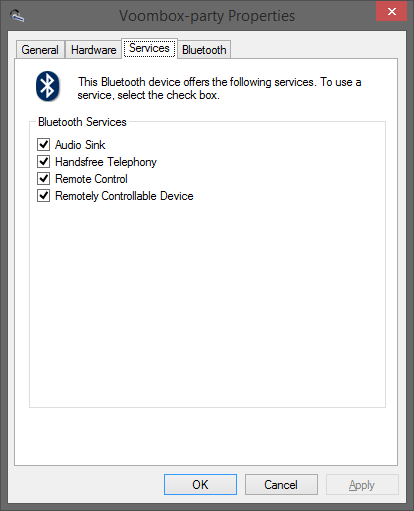
Remote control is enabled in the bluetooth services.
I really need this issue fixed so that I can use the play button from the shower.
What can be causing this issue?
링크가 복사됨


- 신규로 표시
- 북마크
- 구독
- 소거
- RSS 피드 구독
- 강조
- 인쇄
- 부적절한 컨텐트 신고
I have the same problem, the pause/play isn't registering with my Sony bluetooth headset, I checked with a Toshiba laptop that uses a different their own bluetooth stack and guess what?, it works!!, so I knew it something wrong with Intel's bluetooth stack, please fix this.
- 신규로 표시
- 북마크
- 구독
- 소거
- RSS 피드 구독
- 강조
- 인쇄
- 부적절한 컨텐트 신고
pinkbeca12,
Please access the user guide of your Bluetooth in order to check whcih profiles are supported. Please access this link for further assistance: http://www.intel.com/support/wireless/wlan/sb/CS-034938.htm Intel® Wi-Fi Products — How to Access the Intel User Guide for Bluetooth® Technology in the following link, you will find more information on connecting a device via Bluetooth*: http://www.intel.com/support/wireless/wlan/sb/CS-034963.htm Intel® Wi-Fi Products — Connecting to Devices Using Bluetooth® Technology
Is this issue occuring with a native application or with a third-party one? Gives more details in which circumtances it occurs.
- 신규로 표시
- 북마크
- 구독
- 소거
- RSS 피드 구독
- 강조
- 인쇄
- 부적절한 컨텐트 신고
I'm using VLC and I can't assign the Play/Pause button, but when I took my bluetooth headset to use it with my mom's laptop that uses their own brand of bluetooth stack it works!, why won't this button assign with Intel's bluetooth stack?
- 신규로 표시
- 북마크
- 구독
- 소거
- RSS 피드 구독
- 강조
- 인쇄
- 부적절한 컨텐트 신고
pinkbecca12,
In this particular case we recommend that you contact VLC* support in order to check with them about what Bluetooth profile is supported by this application.
