
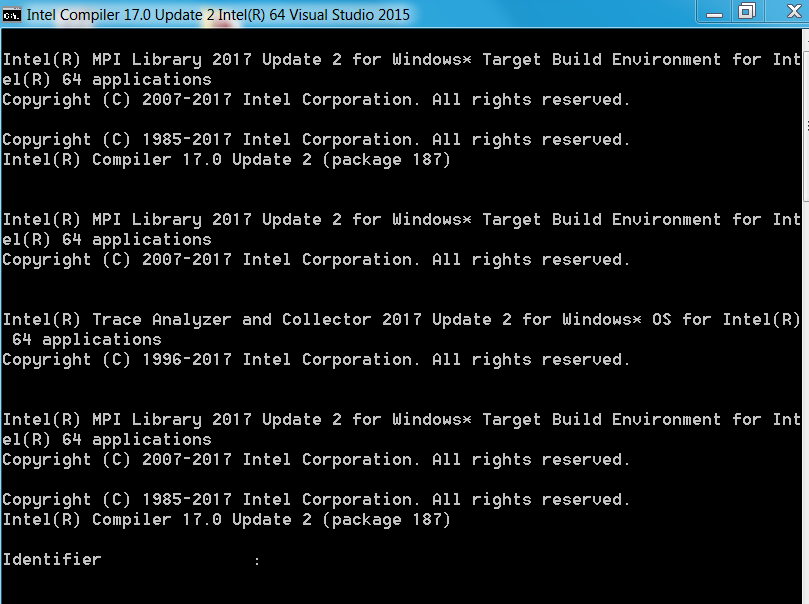
I am trying to link intel visual studio with abaqus and now when I try to open abaqus intel compilers terminal opens and asks for identifier. I don't know what to enter in that.

Dear Manvi,
my name is David Sziroczak, I am one of the senior Abaqus users at Intrinsys ltd, I'll try to help you (and anyone else who reads this forum post!)
First of all, what version of software are you trying to use? Abaqus installations require a specific release of Intel Fortran compiler and Visual Studio. It might work with other unsupported releases, but then it might not, so best use the prescribed versions of the software.
Please check the following guide on Intrinsys.com for the details of how to get the user subroutines capability working in Abaqus:
http://www.intrinsys.com/blog/2016/installing-abaqus-subroutines
I hope this helps, most of the time problems come up because of incorrect versions of software, or not setting up the environment correctly.
Best regards,
David
链接已复制

Dear Manvi,
my name is David Sziroczak, I am one of the senior Abaqus users at Intrinsys ltd, I'll try to help you (and anyone else who reads this forum post!)
First of all, what version of software are you trying to use? Abaqus installations require a specific release of Intel Fortran compiler and Visual Studio. It might work with other unsupported releases, but then it might not, so best use the prescribed versions of the software.
Please check the following guide on Intrinsys.com for the details of how to get the user subroutines capability working in Abaqus:
http://www.intrinsys.com/blog/2016/installing-abaqus-subroutines
I hope this helps, most of the time problems come up because of incorrect versions of software, or not setting up the environment correctly.
Best regards,
David
Dear David,
I am using Abaqus 6.14-1 version and visual studio 2015 with Parallel studio Xe 2017. the only thing that I have done to link them is that I changed the abq6141.bat file to
@echo off
IF NOT DEFINED FORTRAN_VARS_SET call
@call "C:\Program Files (x86)\IntelSWTools\parallel_studio_xe_2017.2.046\compilers_and_libraries_2017\windows\bin\ifortvars.bat" intel64 vs2015
@call "C:\Program Files (x86)\IntelSWTools\parallel_studio_xe_2017.2.046\compilers_and_libraries_2017\windows\bin\ipsxe-comp-vars.bat" intel64 vs2015
set FORTRAN_VARS_SET=1
"C:\SIMULIA\Abaqus\6.14-1\code\bin\abq6141.exe"
%*
And I changed the path in system variable to C:\Program Files (x86)\IntelSWTools\compilers_and_libraries_2017.2.187\windows\bin\intel64;C:\Program Files (x86)\IntelSWTools\compilers_and_libraries_2017.2.187\windows\bin;c:\windows\system32;
regards
Manvi

I will comment that an "Identifier" prompt such as is shown does not appear in any of the Intel Parallel Studio configuration scripts. What I would do is search the Abaqus script you invoked (and any Abaqus scripts it calls) for "Identifier" and see where this is coming from and what it wants.

David S. wrote:Dear Manvi,
my name is David Sziroczak, I am one of the senior Abaqus users at Intrinsys ltd, I'll try to help you (and anyone else who reads this forum post!)
First of all, what version of software are you trying to use? Abaqus installations require a specific release of Intel Fortran compiler and Visual Studio. It might work with other unsupported releases, but then it might not, so best use the prescribed versions of the software.
Please check the following guide on Intrinsys.com for the details of how to get the user subroutines capability working in Abaqus:
http://www.intrinsys.com/blog/2016/installing-abaqus-subroutines
I hope this helps, most of the time problems come up because of incorrect versions of software, or not setting up the environment correctly.
Best regards,
David
Dear David,
I am Bui Tien Son and I am using abq2019 se software. I share the same problem with Manvi. I have checked the link in your reply but I can not find any clue related to my edition.
Could you help me to find the answer for my situation?

