
- Marcar como nuevo
- Favorito
- Suscribir
- Silenciar
- Suscribirse a un feed RSS
- Resaltar
- Imprimir
- Informe de contenido inapropiado
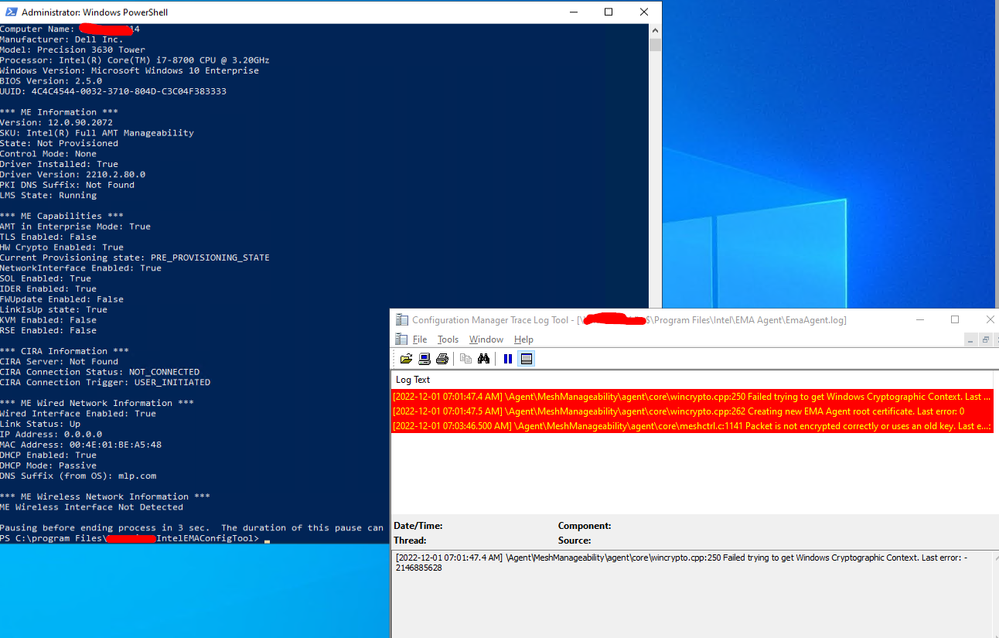
I am seeing the error on the EMAAgent log for a machine that has just had EMA Agent installed:
"Packet is not encrypted correctly or uses an old key. Last error: 0"
Our installation process is as follows:
- Install IME drivers + Configure LMS service to Automatic
- Reboot
- De-Provision AMT (if provisioned)
- Reboot
- Install EMA Agent
- Then we sometimes see the error.
"Packet is not encrypted correctly or uses an old key. Last error: 0"
We haven't fully deployed EMA to our estate, but the fact I saw this error during my testing is worrying me.
Why exactly does this error happen? If AMT is de-provisioned this error makes sense as the AMT chip should be welcoming the EMA provisioning???
- Marcar como nuevo
- Favorito
- Suscribir
- Silenciar
- Suscribirse a un feed RSS
- Resaltar
- Imprimir
- Informe de contenido inapropiado
Hi all,
If anyone else gets this issue, I managed to fix it.
- Open up PC - Pull out CMOS battery (it was a DELL precision 3630)
- Wait 20 minutes
- Go into MEBx (BIOS) set new default password
- Turn machine on
- Machine then successfully provisioned AMT agent
Enlace copiado
- Marcar como nuevo
- Favorito
- Suscribir
- Silenciar
- Suscribirse a un feed RSS
- Resaltar
- Imprimir
- Informe de contenido inapropiado
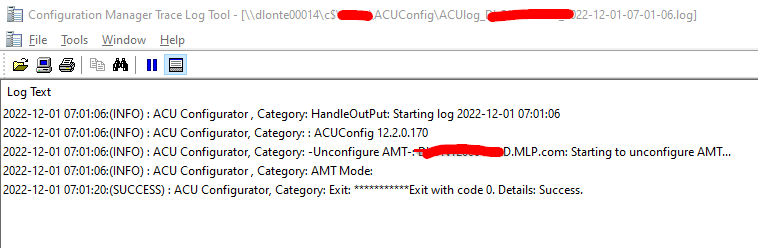
Here is an example.
As you can see - AMT is de-provisioned:
But EMA struggles to provision.

- Marcar como nuevo
- Favorito
- Suscribir
- Silenciar
- Suscribirse a un feed RSS
- Resaltar
- Imprimir
- Informe de contenido inapropiado
Hello Jools86,
Welcome back to the Intel community.
You say this is somehow a random error not happening on all the provisioned systems.
Can you tell what is the version of AMT running on the systems where you see this particular error?
Are you using a provisioning certificate? Which provider?
Jose A.
Intel Customer Support Technician
- Marcar como nuevo
- Favorito
- Suscribir
- Silenciar
- Suscribirse a un feed RSS
- Resaltar
- Imprimir
- Informe de contenido inapropiado
HI Jose,
I got past this error (dont know how), but machine not provisioning https://community.intel.com/t5/Intel-vPro-Platform/AMT-provisioning-keeps-failing/td-p/1434923, so something wrong with AMT on device.
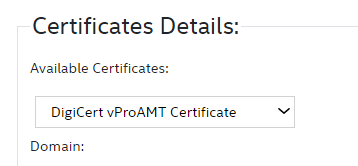
We are using a DigiCert certificate (which is unchanged and provisions other machines) and have successfully provisioned this machine before
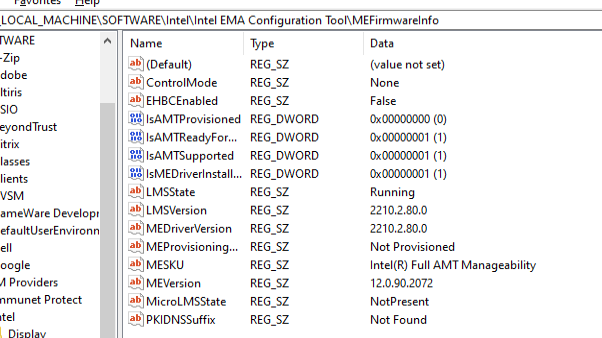
The AMT version of the machine is: 12.0.90.2072:
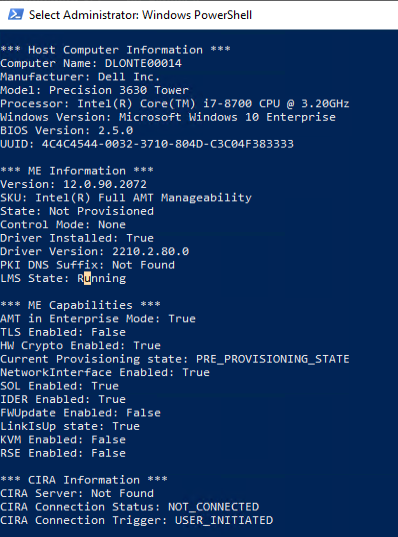
Please see my other post (for where I am now) https://community.intel.com/t5/Intel-vPro-Platform/AMT-provisioning-keeps-failing/td-p/1434923 for where I am now with this machine, after resetting AMT chip in BIOS multiple times.
Regards,
Julian

- Marcar como nuevo
- Favorito
- Suscribir
- Silenciar
- Suscribirse a un feed RSS
- Resaltar
- Imprimir
- Informe de contenido inapropiado
Hello Jools86,
We will continue working on the provisioning issue under this thread.
Can you please let us know if you are getting any error messages?
Are you getting this issue on several systems? if so how many?
Can you please confirm what EMA version are you running?
We will be looking forward to your updates.
Best regards,
Sergio S.
Intel Customer Support Technician
- Marcar como nuevo
- Favorito
- Suscribir
- Silenciar
- Suscribirse a un feed RSS
- Resaltar
- Imprimir
- Informe de contenido inapropiado
Can you please let us know if you are getting any error messages?
The ones I have screenshotted in this forum
Are you getting this issue on several systems? if so how many?
Just 1 PC
Can you please confirm what EMA version are you running?
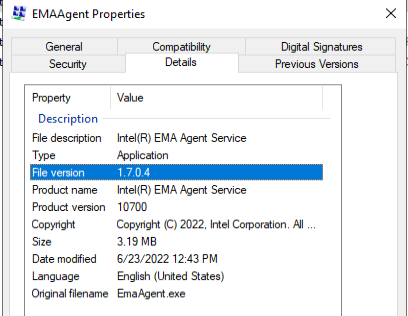
- Marcar como nuevo
- Favorito
- Suscribir
- Silenciar
- Suscribirse a un feed RSS
- Resaltar
- Imprimir
- Informe de contenido inapropiado
Hello Jools86,
There is a newer version of EMA available to download. Version 1.9 could be worth trying
Could you confirm if this system is a Dell Precision 3630 Tower? Did it provision successfully before? Have you performed any recent changes in this system like updating BIOS, hardware changes, OS reimaging?
Regards
Jose A.
Intel Customer Support Technician
- Marcar como nuevo
- Favorito
- Suscribir
- Silenciar
- Suscribirse a un feed RSS
- Resaltar
- Imprimir
- Informe de contenido inapropiado
Thanks Jose, I will try it. This looks interesting:
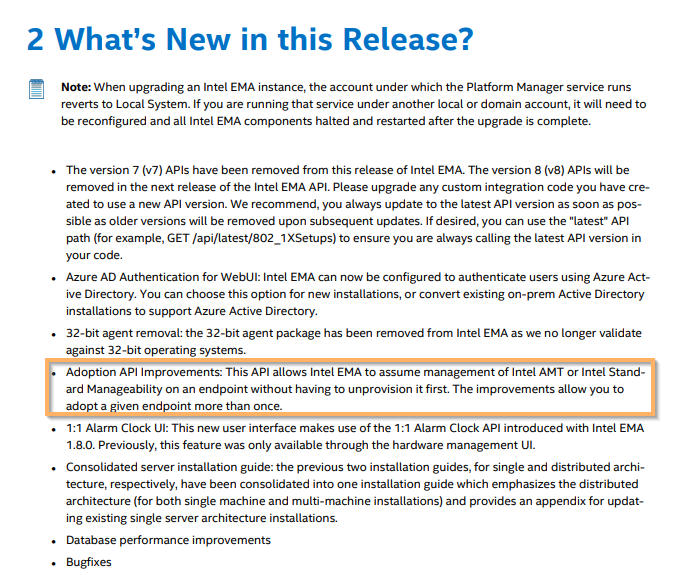
- Marcar como nuevo
- Favorito
- Suscribir
- Silenciar
- Suscribirse a un feed RSS
- Resaltar
- Imprimir
- Informe de contenido inapropiado
Hello Jools86,
I am just following up to double-check if you were able to get some progress with the EMA v1.9 installation. Otherwise let us know if you require more time to accomplish this.
Regards
Jose A.
Intel Customer Support Technician
- Marcar como nuevo
- Favorito
- Suscribir
- Silenciar
- Suscribirse a un feed RSS
- Resaltar
- Imprimir
- Informe de contenido inapropiado
Hello Jools86,
We will proceed to mark this thread as closed. If you have further issues or questions just go ahead and submit a new topic.
Regards
Jose A.
Intel Customer Support Technician
- Marcar como nuevo
- Favorito
- Suscribir
- Silenciar
- Suscribirse a un feed RSS
- Resaltar
- Imprimir
- Informe de contenido inapropiado
I managed to successfully upgrade to Intel EMA 1.9. All machines provisioning fine, but this problem machine still has the same error:

- Marcar como nuevo
- Favorito
- Suscribir
- Silenciar
- Suscribirse a un feed RSS
- Resaltar
- Imprimir
- Informe de contenido inapropiado
Hi all,
If anyone else gets this issue, I managed to fix it.
- Open up PC - Pull out CMOS battery (it was a DELL precision 3630)
- Wait 20 minutes
- Go into MEBx (BIOS) set new default password
- Turn machine on
- Machine then successfully provisioned AMT agent

- Marcar como nuevo
- Favorito
- Suscribir
- Silenciar
- Suscribirse a un feed RSS
- Resaltar
- Imprimir
- Informe de contenido inapropiado
Surely this is not feasible for Optiplex AIO machines? we can't just pull out the CMOS battery of hundreds of AIO computers - is there another method? There must be - surely?

- Suscribirse a un feed RSS
- Marcar tema como nuevo
- Marcar tema como leído
- Flotar este Tema para el usuario actual
- Favorito
- Suscribir
- Página de impresión sencilla