
- Mark as New
- Bookmark
- Subscribe
- Mute
- Subscribe to RSS Feed
- Permalink
- Report Inappropriate Content
Dear Intel,
The wireless network driver/adapter suddenly stopped working yesterday. My computer is MSI GS65 Stealth Thin 8RF with windows 10 as an operating system. Even after installing the latest driver from Intel's website (version: 22.30.0.11, driver date: 20-Jan-21), it is still not working with an error code:
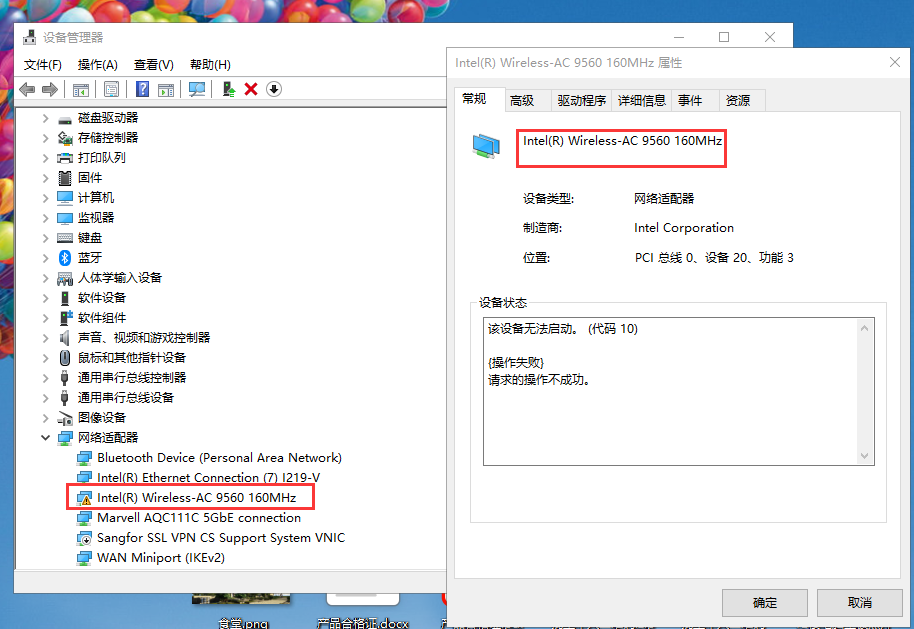
This device cannot start. (Code 10)
{Operation Failed}
The requested operation was unsuccessful.
Please tell us what to do because a laptop with no wireless connection is not useful if there's no ethernet..
Thank you in advance.
Link Copied

- Mark as New
- Bookmark
- Subscribe
- Mute
- Subscribe to RSS Feed
- Permalink
- Report Inappropriate Content
Same problem

- Mark as New
- Bookmark
- Subscribe
- Mute
- Subscribe to RSS Feed
- Permalink
- Report Inappropriate Content
Hello,
Go to device Manager and see if Intel (R) Wireless-AC 9560 is disabled or enabled. Please let us know how you are doing! Thank you
- Mark as New
- Bookmark
- Subscribe
- Mute
- Subscribe to RSS Feed
- Permalink
- Report Inappropriate Content
- Mark as New
- Bookmark
- Subscribe
- Mute
- Subscribe to RSS Feed
- Permalink
- Report Inappropriate Content
- Mark as New
- Bookmark
- Subscribe
- Mute
- Subscribe to RSS Feed
- Permalink
- Report Inappropriate Content
It is enabled, and even though it is enabled error code 10 is present and the wifi is not working on the laptop
- Mark as New
- Bookmark
- Subscribe
- Mute
- Subscribe to RSS Feed
- Permalink
- Report Inappropriate Content
Error code 10 is the driver error code that is not working, it includes many reasons, how much version have you updated the window version?
- Mark as New
- Bookmark
- Subscribe
- Mute
- Subscribe to RSS Feed
- Permalink
- Report Inappropriate Content
This error code is usually encountered in beta window updates
- Mark as New
- Bookmark
- Subscribe
- Mute
- Subscribe to RSS Feed
- Permalink
- Report Inappropriate Content
Windows now is on the latest update (not beta).
I should wait for another update?
I tried to solve the problem in many ways but I couldn't...
- Mark as New
- Bookmark
- Subscribe
- Mute
- Subscribe to RSS Feed
- Permalink
- Report Inappropriate Content
Here is my system information.
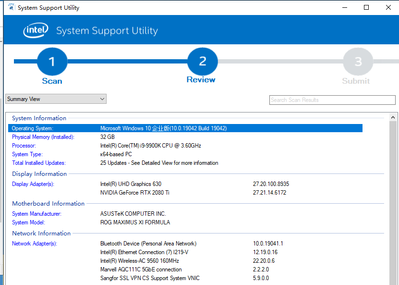
Same problem,not about beta version of Windows,it's intel WIFI driver problem or Windows problem.

- Mark as New
- Bookmark
- Subscribe
- Mute
- Subscribe to RSS Feed
- Permalink
- Report Inappropriate Content
Hello @StephanyR
Thank you for posting on the Intel️® communities.
Please share with us the Intel® System Support Utility (Intel® SSU) results:
- Download the Intel SSU https://downloadcenter.intel.com/download/25293/Intel-System-Support-Utility-for-Windows-
- Open the application and select "Everything" click on "Scan" to see the system and device information. By default, Intel® SSU will take you to the "Summary View".
- Click on the menu where it says "Summary" to change to "Detailed View".
- To save your scan, click on "Next", then "Save".
Regards,
David G
Intel Customer Support Technician
- Mark as New
- Bookmark
- Subscribe
- Mute
- Subscribe to RSS Feed
- Permalink
- Report Inappropriate Content
Thank you. The problem is solved now after the update of windows I reckon.
- Mark as New
- Bookmark
- Subscribe
- Mute
- Subscribe to RSS Feed
- Permalink
- Report Inappropriate Content
Hello @StephanyR
Thank you for sharing this fix, we are glad to know you found a solution and we will close the thread since it's already resolved.
@sdWer please make sure to follow all the steps posted on this tread, make sure you completed all the Windows updates and if the problem persists, please submit a new question as this thread will no longer be monitored.
Regards,
David G
Intel Customer Support Technician

- Subscribe to RSS Feed
- Mark Topic as New
- Mark Topic as Read
- Float this Topic for Current User
- Bookmark
- Subscribe
- Printer Friendly Page